

- Messages
- 1,451
- Country

Hello friends:
In my constant struggle with XML code, I found some issues; among them; the Tooltip codes. By experimentation, I had some ideas and want to share them with all of you. This is aimed for those who are beginning to understand XML subtleties (like me); however, for seasoned programmers, this might be overkilling.
CUSTOM TOOLTIPS:
Tooltips will show a custom text when the mouse is hovering over a region defined within the mouse area code.
If non of default Help IDs is what you want to display, there is a workaround: Use conditional text techniques along A:Vars and/or L:Vars !!!
For this particular case, I want to display:
CRS 1 in degrees when NAV1 is selected as source and
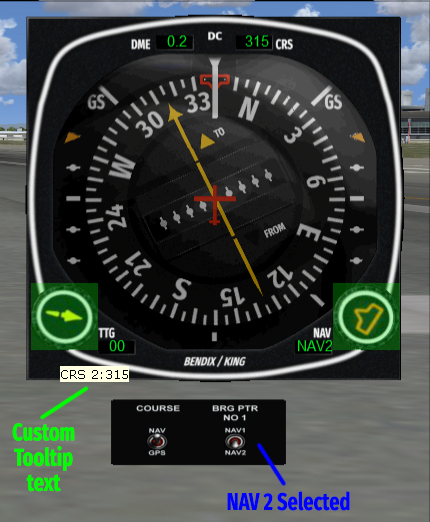
CRS 2 in degrees when NAV2 is selected
(L:SK407_HSI_NAV_Source,bool) is a custom L:Var which is used to toggle between NAV1 and NAV2.
Particularly, I don't like long text strings, because they are hard to read and understand. However, tooltips behaves slightly different than a regular string:
they don't like white spaces between code lines! That's why I did some preparations before to use the "code version" (see the code below):
In order to use this tooltip, it is desirable to eliminate all white spaces in the "code version":
I will show three custom mouse areas where I used this "technique":
Now, the final result within the simulator.
When NAV1 is selected:

When NAV2 is selected:
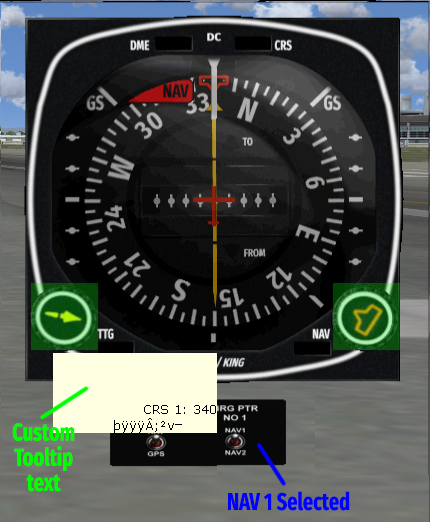
Do you remember I mentioned earlier that Tooltips don't like white spaces between lines? See what happens if I don't eliminate them (below, take a look at the code and the image):
Wrong result!
Either way, I hope you find this helpful.
Sergio.

In my constant struggle with XML code, I found some issues; among them; the Tooltip codes. By experimentation, I had some ideas and want to share them with all of you. This is aimed for those who are beginning to understand XML subtleties (like me); however, for seasoned programmers, this might be overkilling.
CUSTOM TOOLTIPS:
Tooltips will show a custom text when the mouse is hovering over a region defined within the mouse area code.
If non of default Help IDs is what you want to display, there is a workaround: Use conditional text techniques along A:Vars and/or L:Vars !!!
For this particular case, I want to display:
CRS 1 in degrees when NAV1 is selected as source and
CRS 2 in degrees when NAV2 is selected
(L:SK407_HSI_NAV_Source,bool) is a custom L:Var which is used to toggle between NAV1 and NAV2.
Particularly, I don't like long text strings, because they are hard to read and understand. However, tooltips behaves slightly different than a regular string:
they don't like white spaces between code lines! That's why I did some preparations before to use the "code version" (see the code below):
HTML:
"Course" Custom Tooltip Setup:
<Tooltip>
%((L:SK407_HSI_NAV_Source,bool))
%{if}
CRS 2: %((A:NAV2 OBS,degrees))%!03.0f!
%{else}
CRS 1: %((A:NAV1 OBS,degrees))%!03.0f!
%{end}
</Tooltip>
In order to use this tooltip, it is desirable to eliminate all white spaces in the "code version":
HTML:
"Course" Tooltip to be used within the gauge code itself:
<Tooltip>%((L:SK407_HSI_NAV_Source,bool))%{if}CRS 2: %((A:NAV2 OBS,degrees))%!03.0f!%{else}CRS 1: %((A:NAV1 OBS,degrees))%!03.0f!%{end}</Tooltip>
I will show three custom mouse areas where I used this "technique":
HTML:
<!-- M O U S E E V E N T L O G I C -->
<Mouse>
<!-- NAV1 / NAV2 Source Toggle -->
<Area Left="340" Top="677" Width="127" Height="127">
<Tooltip>NAV1/NAV2 Source Toggle</Tooltip>
<Cursor Type="Hand"/>
<Click>(L:SK407_HSI_NAV_Source,bool) ! (>L:SK407_HSI_NAV_Source,bool)</Click>
</Area>
<!-- Course Knob -->
<Area Left="27" Top="538" Width="127" Height="127">
<Tooltip>%((L:SK407_HSI_NAV_Source,bool))%{if}CRS 2:%((A:NAV2 OBS,degrees))%!03.0f!%{else}CRS 1:%((A:NAV1 OBS,degrees))%!03.0f!%{end}</Tooltip>
<!-- CRS DEC-->
<Area Right="60">
<Cursor Type="DownArrow"/>
<Click Repeat="Yes">
(L:SK407_HSI_NAV_Source,bool)
if{ (>K:VOR2_OBI_DEC) }
els{ (>K:VOR1_OBI_DEC) }
</Click>
</Area>
<!-- CRS INC-->
<Area Left="66">
<Cursor Type="UpArrow"/>
<Click Repeat="Yes">
(L:SK407_HSI_NAV_Source,bool)
if{ (>K:VOR2_OBI_INC) }
els{ (>K:VOR1_OBI_INC) }
</Click>
</Area>
</Area>
<!-- Heading Knob -->
<Area Left="593" Top="538" Width="127" Height="127">
<ToolTip>HDG: %((A:Plane heading degrees gyro,degrees))%!03.0f!</ToolTip>
<!-- HDG DEC-->
<Area Right="60">
<Cursor Type="DownArrow"/>
<Click Event="HEADING_BUG_DEC" Repeat="Yes"/>
</Area>
<!-- HDG INC-->
<Area Left="66">
<Cursor Type="UpArrow"/>
<Click Event="HEADING_BUG_INC" Repeat="Yes"/>
</Area>
</Area>
</Mouse>Now, the final result within the simulator.
When NAV1 is selected:
When NAV2 is selected:
Do you remember I mentioned earlier that Tooltips don't like white spaces between lines? See what happens if I don't eliminate them (below, take a look at the code and the image):
HTML:
      <!-- Course Knob -->
          <Area Left="27" Top="538" Width="127" Height="127">
              <Tooltip>
                  %((L:SK407_HSI_NAV_Source,bool))
                  %{if}
                  CRS 2: %((A:NAV2 OBS,degrees))%!03.0f!
                  %{else}
                  CRS 1: %((A:NAV1 OBS,degrees))%!03.0f!
                  %{end}
              </Tooltip>
              <!-- CRS DEC-->
              <Area Right="60">
                  <Cursor Type="DownArrow"/>
                  <Click Repeat="Yes">
                      (L:SK407_HSI_NAV_Source,bool)
                              if{ (>K:VOR2_OBI_DEC) }
                          els{ (>K:VOR1_OBI_DEC) }
                  </Click>
              </Area>
              <!-- CRS INC-->
              <Area Left="66">
                  <Cursor Type="UpArrow"/>
                  <Click Repeat="Yes">
                      (L:SK407_HSI_NAV_Source,bool)
                              if{ (>K:VOR2_OBI_INC) }
                          els{ (>K:VOR1_OBI_INC) }
                  </Click>
              </Area>
          </Area>
Wrong result!
Either way, I hope you find this helpful.
Sergio.
Last edited:


