• Which the release of FS2020 we see an explosition of activity on the forun and of course we are very happy to see this. But having all questions about FS2020 in one forum becomes a bit messy. So therefore we would like to ask you all to use the following guidelines when posting your questions:

    • Tag FS2020 specific questions with the MSFS2020 tag.
    • Questions about making 3D assets can be posted in the 3D asset design forum. Either post them in the subforum of the modelling tool you use or in the general forum if they are general.
    • Questions about aircraft design can be posted in the Aircraft design forum
    • Questions about airport design can be posted in the FS2020 airport design forum. Once airport development tools have been updated for FS2020 you can post tool speciifc questions in the subforums of those tools as well of course.
    • Questions about terrain design can be posted in the FS2020 terrain design forum.
    • Questions about SimConnect can be posted in the SimConnect forum.

    Any other question that is not specific to an aspect of development or tool can be posted in the General chat forum.

    By following these guidelines we make sure that the forums remain easy to read for everybody and also that the right people can find your post to answer it.

DAE import issue

Messages
560
Country
unitedkingdom
This is a scenery model created in SketchUp. Other models in the same project import to MCX just fine, so why this one has a problem I have no idea! This is the message:

15:45 AssimpReader Error Error importing file: Collada: F:\Military AI Works\USA Projects\KNIP Navy Jax\TJC DAE Models\Hangar 113 Group 3.dae - Expected end of <source> element.

At the bottom, it reads: ATT COR CUR COR Unrestricted animation export Reading Assimp

There are no animations in the model, which I've attached.
 

Attachments

Hi Tim:

Like MCX, Sketchup 2016 on my system also cannot import the Collada *.DAE you attached above.

Please keep in mind that the ASSIMP 3D I/O DLL used by MCX may still have issues with processing of 'some' Collada *.DAE files. :alert:


Also, MCX Collada *.DAE import requires the mapped texture Material files to all be located within the same folder as the *.DAE. :pushpin:


However, the *.DAE file in question may also have issues in addition to its code structure, as some mapped texture materials may be missing from the (14) you have attached above, ...as seen in this info from NotePad++:

Search "jpg" (19 hits in 1 file of 1 searched)
[path]\Tim_Collins_Hangar 113\Hangar 113\Hangar 113 Group 3.dae (19 hits)
Line 24879: <init_from>Hangar%20113%20Group%203/Jacksonville_Base.jpg</init_from>
Line 24882: <init_from>Hangar%20113%20Group%203/Metal_Rough.jpg</init_from>
Line 24885: <init_from>Hangar%20113%20Group%203/Jax_Cladding.jpg</init_from>
Line 24888: <init_from>Hangar%20113%20Group%203/Hangar_pillar_top.jpg</init_from>
Line 24891: <init_from>Hangar%20113%20Group%203/Hangar_side_roof.jpg</init_from>
Line 24894: <init_from>Hangar%20113%20Group%203/Hangar_Roof_2.jpg</init_from>
Line 24897: <init_from>Hangar%20113%20Group%203/Hangar_roof_1.jpg</init_from>
Line 24900: <init_from>Hangar%20113%20Group%203/Jacksonville_1.jpg</init_from>
Line 24903: <init_from>Hangar%20113%20Group%203/Roof_7.jpg</init_from>
Line 24906: <init_from>Hangar%20113%20Group%203/Jacksonville_1_0.jpg</init_from>
Line 24909: <init_from>Hangar%20113%20Group%203/Hangar_pillar_top_1.jpg</init_from>
Line 24912: <init_from>Hangar%20113%20Group%203/Shed_Roof_1.jpg</init_from>
Line 24915: <init_from>Hangar%20113%20Group%203/Shed_Roof_1_2.jpg</init_from>
Line 24918: <init_from>Hangar%20113%20Group%203/Shed_roof_2.jpg</init_from>
Line 24921: <init_from>Hangar%20113%20Group%203/Jacksonville_1_3.jpg</init_from>
Line 24924: <init_from>Hangar%20113%20Group%203/Jacksonville_1_4.jpg</init_from>
Line 24927: <init_from>Hangar%20113%20Group%203/Jacksonville_1_5.jpg</init_from>
Line 24930: <init_from>Hangar%20113%20Group%203/Jacksonville_1_6.jpg</init_from>
Line 24933: <init_from>Hangar%20113%20Group%203/Jacksonville_1_7.jpg</init_from>


I suggest re-importing the original source file for the 3D model into Sketchup, then export it instead as a Google Earth *.KMZ file.

MCX can then open the embedded Collada *.DAE contained within the *.KMZ via a different / more trouble-free method. ;)

[EDITED]

MCX directly imports *.KMZ files when they are submitted as a source file; this often (but not always) works when "naked" *.DAE import does not.

Be certain to set all desired [Options] for *.OBJ Export / Import I/O processing in the Sketchup dialog boxes. :pushpin:


FYI: A Sketchup exported Google Earth *.KMZ is a ZIP file containing the:

* Collada *.DAE

* mapped texture Materials

...and:

* metadata such as Geo-referencing etc.


If a 3D model is automatically or manually Geo-located (Geo-referenced at its central Cartesian 0,0,0 / X,Y,Z datum, MCX will import / use that info.

Otherwise, 3D models default to original Geo-referncing coordinates of the parent company that developed Sketchup in Boulder, Colorado USA.

[END_EDIT]

GaryGB
 
Last edited:
Thanks Gary. Yes, I had a feeling (after trying several iterations, shedding building after building from the group!) that materials may be the root of the issue, but I did try to ensure that the model only referenced the correct materials rather than everything that's in the full project. Indeed, I tried a version of the model using only SketchUp native colours rather than any texture files, but I had the same result. Interestingly, only this one building displays this behaviour; the others in the group if saved without this hangar compile perfectly, and MCX is happy with their .dae file.

I'll try the kmz route tomorrow. If it doesn't work, I guess I'll have to start that hangar from scratch!
 
Hi Tim:

IIUC, you are creating this hangar as an entirely new 3D model ? :scratchch


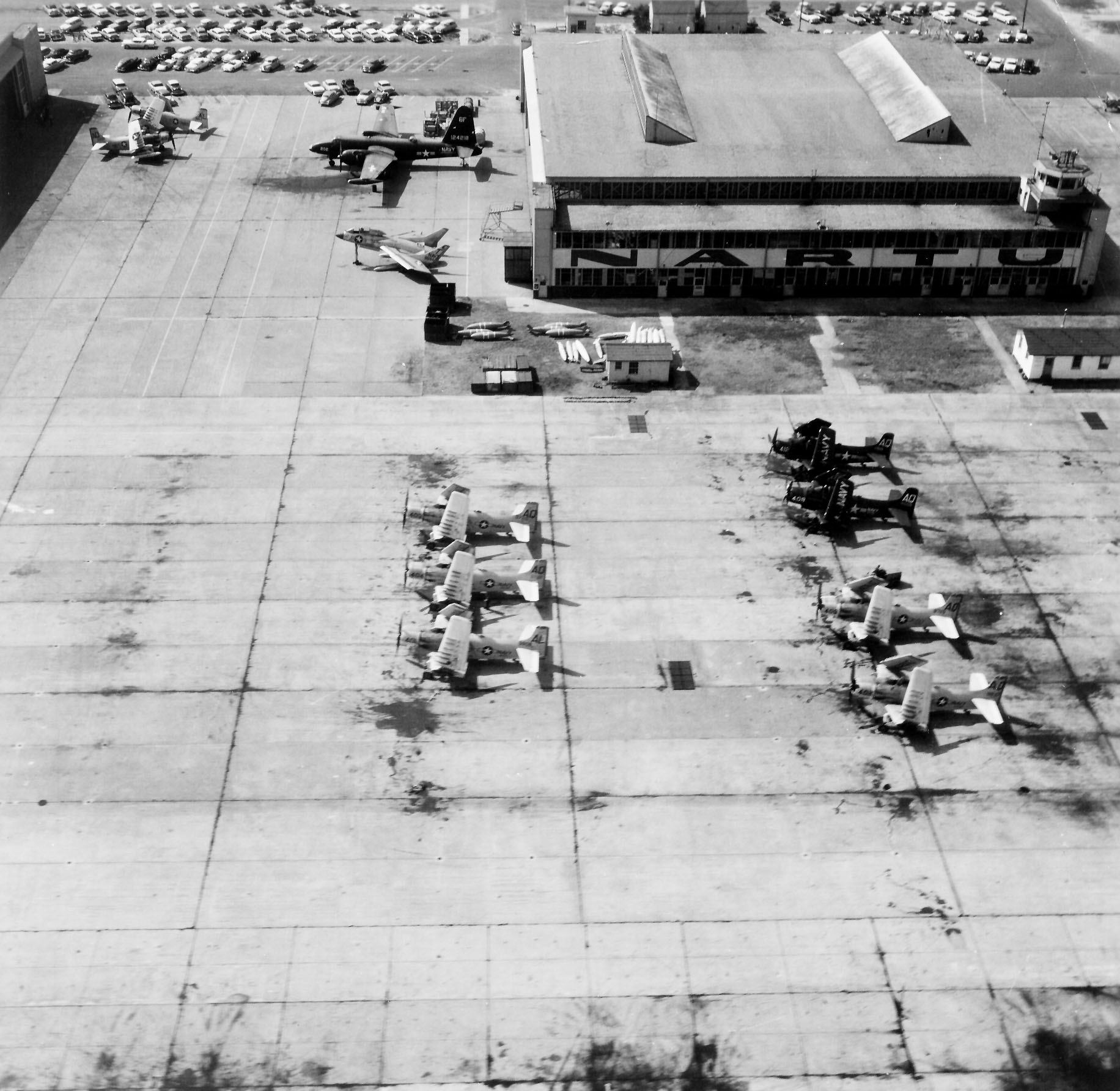
nas_jacksonville_nar_hangar_1958.jpg


usa-naval-air-reserve-training-unit-hangar-113_ge-3d-jpg.80571


GaryGB
 

Attachments

  • USA Naval Air Reserve Training Unit hangar 113_GE-3D.jpg
    USA Naval Air Reserve Training Unit hangar 113_GE-3D.jpg
    723.9 KB · Views: 533
Last edited:
Yes. Well, the whole base - eventually! It started as a simple update to John Stinstrom’s scenery for MAIW to reflect KNIP’s current configuration and to resolve an issue that AI refuses to appear there in P3D (which needed a new AFD to sort out). It’s become a bit more than that, though it’s on the back burner a bit.

2671CFE2-466F-488C-BE3E-058C99BDB70E.jpeg


I was intending to transition my scenery-building to Blender, but the learning curve has somewhat discouraged me - and I do love SU!
 
Well, that was interesting. MCX could not open the DAE extracted from the kmz file. However, clicking on the Google Earth 'Doc' icon from the unzipped folder successfully opened the model in Google Earth. There's no location info in the file, so it seemed to open in a random location (and partly in a hill). Very odd!

Here's an illustration of the model from the same side as your last image, but without the compression.

Hangar 113.png
 
Last edited:
Well, that was interesting. MCX could not open the DAE extracted from the kmz file. However, clicking on the Google Earth 'Doc' icon from the unzipped folder successfully opened the model in Google Earth. There's no location info in the file, so it seemed to open in a random location (and partly in a hill). Very odd!

Hi again:

I should have been more detailed in my explanation of the *.KMZ option with MCX ...please see my edit above: :oops:

https://www.fsdeveloper.com/forum/threads/dae-import-issue.454875/post-899476

I hope this option may still work for you; if not, you could instead export a *.OBJ file from sketchup ...for import by MCX. :idea:


Wavefront OBJ ( *.obj )- may be more successful vs. Collada *.DAE- via a few extra steps to config and I/O process in MCX and Sketchup cited here: ;)

https://www.fsdeveloper.com/forum/t...markings-using-sketchup-and-mcx.446617/page-3


Note that TIG's plugins for OBJ I/O are utilized in the work-flow linked above; if you require info on where to put plugin files, feel free to inquire further.


BTW: Which numeric / year version of Sketchup are you presently using ? :scratchch

GaryGB
 
Last edited:
Hi Gary. I'm on SU Make 2017 (17.2.2555 64-bit).

Thanks for that. I'll try it shortly.

Edit:

Importing the KMZ file into MCX gave the same error as before. Exporting as a Wavefront .obj without textures did result in a successful import to MCX, with everything rotated by 90 degrees (which I expected), so I think there's scope to play with the settings and see if I can get something usable out of it. If not, all of the repeating assets in the model are saved as components, so it wouldn't be too difficult to repeat it (and there are other Kahn hangars still on the airfield (seafront side) still to be replicated).

Edit 2:

Got it importing in the right orientation. I'm not sure why MCX is not picking up the materials, but I'm not sure where it's expecting to look for the materials for an obj file. MCX Importer settings don't give me any clues. I'll have a good look through the long thread you linked to to see if I can make sense of it there.
 

Attachments

  • Hangar 113 Group obj.png
    Hangar 113 Group obj.png
    83.4 KB · Views: 234
Last edited:
It usually defaults to looking for textures in the same folder that the source file is located, except in certain cases (DAE, FS aircraft, FS scenery, etc.).
 
Yes, that’s what I assumed. So I put the .obj file inside the texture folder SU created when it exported the file (it was saved outside that folder). Neither outside nor inside the folder resulted in the textures being imported. The texture names MCX was searching for (some of which can be seen in the image) mostly match those in the folder, however I assume the colours are contained in the .mtl file which accompanied the .obj file. I’m curious about the ‘unsupported element’ messages - of which there are loads. Do these refer to components in SketchUp? Or is it something else…?
 
Yes, that’s what I assumed. So I put the .obj file inside the texture folder SU created when it exported the file (it was saved outside that folder). Neither outside nor inside the folder resulted in the textures being imported. The texture names MCX was searching for (some of which can be seen in the image) mostly match those in the folder, however I assume the colours are contained in the .mtl file which accompanied the .obj file.

Have you set the MCX search path for the 3D model mapped Material source folder you are attempting to import / load textures from ?

MCX > Options > Texture Settings > Texture Search Path [...] button > Search Path Editor > Add path... > Browse / Select: Texture folder > [OK] button


Also, bear in mind that Sketchup does not display DXT BMPs , but instead defaults to other graphic texture Material formats.


Remember too, in MCX, prior to export, we must write a texture output path into the MDL, and convert textures to a format used by FS:

https://www.fsdeveloper.com/forum/threads/mcx-texture-format-change.453458/post-889535


I’m curious about the ‘unsupported element’ messages - of which there are loads. Do these refer to components in SketchUp? Or is it something else…?

Perhaps this thread may prove informative ?

https://www.fsdeveloper.com/forum/threads/unsupported-material-element-map_ks.443505/

GaryGB
 
Last edited:
Hi Gary. Yes, I did set the path after looking through the MCX import options. SU textures , as I know you know, are jpgs, and of course MCX imports those perfectly well with a .dae file then converts them to DDS when exporting as a P3D bgl. The obj export from SU also provides the textures as jpgs, so I was a little surprised that MCX couldn't find them. I tried again to remove all non-colour textures from the model, but MCX still didn't like it.

As I've managed to get an untextured model out as a Wavefront obj, I might try re-exporting from MCX as a dae to import to Blender and texture it there (that'll be a new experience!). My only worry is I know Blender really doesn't like SU components, and there are rather a lot in this model. But it might be an interesting exercise, and provide some useful experience in SU to Blender conversions.

Of all the many, many models I've made in SketchUp and converted via MCX, this is the first that's caused any real problems, which isn't a bad record. I don't want to waste my time (and yours) chasing an obscure error if I can get round it more quickly by starting that building from scratch. It was really a case of seeing if I'd done something stupid (which is very much still a possibility!) that could easily be corrected. It would appear that it's something more fundamental, and it probably isn't worth us diving down rabbit holes to find a cure for this one building.

But, as always, thanks for your help, Gary. I've learned some stuff, and I have a load of material to learn more from, so every day's a school day!
 
I have not had time to tinker with Blender, but perhaps this Blender plug-in is able to solve the issue with import of Sketchup Components ?

https://github.com/heikkisa/blender-import-sketchup


[EDITED]

Otherwise, there are a few Sketchup plugins which can iterate to convert Components into unique Geometry 3D objects prior to Export:

https://sketchucation.com/pluginstore?pln=make_all_unique

https://sketchucation.com/pluginstore?pln=Make_Components


...and for the occasional maddening goof of applying a Material to the 'exterior' of a Group or Component with the Paint Bucket Tool in Sketchup: ;)

https://sketchucation.com/pluginstore?pln=Remove_CG_mat

[END_EDIT]


Good luck with your project. :)

GaryGB
 
Last edited:
Thanks Gary. There's some useful advice in the notes for that plug-in, which would be valid even without installing the plug-in.

Having seen some spectacular sceneries done in Blender, and followed some of Bill Womack's instructional videos on YouTube, I think I really need to bite the bullet and get my head around it. But I've been saying that for a couple of years, and when I get an idea in my head I automatically turn to SketchUp because I can get excellent results quickly - and it appeals to the technical artist in me far more than the Blender/3dsMax system of aggregating building blocks.

Once again, thanks for your help.
 
Back
Top