• Which the release of FS2020 we see an explosition of activity on the forun and of course we are very happy to see this. But having all questions about FS2020 in one forum becomes a bit messy. So therefore we would like to ask you all to use the following guidelines when posting your questions:

    • Tag FS2020 specific questions with the MSFS2020 tag.
    • Questions about making 3D assets can be posted in the 3D asset design forum. Either post them in the subforum of the modelling tool you use or in the general forum if they are general.
    • Questions about aircraft design can be posted in the Aircraft design forum
    • Questions about airport design can be posted in the FS2020 airport design forum. Once airport development tools have been updated for FS2020 you can post tool speciifc questions in the subforums of those tools as well of course.
    • Questions about terrain design can be posted in the FS2020 terrain design forum.
    • Questions about SimConnect can be posted in the SimConnect forum.

    Any other question that is not specific to an aspect of development or tool can be posted in the General chat forum.

    By following these guidelines we make sure that the forums remain easy to read for everybody and also that the right people can find your post to answer it.

MSFS20 Default lights not lighting up

Messages
85
Country
germany
Hey everyone,

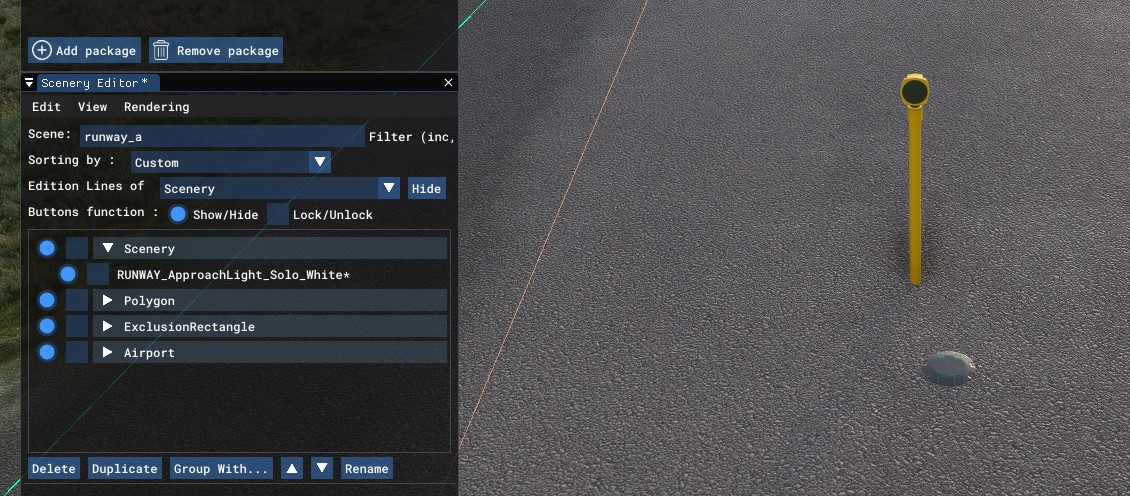
can somebody tell me why the default lights from fs-base package do not light up? I've tried the RUNWAY_ApproachLight_Solo_White and this RUNWAY_Tips_Green_Green, it does not light up as I thought it should.
I can do my own models, but because the lighted parts are so small they are not really visible, so I hoped for the default models, but they just do not light up?

lights-not-lit.jpg
 
Nope. They're just static models.

I really wish they did provide freely placeable lights with similar qualities to runway and taxiway lights.
 
That's what I thought. It would make way easier to be able to use these instead of just static images.
 
Had the same disappointment, I really don't see the point in making static lights available that don't light up at night...
BTW I wasn't able either to place a light FX from their library.

So, eventually, I made my own runway side and threshold lights.

Cheers
Antoine
 
Had the same disappointment, I really don't see the point in making static lights available that don't light up at night...
BTW I wasn't able either to place a light FX from their library.

So, eventually, I made my own runway side and threshold lights.

Can you give us some ideas on how to make custom lights emit light over a decent distance?

I can't get any light that I create to appear beyond 100-200 metres unless it's absolutely huge. After that it disappears.
 
Have you tried creating an "MSFS Invisible" cube around it? Make this one way bigger than the lamp itself to be able to see the lights from farther out. But still, it's not as far visible as compared to the default lights.
 
Can you give us some ideas on how to make custom lights emit light over a decent distance?

I can't get any light that I create to appear beyond 100-200 metres unless it's absolutely huge. After that it disappears.
Sure, I made a combination of 4 things:
1) design my 3D runway light model in 3DSMax (Blender will do the same) with a small emissive light bulb (to make something visible in the night) and a spot light source (i.e. omnidirectional) floating a few cm above. This is the close view model.
2) add to that close view model a 2m-by-2m-by-2m cube burried 25m below ground level, this makes things visible from farther away. Still not sufficient.
3) work with LODs
4) add conditional visibility to prevent far LODs from showing up in daytime

For step 3), if you're familiar with LODs, you can name each node in 3DSMax or Blender in a way that allows group exorting directly as LOD levels.
For some reason I like however to work stepwise manually, i.e. I exported my close-view model from step 2) as runway_light_LOD0.gltf

Then I clone my close-view model (i.e. make a copy) and edit it with 3 white emissive discs to get a light dot visible from farther away and remove details that won't need to show up => export as runway_light_LOD1.gltf

I repeat this step with bigger and bigger white emissive discs and increasing progressively the intensity of the light source to export as runway_light_LOD2.gltf, runway_light_LOD3.gltf, etc.

Eventually I play with the values in the XML file to get the desired transition from LOD to LOD in MSFS. This is a lengthy process because it doesn't update easily in the sim when you change something, and the overlays in the Scenery Editor add a bias - you may want to hide everything else.

Step 4) necessitates to define your runway lights as Simobjects (see Visibility thread of discussion in this forum). It is facultative, but in most cases it would be disturbing to see those white emissive discs in daytime, while it's ok by night.

You can give my free LSGY Yverdon-les-Bains aerodrome scenery a try to see my runway lights at work. I've only defined 3 or 4 LODs, they're not progressive enough to my taste, more LODs would be necessary for smoother transitions.

Enjoy !

Cheers
Antoine

 
Last edited:
Great airport.

Thank you for the explanation. That all makes sense. I haven't done anything with LODs yet but it didn't occur to me to make it gradually bigger.

The only thing that gave me several miles of visibility so far was a narrow 10,000 watt light but it made the runway look like a Jean Michel Jarre concert.


Have you tried creating an "MSFS Invisible" cube around it? Make this one way bigger than the lamp itself to be able to see the lights from farther out. But still, it's not as far visible as compared to the default lights.

Yes. Tried that. It didn't work. I can't get visibility with anything sensibly sized beyond 150 metres ish no matter what I've tried. A plane or box 2km by 2 km doesn't work any better than 20 metre one. They should've included a bunch of lights that are free floating that have the same qualities as their runway lights. It would be extremely useful.

I've had a look at the FX bit as if you could add aircraft lights to a static object that would get the job done nicely, but I've no idea what to do or whether it's possible.
 
Last edited:
Back
Top