
-
Which the release of FS2020 we see an explosition of activity on the forun and of course we are very happy to see this. But having all questions about FS2020 in one forum becomes a bit messy. So therefore we would like to ask you all to use the following guidelines when posting your questions:
- Tag FS2020 specific questions with the MSFS2020 tag.
- Questions about making 3D assets can be posted in the 3D asset design forum. Either post them in the subforum of the modelling tool you use or in the general forum if they are general.
- Questions about aircraft design can be posted in the Aircraft design forum
- Questions about airport design can be posted in the FS2020 airport design forum. Once airport development tools have been updated for FS2020 you can post tool speciifc questions in the subforums of those tools as well of course.
- Questions about terrain design can be posted in the FS2020 terrain design forum.
- Questions about SimConnect can be posted in the SimConnect forum.
Any other question that is not specific to an aspect of development or tool can be posted in the General chat forum.
By following these guidelines we make sure that the forums remain easy to read for everybody and also that the right people can find your post to answer it.
You are using an out of date browser. It may not display this or other websites correctly.
You should upgrade or use an alternative browser.
You should upgrade or use an alternative browser.
Do you have some tips? I'm beginer :)
- Thread starter Marc L
- Start date

S
Spitz
Guest
Cooldid someone know how to texture a building with photoreal? or custom textures?
If I remember correctly there's quite a nice option if you go to File->Import. Select at the bottom for file type all supported images and the on the right tick the box that says use as texture. There's also somewhere where you can set/limit/unlimit the size of the imported texture. Will find out where exactly.

- Messages
- 1,510
- Country

You can straighten and use the photo in your first post:Cool
First use the lasso tool to select a rectangular area

Copy & paste the selected area as a layer, make a rectangular color fill layer that approximates the needed shape

Select the cut out layer, use transform > distort to pull the corners onto the color fill layer

Trim up the edges, delete the color fill layer, position the straightened cutout onto your texture sheet and apply it to your model.


- Messages
- 777
- Country
An easier way, IMO,...
From the original image...
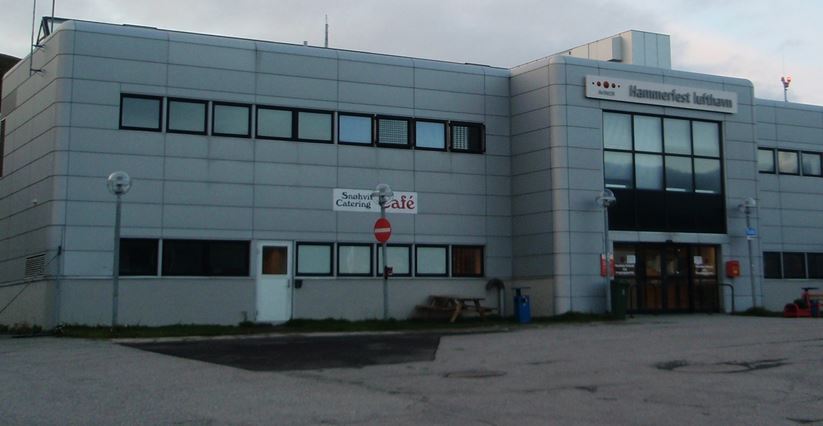
...use the crop tool and draw a random crop box...
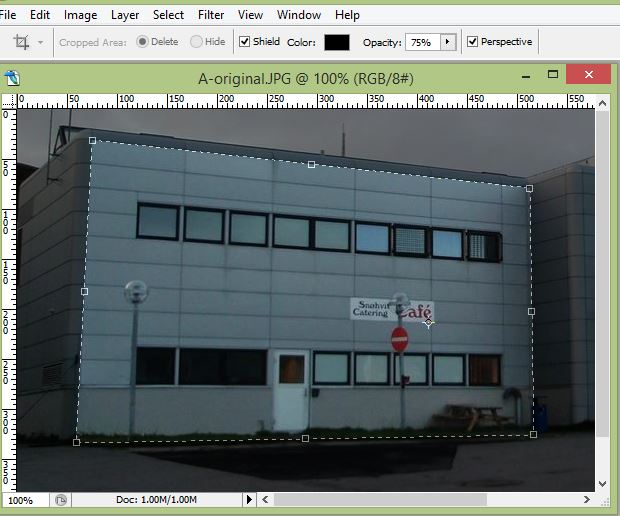
...check the Perspective box and drag the corners to where you want them, right click and "crop"...

This method lets PS do the transforming.
cheers,
Lane
From the original image...
...use the crop tool and draw a random crop box...
...check the Perspective box and drag the corners to where you want them, right click and "crop"...
This method lets PS do the transforming.
cheers,
Lane

- Messages
- 2,231
- Country

You are all very experienced, I thank you all.
don't forget, I'm not making Hammerfest, I'm learning about conception I don't know if it will be released
I have a new question: How to do Mesh? (Vertical cliffs etc) I have Global Mapper, I wanna active a trial licence when I'm ready (but GeoTIFF are requiers, and I don't knot what is this :/
I'm gratful for your patience with me
Greeting, Marc
don't forget, I'm not making Hammerfest, I'm learning about conception
I don't know if it will be released I have a new question: How to do Mesh? (Vertical cliffs etc) I have Global Mapper, I wanna active a trial licence when I'm ready
(but GeoTIFF are requiers, and I don't knot what is this :/I'm gratful for your patience with me
Greeting, Marc
