
• Which the release of FS2020 we see an explosition of activity on the forun and of course we are very happy to see this. But having all questions about FS2020 in one forum becomes a bit messy. So therefore we would like to ask you all to use the following guidelines when posting your questions:

    • Tag FS2020 specific questions with the MSFS2020 tag.
    • Questions about making 3D assets can be posted in the 3D asset design forum. Either post them in the subforum of the modelling tool you use or in the general forum if they are general.
    • Questions about aircraft design can be posted in the Aircraft design forum
    • Questions about airport design can be posted in the FS2020 airport design forum. Once airport development tools have been updated for FS2020 you can post tool speciifc questions in the subforums of those tools as well of course.
    • Questions about terrain design can be posted in the FS2020 terrain design forum.
    • Questions about SimConnect can be posted in the SimConnect forum.

    Any other question that is not specific to an aspect of development or tool can be posted in the General chat forum.

    By following these guidelines we make sure that the forums remain easy to read for everybody and also that the right people can find your post to answer it.

MSFS20 Duplicate Windsocks

Messages
504
Country
australia
Hi All,
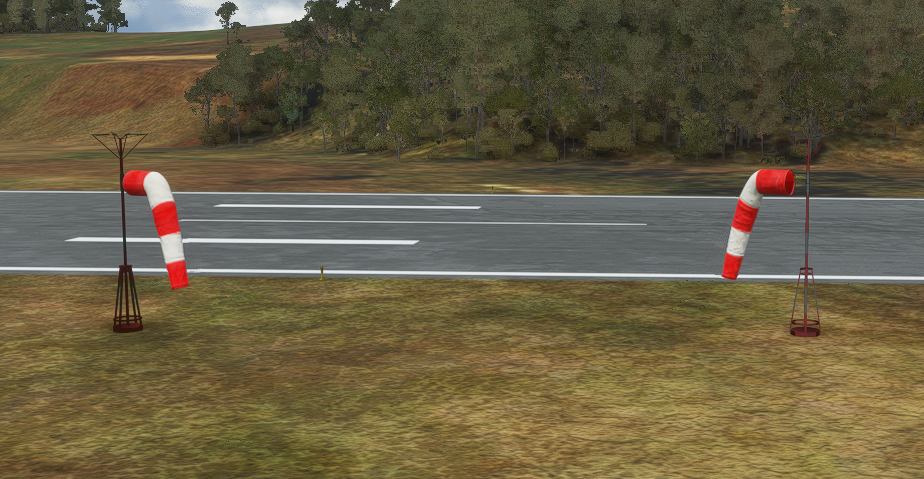
This is a fictional airport and I added a Windsock but to my surprise, one already existed - I assume from adding the runway (if so I have never noticed)?
The one on the left is the "stock" facing the wrong way and there's nothing in the XML to turn it or remove. The one on the right is my add-on, facing the correct way.
I will add that I've now edited this project using the In-Sim Tools and don't think I can go "backwards" to ADE. I don't believe this occurred via ADE - meaning ADE doesn't add windsocks with a runway? I know it will bring them in if basing on an existing but this wasn't. I have tried an exclusion rectangle to bomb it but cannot. Any ideas?
1613182905930.png
 
You are right - ADE can't round trip with existing projects modified in sim. It is high on the list but not done yet Stock Windsocks are stored in WPX files and are sim objects. ADE isn't reading these yet.

The exclusion rectangle has flags to exclude sim objects and windsocks

1613196027432.png


But I am not sure which either works. Exclude Windsocks may be for old style FSX windsocks and not work on the new ones.

There doesn't seem to be another mechanism for excluding them that I have found
 
Thanks Jon. I tried (in sim) to exclude explicitly the windsock, then all + windsock (via xml) but neither worked. I actually never noticed the windsock when I created the airport-it’s fictional so I have no idea how it even got in there.
This project started as the original ADE 1.7(?) and I modified it in the first 2020 alpha. Could it have come through from there?
Anyway I could leave it and remove my inserted one but it's pointing in the wrong direction.
I have excluded windsock from an airport I am working on now by using exclusion rectangle and making it a few feet wider than the base of the windsock stand. That works. That airport had 6 - three runways and a sock each end each side
Maybe this exclusion is too wide. Silly thing is I can’t see the windsock while editing so I’m guessing the exact position but I can see it plain as day out of edit mode
 
they all are there are threads about fixing it but if you didn't place it then I don't them you can edit it
 
Ok my report... summary=couldn’t fix it. Silly thing is that I’ve removed them at other airports with exclusion rectangle and only set the exclude windsock
At this one, fictional airport, it simply refuses to go and is 180 backwards.
Maybe as you suggested because there’s no wpx file to reference there’s no way to delete.
 
In older versions of the sim the usual problem with objects like this, that appear in a place for which there is no explanation, is that there is more than one package in your system for this airport. Thus you may have one generated earlier and hiding so to speak. Check all packages. Make sure you did not put a package into the official folder(s) by accident We are all doing a lot of testing an are in danger of creating unexpected results

The other thing I have seen is multiple bgl files generated in the same package. Make sure there is only one.
 
Ok thanks. All things to check. I have also found that when rebuilding it is sometimes necessary to delete the _PackageInt folder, which holds the metadata and timestamps for all the builds. It’s safe to delete and is rebuilt automatically without the baggage. Perhaps I’ve forgotten in this case.
 
This is not much use in your situation but ADE can now add sim object windsocks. I added two with 180 deg heading difference and the socks do seem to be on opposite headings. I don't know whether this fixes the wrong direction for windsocks. Also Scenery Objects (such as a windsock) are placed at 180 to the set heading due to some internal reasons from Asobo.

1613300884325.png
 
OK Windsock gone. I used an exclusion rectangle with Exclude=Windsock

When rebuilding a project and BEFORE you click rebuild:
  1. Delete the _PackageInt folder (holds metadata/timestamps/tempfiles) - This has Ghost links in it
  2. Delete the Package folder - this has old packages and bgls if you've changed names etc
  3. If you use the Export All option - Delete the contents of the root folder you chose to export to (I use FS_Export - it has a Community folder beneath)
Now build...

DELETE THE EXISTING COMMUNITY PACKAGE COMPLETELY - Don't just copy
 
For windsocks to work correctly, they must have a 0 degree direction. Default direction of objects is 180, so all windsocks that the author didn't then correct the direction to 0 will blow 180 degrees out of phase from the actual wind direction. I didn't pay attention to what you do in ADE as I just automatically edit them to 0 when I add them.

To exclude windsocks, you use an exclusion rectangle and tick the exclude windsocks option.
 
Thanks for the reply. Did you read the whole post? That is what I do (degrees to zero and exclusions) however, this had a ghost windsock.
My end resolution was posted as: remove the folders listed and rebuild. This also applies to any other BGL or object that ghosts 😁
 
For windsocks to work correctly, they must have a 0 degree direction. Default direction of objects is 180, so all windsocks that the author didn't then correct the direction to 0 will blow 180 degrees out of phase from the actual wind direction.
This is confusing. In ADE, added windsocks are shown as 0 degrees heading resulting in a windsock direction opposite what is correct. Therefore, I have to change the heading to 180 degrees for it to appear correctly in MSFS.
 
This is confusing. In ADE, added windsocks are shown as 0 degrees heading resulting in a windsock direction opposite what is correct. Therefore, I have to change the heading to 180 degrees for it to appear correctly in MSFS.
I have updated windsocks for the next alpha. I assume you are using the old XML based Windsocks, ADE is reversing the headings of scenery objects so they face the expected way since Asobo chose to make the default heading reversed.
 
Back
Top