

Hi,
I'm having a problem with a texture. The objects behind it appear transparent. If I remove the mask and use a simple DXT1 alpha channel, the problem goes away. The only thing is is that it does not look very good. The image shimmers with or without mipmaps.
Also, what I have done is created the plane, textured it, cloned it and flipped normals. If I use DS_XXX.bmp in the material editor in GMAX, I get the same transparency issue.
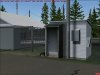
Any ideas? Please see attached pic.
Thanks,
Adam
EDIT: I just talked to a friend that does scenery design and he said that it might have something to do with the drawing order if the bgl contains multiple objects. My bgl has only the fence polygon in it.
I'm having a problem with a texture. The objects behind it appear transparent. If I remove the mask and use a simple DXT1 alpha channel, the problem goes away. The only thing is is that it does not look very good. The image shimmers with or without mipmaps.
Also, what I have done is created the plane, textured it, cloned it and flipped normals. If I use DS_XXX.bmp in the material editor in GMAX, I get the same transparency issue.
Any ideas? Please see attached pic.
Thanks,
Adam
EDIT: I just talked to a friend that does scenery design and he said that it might have something to do with the drawing order if the bgl contains multiple objects. My bgl has only the fence polygon in it.
Attachments
Last edited:


 . You need to make sure that the parts behind the transparant texture are drawn before the transparant texture (polygon) itself.
 . If the transparant part is only one well defined material, then it should not be that hard for me to fix it in the AMS code. But if the object is much more complex, then I would probably take too much time.