

- Messages
- 19
- Country

I didn't find proper thread about this, so I wanted to share with all of you who like to do the modelling with SketchUp.
While investigating the easiest workflow for texturing my 3D models, I have found this tool, available for free:
Unwrap and Flatten Faces
Essentially, it works in the way that unwraps all the faces and makes them flat on the "floor", so you can easily align them to square and export as bitmap:
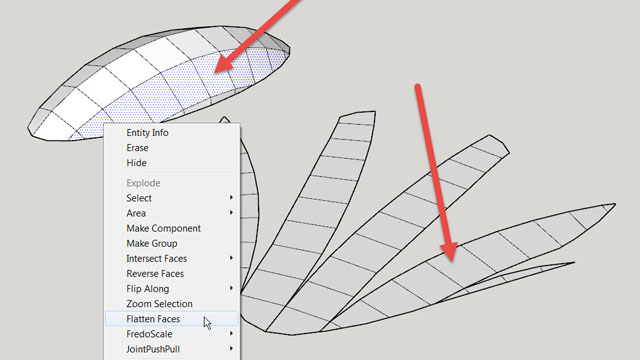
It's purpose isn't that by itself, but I found it very usefull. After you solve the puzzle , you can export top down view as bitmap and then paint proper textures with right dimensions and orientation, to avoid later problems which jumps in if you resize the parts of the texture (As I remember, these problems includes exporting to multiple textures instead of one map). If you paint them in various colors so you can recognize the faces easier, the Photoshop part should be much more a pleasure, than a pain.
I hope that my explanation of this tool isn't too much confusing, so if anyone finds this helpful, I'm glad I shared it!
Best regards,
Dragan
While investigating the easiest workflow for texturing my 3D models, I have found this tool, available for free:
Unwrap and Flatten Faces
Essentially, it works in the way that unwraps all the faces and makes them flat on the "floor", so you can easily align them to square and export as bitmap:
It's purpose isn't that by itself, but I found it very usefull. After you solve the puzzle
, you can export top down view as bitmap and then paint proper textures with right dimensions and orientation, to avoid later problems which jumps in if you resize the parts of the texture (As I remember, these problems includes exporting to multiple textures instead of one map). If you paint them in various colors so you can recognize the faces easier, the Photoshop part should be much more a pleasure, than a pain. I hope that my explanation of this tool isn't too much confusing, so if anyone finds this helpful, I'm glad I shared it!
Best regards,
Dragan
Last edited: