

- Messages
- 118
Hello.
I am creating some elevated ground polygons and I wonder, is there any way to make them non see-though, as every 3D object which is "behind" still displays. Here is an example. I am using ground polygons, 3D walls and a platform object. It looks nice when there is nothing behind (or under) ground polygons:
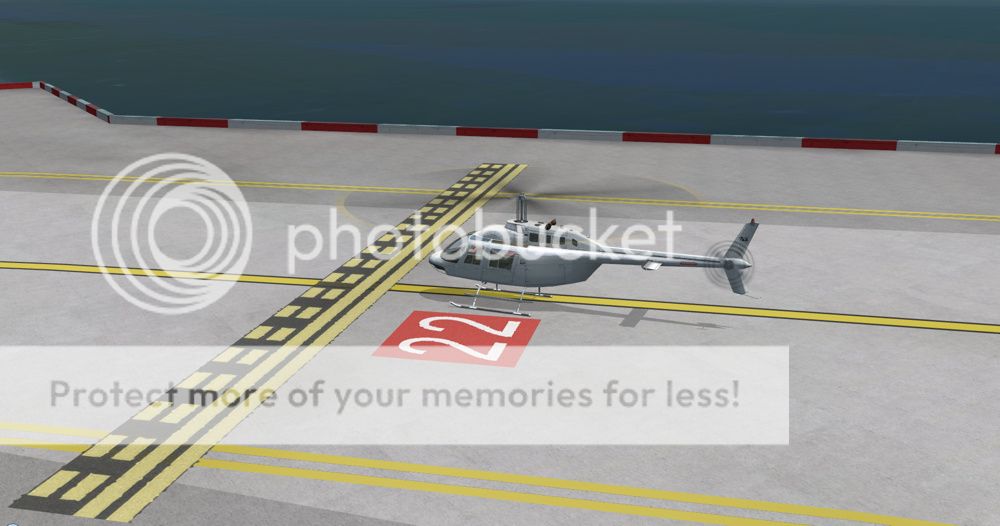
Unfortunally it looks very unrealistic when there are some objects (and in this case those 3D walls, exported with FSX sdk) under (or behind) ground polygons:
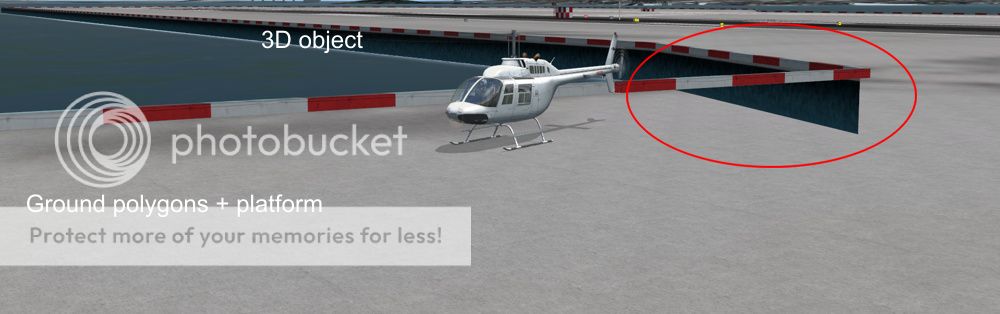
I had this issue many times before and usually it was possible to simply change ground polygons to a 3D (non-layered) object with a platform (heliports), however in this case it would hardly be possible due to extensive ground markings and quite a large area. I will very much appreciate any idea of a possible solution.
Best regards
Stanislaw
I am creating some elevated ground polygons and I wonder, is there any way to make them non see-though, as every 3D object which is "behind" still displays. Here is an example. I am using ground polygons, 3D walls and a platform object. It looks nice when there is nothing behind (or under) ground polygons:
Unfortunally it looks very unrealistic when there are some objects (and in this case those 3D walls, exported with FSX sdk) under (or behind) ground polygons:
I had this issue many times before and usually it was possible to simply change ground polygons to a 3D (non-layered) object with a platform (heliports), however in this case it would hardly be possible due to extensive ground markings and quite a large area. I will very much appreciate any idea of a possible solution.
Best regards
Stanislaw
Last edited:

