
• Which the release of FS2020 we see an explosition of activity on the forun and of course we are very happy to see this. But having all questions about FS2020 in one forum becomes a bit messy. So therefore we would like to ask you all to use the following guidelines when posting your questions:

    • Tag FS2020 specific questions with the MSFS2020 tag.
    • Questions about making 3D assets can be posted in the 3D asset design forum. Either post them in the subforum of the modelling tool you use or in the general forum if they are general.
    • Questions about aircraft design can be posted in the Aircraft design forum
    • Questions about airport design can be posted in the FS2020 airport design forum. Once airport development tools have been updated for FS2020 you can post tool speciifc questions in the subforums of those tools as well of course.
    • Questions about terrain design can be posted in the FS2020 terrain design forum.
    • Questions about SimConnect can be posted in the SimConnect forum.

    Any other question that is not specific to an aspect of development or tool can be posted in the General chat forum.

    By following these guidelines we make sure that the forums remain easy to read for everybody and also that the right people can find your post to answer it.

ENAX - Ålesund hospital helibase

Messages
413
Country
norway
Hello. I present my newest project, the Ålesund hospital helibase, ICAO ENAX. The helibase is located close to the city of Ålesund on the western coast of norway, and is practically placed close to the sea and the norwegian alps.

Note:
The scenery has been created using a newly discovered method [for me...] and it introduces more details to the buildings and ground textures than previously.

The workflow is currently:

  1. Create the model/ground texture in Sketchup
    1. Assign the different parts of the model (e.g. emissive lights, windows, fences, doors - seperated as high/low detail) a texture set
    2. Save the model as a single group.
  2. Import the Sketchup file into Blender
    1. UV-edit based on the texture sets / material
    2. Export as .fbx file.
  3. Import the model into Substance painter
    1. export the textured model as a .glft
  4. Import into Blender
    1. final editing
      1. Lights
      2. Reflection
      3. Emission
      4. LODs
    2. Export to msfs project
The results is what I would consider highly detailed models and ground texture with a relatively straight forward approach.

You can find the scenery at flightsim.to: https://flightsim.to/addon/106573/enax-alesund-hospital-helibase
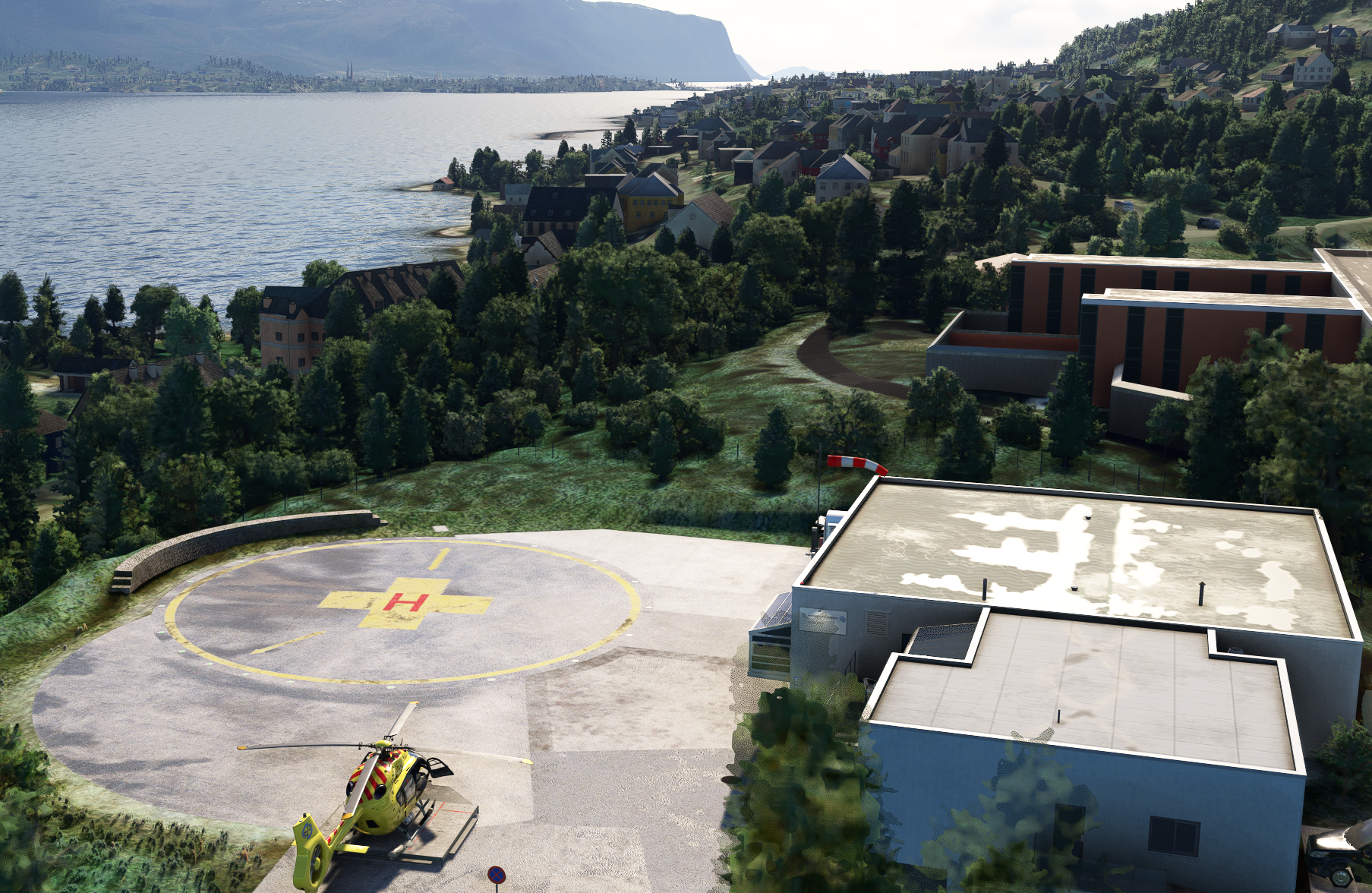
Screenshot 2026-03-28 123430.png


Screenshot 2026-03-28 122659.png
Screenshot 2026-03-28 122844.png
Screenshot 2026-03-28 122915.png
Screenshot 2026-03-28 123027.png
Screenshot 2026-03-28 123056.png
Screenshot 2026-03-28 123111.png
Screenshot 2026-03-28 123307.png
Screenshot 2026-03-28 123602.png
Screenshot 2026-03-28 123637.png
 
WOW ...this looks great; excellent work. :cool:


FYI: Apparently MSFS can not interpret what IIUC is a Scandinavian "Å" in the name, so this shows a run time ICAO nameplate of "lesund".

https://en.wikipedia.org/wiki/Å


A quick question: Are the side panels of the wall in the hospital a Metallic-looking (reflective) material IRL ? :scratchch


The subtle reflective windows are very nice touch in the daytime.

A good balance of detail provided in the hospital building enhances the local flight experience.


Now to test it at night. ;)

UPDATE: Looks good at night as well (your emissive lights are much better than unlighted GEDOT photgrammetry).


Thanks for sharing your workflow ideas- and the final package- with the FS Community. :)

GaryGB
 
Last edited:
WOW ...this looks great; excellent work. :cool:


FYI: Apparently MSFS can not interpret what IIUC is a Norse "Å" in the name, so this shows a run time ICAO nameplate of "lesund".


A quick question: Are the side panels of the wall in the hospital a Metallic-looking (reflective) material IRL ? :scratchch


The subtle reflective windows are very nice touch in the daytime.

A good balance of detail provided in the hospital building enhances the local flight experience.


Now to test it at night. ;)


Thanks for sharing your workflow ideas- and the final package- with the FS Community. :)

GaryGB
Thank you for the comment Gary!

Yes, the hospital wall are made of shiny metal panels. I had to go back and forth finding a solution on how to texture it due to resolution but I believe the end result is quite close to how it actually looks. The colors might be a bit off though as the shinyness of the building is reflecting the colors around, giving a misinterpretation of the actual colors.
 
UPDATE: Looks good at night as well (your emissive lights are much better than unlighted GEDOT photgrammetry).

Thank you. However, I believe I need to test emissive lights a bit more to make a better result. Currently I think they are too bright, but I do not want them too dark either.
 
Historically, FS tends to make LightMap ('_LM' @ FS2Kx) and Emissive (MSFS) night lights in buildings somewhat less bright, and also a slightly- or very- warm color tint.

IIUC, MSFS 2024 does make lights brighter by a factor of ~10x (Dick recently posted info on how to set this somewhere). :idea:

But IMHO, these look good, as they are a more modern cool white- or daylight- color balance while being brighter.

But I'll see if I can find Dick's post on this so you can consider future fine-tuning for the 2024 build.


UPDATE: Here you go (...and its done in Blender, no less ! :laughing:)

https://www.fsdeveloper.com/forum/threads/msfs-2024-sdk.459370/post-929770


I have not yet found the details as to how one adjusts the Brightness scale; Dick alludes to it being done via the Blender Exporter:

https://www.fsdeveloper.com/forum/threads/msfs-2024-sdk.459370/post-930457


Perhaps this may be what works in Blender to control "Emissive Color Multiplier" for a Window ?: :pushpin:

https://www.fsdeveloper.com/forum/threads/emissive-brightness.452421/

https://www.google.com/search?q=Ble...LjK4B9ECwgcDMi00yAcUgAgA&sclient=gws-wiz-serp


Most of these threads / posts deal with discrete light objects rather than Emissive texture Materials in Windows at night:

https://www.fsdeveloper.com/forum/threads/revisiting-msfs-lights-after-a-few-years.456790/

https://www.fsdeveloper.com/forum/threads/msfs-scenery-lights.455868/post-906738

https://www.fsdeveloper.com/forum/threads/translucent-lighting.452644/post-883173

https://www.fsdeveloper.com/forum/threads/lights-in-msfs-too-bright.457282/


Google AI has this to say about Emissive Color Multiplier via Substance Painter plugin for Sketchup:

https://www.google.com/search?q=Ske...B5oPwgcGMC40LjE0yAdAgAgA&sclient=gws-wiz-serp


PS: If you had not yet seen this, here is Trimble's info on PBR via glTF / GLB files:

https://help.sketchup.com/en/sketchup/working-gltf-files


IIUC, their PBR methods are compatible with MSFS SDK, and may allow mapping MSFS' PBR texture Materials in Sketchup. :stirthepo


GaryGB
 
Last edited:
Back
Top