
-
Which the release of FS2020 we see an explosition of activity on the forun and of course we are very happy to see this. But having all questions about FS2020 in one forum becomes a bit messy. So therefore we would like to ask you all to use the following guidelines when posting your questions:
- Tag FS2020 specific questions with the MSFS2020 tag.
- Questions about making 3D assets can be posted in the 3D asset design forum. Either post them in the subforum of the modelling tool you use or in the general forum if they are general.
- Questions about aircraft design can be posted in the Aircraft design forum
- Questions about airport design can be posted in the FS2020 airport design forum. Once airport development tools have been updated for FS2020 you can post tool speciifc questions in the subforums of those tools as well of course.
- Questions about terrain design can be posted in the FS2020 terrain design forum.
- Questions about SimConnect can be posted in the SimConnect forum.
Any other question that is not specific to an aspect of development or tool can be posted in the General chat forum.
By following these guidelines we make sure that the forums remain easy to read for everybody and also that the right people can find your post to answer it.
You are using an out of date browser. It may not display this or other websites correctly.
You should upgrade or use an alternative browser.
You should upgrade or use an alternative browser.
Experiences with FS2004 aircraft import/export
- Thread starter arno
- Start date

- Messages
- 34,464
- Country

That would be the build before yesterday when I improved the reading of the visibility conditions.I'm not sure which build you would like me to try this AI model with, since I don't know when you started making these changes?

tgibson
Resource contributor
- Messages
- 11,792
- Country

I tried converting it to FSX using the 12/29 build (the earliest one I have kept) and it is the same, except now the flaps don't animate.
I didn't keep the 1/4 build because it took a very long time to unzip for some odd reason. Today's is fine. EDIT: Got it from the Recycle Bin. I found the reason it is slow, the file had been set for Indexing.
EDIT: The 1/4 build compiles the same FSX model as the 12/29 build.
I didn't keep the 1/4 build because it took a very long time to unzip for some odd reason. Today's is fine. EDIT: Got it from the Recycle Bin. I found the reason it is slow, the file had been set for Indexing.
EDIT: The 1/4 build compiles the same FSX model as the 12/29 build.
Last edited:
- Messages
- 34,464
- Country
OK, thanks for checking. I will have a look why this model has issues.I tried converting it to FSX using the 12/29 build (the earliest one I have kept) and it is the same, except now the flaps don't animate.
- Messages
- 34,464
- Country
I just found a quite serious bug in the material editor, as you can't update the properties now. So I will wait with pushing this development release until I have fixed that.Hi Martin,
I'll push a new development release at the end of the afternoon. It will include the following changes:
I could not find anything weird in the models that had a dark pilot or wheel. So that is something I need to check in the sim later.
- Fixed issue with empty LOD in He-177 model that caused the model to be invisible in the highest LOD.
- Fixed issue with parsing IfInF command that caused invalid visibility conditions, this made the wheels of the Me-262 not appear.
- Fixed issue when alpha test threshold for materials with only diffuse color, this could influence the issue with the pilot not visible in the Mig-17 (I have not had the time to test this in the sim).
The displaced wheels in the He-112 is caused by the userdefined8 animation that is used. This one is not supported by FSX. So you will have to replace it with another animation or remove it to get a correctly working model in FSX.
For the folding wings and the flaps I think the posts above by Tom already indicate that this will not be a simple conversion. It looks like some AI specific animation will have to be used to make them work.
This new build also has changes to the material editor, hierarchy editor, animation editor and attached object editor. All these editors will only show the details of the active representation and update their information when a different representation is selected. If you find anything not working correctly after this change let me know, I found a few bugs in it already
- Messages
- 34,464
- Country
Fixed that bug and the new release is online now. See the post before for an overview of the changes.I just found a quite serious bug in the material editor, as you can't update the properties now. So I will wait with pushing this development release until I have fixed that.
tgibson
Resource contributor
- Messages
- 11,792
- Country
Hi,
I'll have to remember to switch to the internal model before trying to edit the VC materials. Seems to work fine, BTW.
I converted the AI DC-6B to FSX with this latest release, and there is improvement. The things that worked before (takeoff flaps, prop visibilities, animated airstairs panel visibility) still work OK.
Works now and didn't before:
Landing gear is visible and retracts properly.
The left main and nose wheels rotate as they should.
The nose wheel steering works properly (special AI animation)
Still not working:
Right main wheels do not rotate.
The black nose gear opening and nose gear doors do not disappear when the gear is up. (They are applied on a solid fuselage).
The props (all) do not rotate.
The airstairs visibility is backwards.
The animated airstairs panel does not move (I think, hard to tell).
The passenger door and black opening are displaced and do not animate or disappear when they should.
When the FSX conversion is loaded into MCX all animations appear correct.
I'll have to remember to switch to the internal model before trying to edit the VC materials.
Seems to work fine, BTW.I converted the AI DC-6B to FSX with this latest release, and there is improvement. The things that worked before (takeoff flaps, prop visibilities, animated airstairs panel visibility) still work OK.
Works now and didn't before:
Landing gear is visible and retracts properly.
The left main and nose wheels rotate as they should.
The nose wheel steering works properly (special AI animation)
Still not working:
Right main wheels do not rotate.
The black nose gear opening and nose gear doors do not disappear when the gear is up. (They are applied on a solid fuselage).
The props (all) do not rotate.
The airstairs visibility is backwards.
The animated airstairs panel does not move (I think, hard to tell).
The passenger door and black opening are displaced and do not animate or disappear when they should.
When the FSX conversion is loaded into MCX all animations appear correct.
- Messages
- 107
- Country

Hi I just started experimenting with the new MCX and I am having some "mixed luck" while I am admittedly testing models that I previously converted for MAIW / gsnde, the first thing I noticed was that not all models are exporting successfully for me. The first two I tested were the NBAI F-14A Tomcat clean model (exported greatly!); the second one I have been experimenting with is the LHAI Nh-90 model which is giving me errors and not exporting just creates a 0mb .mdl file:


I am not sure what is causing this error with these particular models (I tried a few within these packages and got the same error with all of them) I have tried exporting as FSX, P3dv4 and 4.4 objects all giving me the same errors... Good news is I was able to convert / export them just fine in my previous copy of MCX so MAIW already has the completed job... But wondering what is different about this version to give me these errors?
Also never saw a response to my post in the other thread but I wanted to ask... Would two things be possible?
1. In the Level of Detail Creator window to be able to highlight / select multiple LODS at once for deletion as opposed to click a single LOD and click delete then repeat till I'd done...
2. In the Hierarchy window to be able to select and drag multiple parts and or attachments to different scenery graph nodes or model parts at the same time as opposed to having to select to drag these individually...
Thanks!
I am not sure what is causing this error with these particular models (I tried a few within these packages and got the same error with all of them) I have tried exporting as FSX, P3dv4 and 4.4 objects all giving me the same errors... Good news is I was able to convert / export them just fine in my previous copy of MCX so MAIW already has the completed job... But wondering what is different about this version to give me these errors?
Also never saw a response to my post in the other thread but I wanted to ask... Would two things be possible?
1. In the Level of Detail Creator window to be able to highlight / select multiple LODS at once for deletion as opposed to click a single LOD and click delete then repeat till I'd done...
2. In the Hierarchy window to be able to select and drag multiple parts and or attachments to different scenery graph nodes or model parts at the same time as opposed to having to select to drag these individually...
Thanks!

- Messages
- 3,371
- Country

Hi Arno.
Again many things have fallen into place. To make it easier to read I will report only what is not working correctly.
I know for some AI things we still need to figure out how MCX can do it.
I will send you a new Zip file for testing tomorrow. I will also send it to Tom, so he may chime in. Pictures also will be added tomorrow, I need to hit the sack.
non-AI Yakovlev Yak-38 Forger (Kazunori Ito)
Pictures
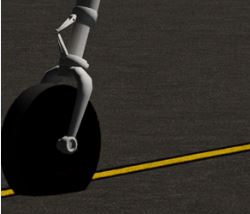
Wheels not looking like wheels

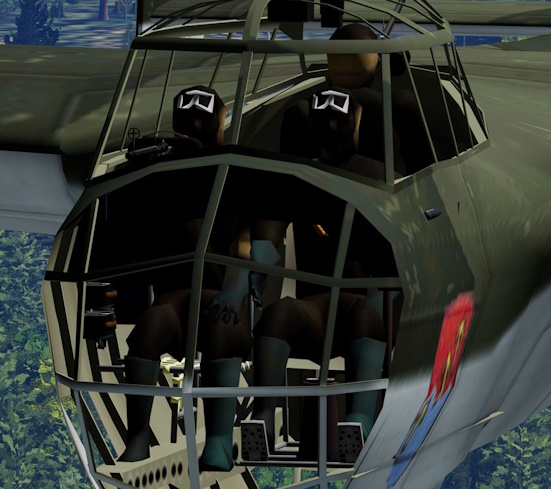
Pilots textures not right - light and dark is reversed

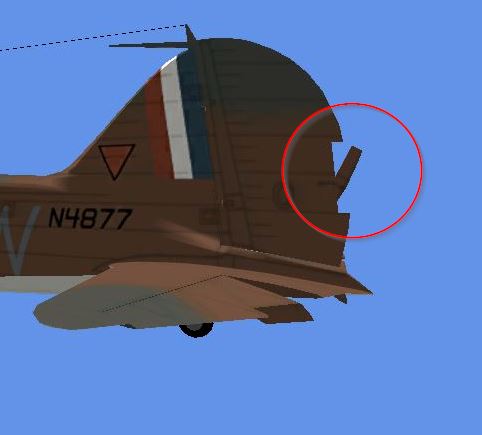
Rudder not right
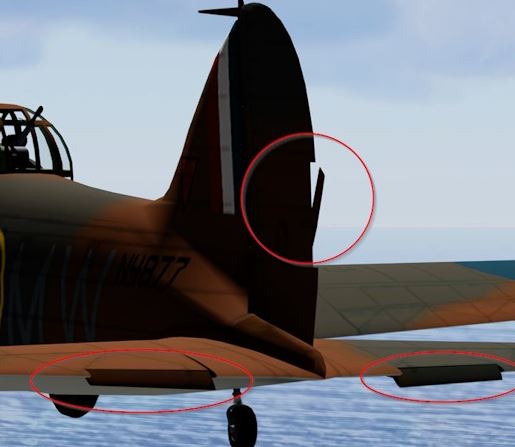
Various Issues
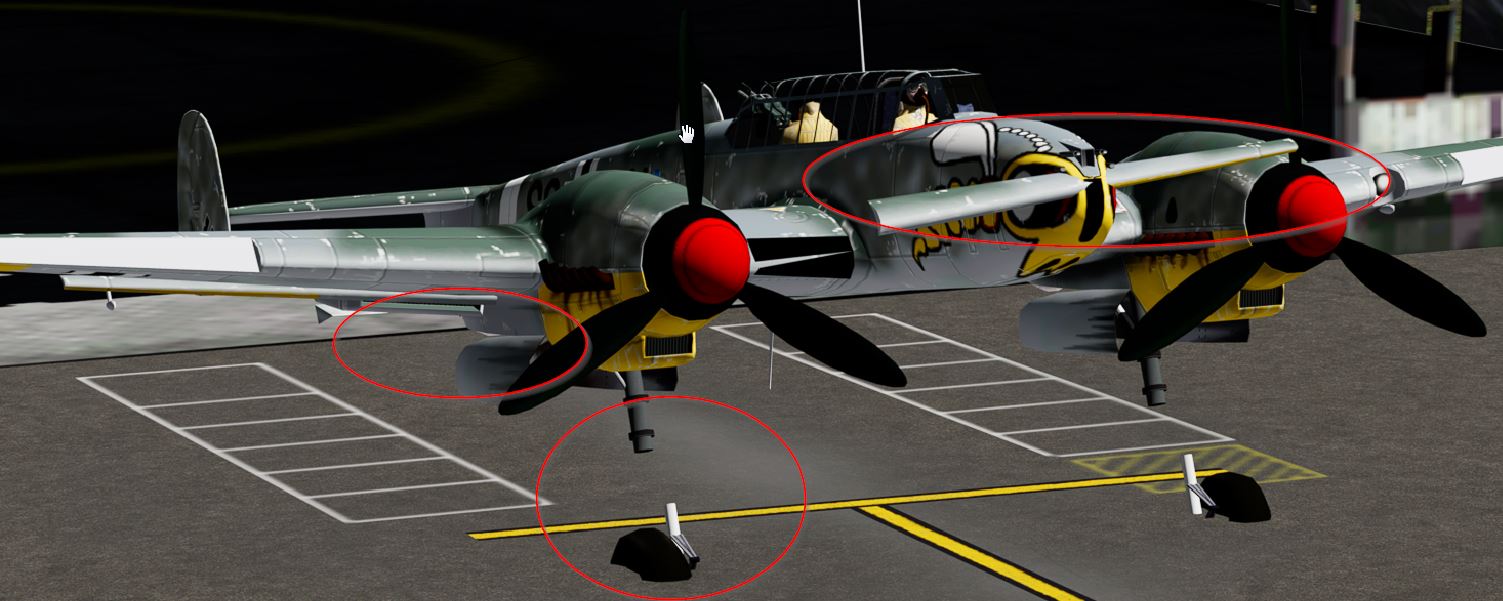
non-AI Messerschmitt Bf 110 (A.F. Scrub
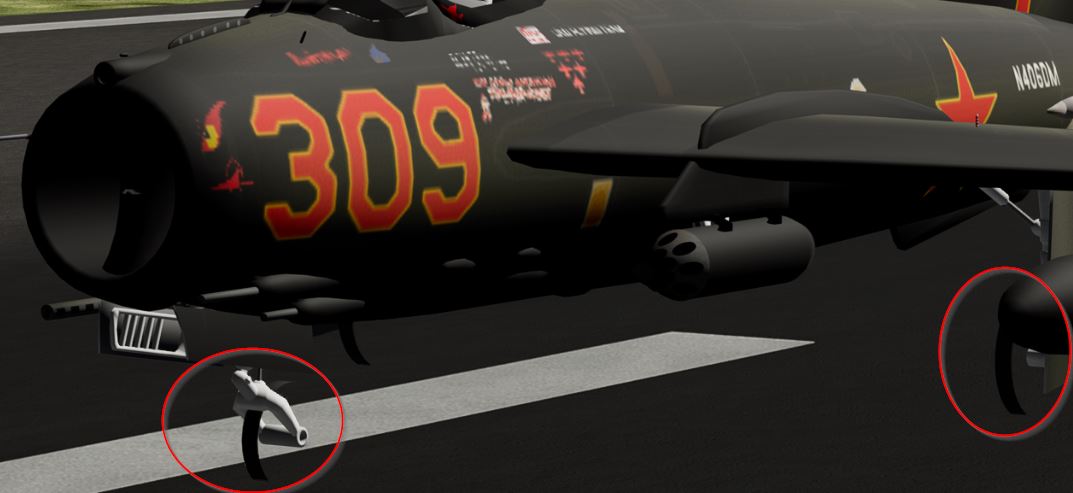
non-AI Mikoyan-Gurevich MiG-17 Fresco (Kazunori Ito)
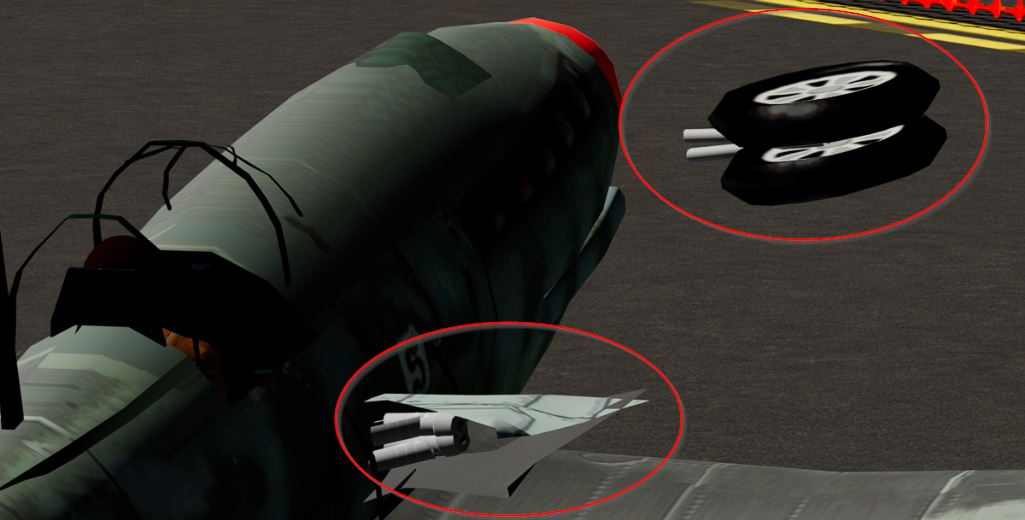
non-AI Heinkel He 112B (A.F. Scrub)
Again many things have fallen into place. To make it easier to read I will report only what is not working correctly.
I know for some AI things we still need to figure out how MCX can do it.
I will send you a new Zip file for testing tomorrow. I will also send it to Tom, so he may chime in. Pictures also will be added tomorrow, I need to hit the sack.
non-AI Yakovlev Yak-38 Forger (Kazunori Ito)
- FSX conversion - Not ok
- Flaps not animated during start
- Wings not folded
- Wheels no longer look like wheels (see picture)
- FS9 import - not ok
- Rudder not right on import (see picture)
- FSX conversion - Not ok
- Flaps not animated during start
- Rudder not right
- FSX conversion - Not ok
- Flaps not animated during start
- Pilots textures not right - light and dark is reversed (see picture)
- Door not animated
- FSX conversion - Not ok
- Flaps not animated during start
- Door not animated
- Elevator not animated
- FSX conversion - Not ok
- Flaps not animated during start
- Gear and wheels still misplaced
- FSX conversion - Not ok
- Flaps not animated during start
- Flaps separated from fuselage during landing
- Door not animated
- Props invisible when rotating fast
- FSX conversion - Not ok
- Flaps not animated during start
- Wheels no longer look like wheels (see picture)
- Props not animated
- Pilots textures not right - light and dark is reversed (see picture)
- Door not animated
- FSX conversion - Not ok
- Flaps not animated during start
- Wheels no longer look like wheels (see picture)
- Props not animated
- Pilots textures not right - light and dark is reversed (see picture)
- Door not animated
- FSX conversion - Not ok
- Flaps not animated during start
- Canopy not animated
- Gear & Wheels not visible and/or misplaced
- Running prop not animated / visible
- 4 artifacts above wings
- FSX conversion - Not ok
- Flaps not animated during start
- Canopy opaque
- Canopy not animated
- FSX conversion - Not ok
- Flaps not animated during start
- Canopy not animated
- "door --> engine hood" not animated
- FSX conversion - Not ok
- Flaps not animated during start
- Gear ands wheels not animated correctly
- Tail gear invisible
- Canopy not animated
- Fuselage part sitting on nose (see picture)
- FSX conversion - Not ok
- Flaps not animated during start
- Canopy not animated
- Slats not animated
- FSX conversion - Not ok
- Flaps not animated during start
- Canopy not animated
- Pilot not visible
- Wheel only partly visible - outer rim (see picture)
- FSX conversion - Not ok
- Flaps not animated during start
- Props not animated
- Wheels no longer look like wheels (see picture)
- FSX conversion - Not ok
- Flaps not animated during start
- Canopy not animated
- Wings not folded
- Hook not animated
- Drag tail wheel flips left and right while taxi
Pictures
Wheels not looking like wheels
- Yakovlev Yak-38 Forger (Kazunori Ito)
- Heinkel He 177 Greif (Kazunori Ito)
- Heinkel He 219 (Kazunori Ito)
- Northrop P-61 Black Widow (Kazunori Ito)
Pilots textures not right - light and dark is reversed
- Dornier Do 17 (Ross McLennan)
- Heinkel He 177 Greif (Kazunori Ito)
- Heinkel He 219 (Kazunori Ito)
Rudder not right
- non-AI Avro Anson (Dave Garwood)
Various Issues
non-AI Messerschmitt Bf 110 (A.F. Scrub
non-AI Mikoyan-Gurevich MiG-17 Fresco (Kazunori Ito)
non-AI Heinkel He 112B (A.F. Scrub)
Last edited:

My observation with the very latest mcx:
Special tools/smooth shade object doesn't appear to be working properly with animated parts, worked as expected in previous mcx version.
Options/Object Model settings for shading appears to have no effect.
Removing animations via Animation Editor allows proper i.e. normal shading behavior as parts not animated are not adversely affected by current mcx.
Tested this with several of Kazunori Ito's models and have seen this in others like Mike Stone's.
Hope this helps and thanks again for the awesome work.
Special tools/smooth shade object doesn't appear to be working properly with animated parts, worked as expected in previous mcx version.
Options/Object Model settings for shading appears to have no effect.
Removing animations via Animation Editor allows proper i.e. normal shading behavior as parts not animated are not adversely affected by current mcx.
Tested this with several of Kazunori Ito's models and have seen this in others like Mike Stone's.
Hope this helps and thanks again for the awesome work.
- Messages
- 34,464
- Country
The simple answer is probably the animation definition that is used. MCX only renders the key frames, but has no logic to drive them. Or it could also be there is a visibility condition involved that prevents the animations from showing.Arno,
Something Tom pointed out as well before: many animations work fine in MCX but not in the sim. How comes?
- Messages
- 107
- Country
So I just tried a couple of more conversions first the RFP 747-200 and the IL-76 by Ilya Kulikov (Monumentum) and Kirill Konovalov believe I got it off avsimrus... Anyway, my results are rather mixed...
On the RPF 747 I notice that the landing gear struts are missing on the external model and the control surfaces vibrate back and forth rapidly when moved and do not stay in the commanded position... In the VC I noticed that many of the gauges and switches from the instrument panels are missing.... Also the resolution of some of the cockpit markings / textures looks rather blurry when compared to FSX / Fs9 sceenshots... Also one question I did have is while I see that in P3dv5 the Concorde nose / visor variables are still used but I do not see an option to assign that as an animation type in MCX under the animation editor...
On the IL-76 I previously converted the exterior model using an older version of MCX the exterior model looks great but I did notice I could not get it to pickup on the APU door animation in the animation editor it just calls it "userdefined8" and is highlighted in pink... Not sure what I would assign it if I were to assign it... On the interior model again may gauges are missing and a few or them are only partially showing / obscured by black...
On the RPF 747 I notice that the landing gear struts are missing on the external model and the control surfaces vibrate back and forth rapidly when moved and do not stay in the commanded position... In the VC I noticed that many of the gauges and switches from the instrument panels are missing.... Also the resolution of some of the cockpit markings / textures looks rather blurry when compared to FSX / Fs9 sceenshots... Also one question I did have is while I see that in P3dv5 the Concorde nose / visor variables are still used but I do not see an option to assign that as an animation type in MCX under the animation editor...
On the IL-76 I previously converted the exterior model using an older version of MCX the exterior model looks great but I did notice I could not get it to pickup on the APU door animation in the animation editor it just calls it "userdefined8" and is highlighted in pink... Not sure what I would assign it if I were to assign it... On the interior model again may gauges are missing and a few or them are only partially showing / obscured by black...
Attachments



- Messages
- 34,464
- Country
Yes, but I think that is still better than having a huge list of materials that are used in a different representation only. But let me know if you have another view on this.I'll have to remember to switch to the internal model before trying to edit the VC materials.
OK, I will check the remaining issues.I converted the AI DC-6B to FSX with this latest release, and there is improvement. The things that worked before (takeoff flaps, prop visibilities, animated airstairs panel visibility) still work OK.
- Messages
- 34,464
- Country
Hi,
Unfortunately the error messages don't really help. I suspect there is something specific in the model that causes the error, like a weird character in a texture or attachpoint name. But without having the mdl file to test with that is hard to say for sure. If you can send me the file I can have a look.the first thing I noticed was that not all models are exporting successfully for me. The first two I tested were the NBAI F-14A Tomcat clean model (exported greatly!); the second one I have been experimenting with is the LHAI Nh-90 model which is giving me errors and not exporting just creates a 0mb .mdl file:
View attachment 91020View attachment 91021
I thought I had added them to the todo list already, but I forgot last time, so I have done it now. In between fixing the other issues reported I'll try to implement these feature requests as well.Also never saw a response to my post in the other thread but I wanted to ask... Would two things be possible?
- Messages
- 107
- Country
Hi,
Unfortunately the error messages don't really help. I suspect there is something specific in the model that causes the error, like a weird character in a texture or attachpoint name. But without having the mdl file to test with that is hard to say for sure. If you can send me the file I can have a look.
I thought I had added them to the todo list already, but I forgot last time, so I have done it now. In between fixing the other issues reported I'll try to implement these feature requests as well.
Thanks Arno!
So for the NH-90 package I was using to test and got all those error messages here is the link https://militaryaiworks.com/downloa...rcraft-models-fs9/2225-nh-90-german-navy-lhai I tested several of the models in this package all with the same failure...
For my test with the 747 I used this package off flightsim.com FSX_RFPMOD_KLM_PH-BUA_V7.1.zip
and this is the IL-76 package I was testing
Il-76MD FSX - FSX Aircrafts - Avsim.su
 www.avsimrus.com
- Messages
- 34,464
- Country
Hi Martin,
Thanks for the testing again, I'll update the issues on my todo list and check the remaining problems. For some I have some questions or comments below already.
A general remark is that the posts by Tom already seem to indicate that certain user aircraft animations won't just work for AI, they would need to replaced by AI specific animations. That would then not be a conversion issue of MCX, but an activity that has to be done manually.
Thanks for the testing again, I'll update the issues on my todo list and check the remaining problems. For some I have some questions or comments below already.
Did you see my post about the userdefined8 animation in the model? You will have to manually change the animation to a different type that FSX supports or remove it. MCX can not do that automatically.non-AI Heinkel He 112B (A.F. Scrub)
- Gear and wheels still misplaced
A general remark is that the posts by Tom already seem to indicate that certain user aircraft animations won't just work for AI, they would need to replaced by AI specific animations. That would then not be a conversion issue of MCX, but an activity that has to be done manually.
- Messages
- 34,464
- Country
OK, I will check those two issues.Special tools/smooth shade object doesn't appear to be working properly with animated parts, worked as expected in previous mcx version.
Options/Object Model settings for shading appears to have no effect.
- Messages
- 34,464
- Country
On the RPF 747 I notice that the landing gear struts are missing on the external model and the control surfaces vibrate back and forth rapidly when moved and do not stay in the commanded position... In the VC I noticed that many of the gauges and switches from the instrument panels are missing.... Also the resolution of some of the cockpit markings / textures looks rather blurry when compared to FSX / Fs9 sceenshots...
I will try to have a look at these issues, but I am not sure how easy I can reproduce them. They are quite generic comments and I am not an expert of course in how these models are supposed to work.On the interior model again may gauges are missing and a few or them are only partially showing / obscured by black...
The animations that are shown in the editor are read from the modeldef.xml file. So if that animation is not listed in your modeldef.xml file it is not shown in the editor. But if the model uses such an animation MCX will add it as a custom animation.Also one question I did have is while I see that in P3dv5 the Concorde nose / visor variables are still used but I do not see an option to assign that as an animation type in MCX under the animation editor...
The userdefined8 is an animation that FS2004 has, but FSX does not support. Therefore it is shown in pink in the editor to indicate you that you need to replace it with an animation that FSX does support.On the IL-76 I previously converted the exterior model using an older version of MCX the exterior model looks great but I did notice I could not get it to pickup on the APU door animation in the animation editor it just calls it "userdefined8" and is highlighted in pink... Not sure what I would assign it if I were to assign it...