
• Which the release of FS2020 we see an explosition of activity on the forun and of course we are very happy to see this. But having all questions about FS2020 in one forum becomes a bit messy. So therefore we would like to ask you all to use the following guidelines when posting your questions:

    • Tag FS2020 specific questions with the MSFS2020 tag.
    • Questions about making 3D assets can be posted in the 3D asset design forum. Either post them in the subforum of the modelling tool you use or in the general forum if they are general.
    • Questions about aircraft design can be posted in the Aircraft design forum
    • Questions about airport design can be posted in the FS2020 airport design forum. Once airport development tools have been updated for FS2020 you can post tool speciifc questions in the subforums of those tools as well of course.
    • Questions about terrain design can be posted in the FS2020 terrain design forum.
    • Questions about SimConnect can be posted in the SimConnect forum.

    Any other question that is not specific to an aspect of development or tool can be posted in the General chat forum.

    By following these guidelines we make sure that the forums remain easy to read for everybody and also that the right people can find your post to answer it.

P3D v1 Exporting Scenery Object from Blender 4.2

Messages
24
Country
us-newjersey
I created a very simple 4 sided scenery object. I have the P3D/FSX addon installed. I have added a friendly name and generated a GUID.
When I attempt to export as a DirectX mdl I get this error message :
------------------------------------------------------------------
modeldef.xml has not been registered yet
Modeldef.xml file was not found
------------------------------------------------------------------
As this is a new object/model, how is a Modeldef.xml created?
What am I doing wong here?
Thanks
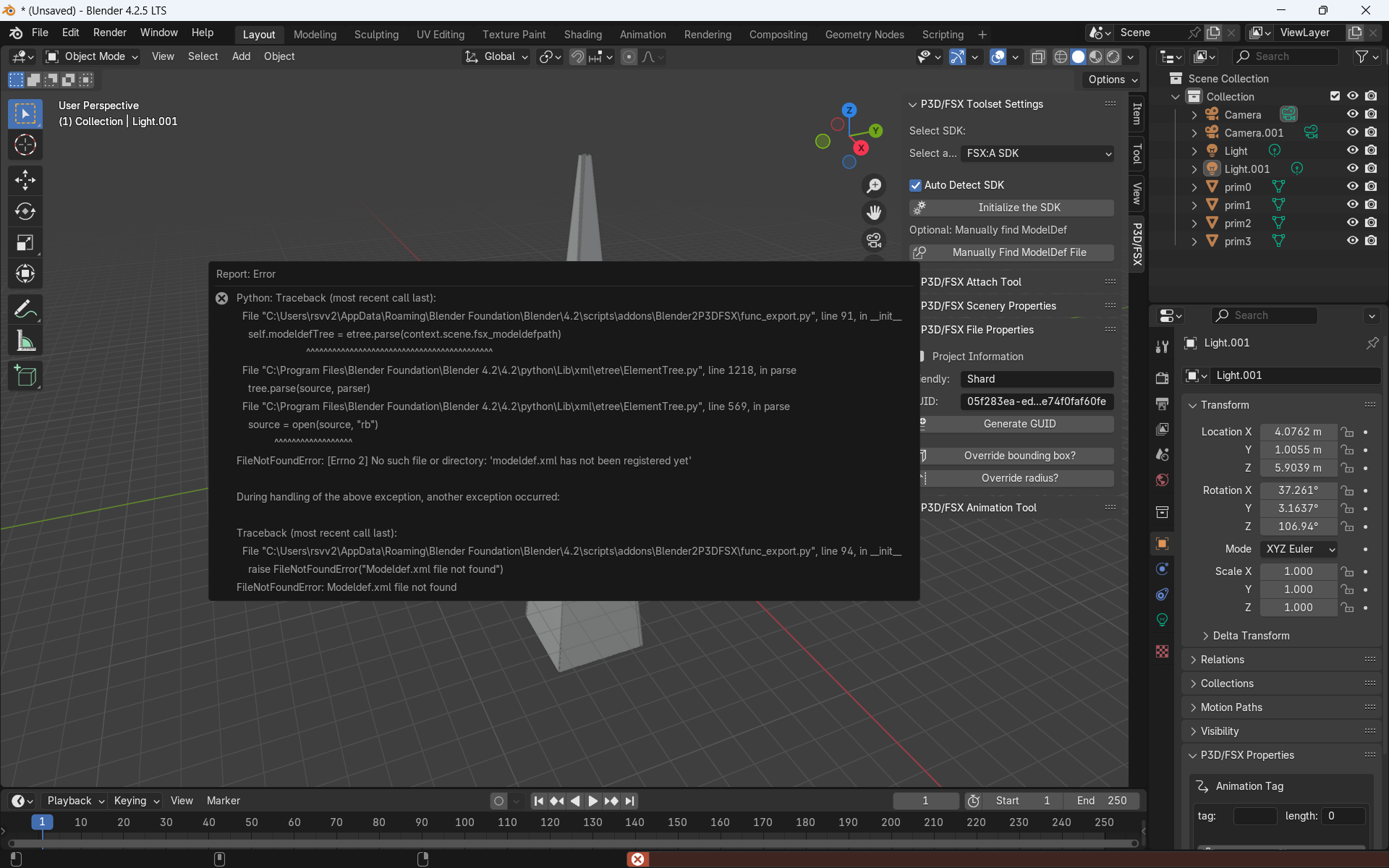
Blender 4_2 to FSX.png
 
Do you read the prerequisites for the P3D/FSX Blender Toolset ?
Apparently not...
As I am new to Blender and the Toolsets, I'm still learning where to find these types of information (your link is to a three year old posting).
That link takes you to the Blender2P3D/FSX page that I had read, and it states as a Requirement "version: v3.x or later.", and since v4.2 is later, it was implied that it would meet the requirements.
Now I know and will install an earlier Blender version.
 
My link is a three years old posting because since three years nobody has upgrade this toolset. It's David W. who make this upgrade and not the author of the frst version.
As Blender 4.x brings new things (new implementation of animations) this toolset is not advised to use with theses last versions
 
I now have 3.6 and P3D/FSX Toolsets installed.
As it would not automatically locate the ModelDef file, i did so manually.
When I attempt to export the mdl, I get the same error, ModelDef file not found.
 
After several attempts it accepted the ModelDef location.
Now I get an error stating the the material is not FSX or PBR, even though I have it set for PBR and it shows "BSDF Principled."
Well, at least I'm one step closer.
 
This is the page I had previously read. And I can not see anything I've done different than what they present.
I'll review each step I took again, and see if I missed anything.
 
I change PBR to spectral and it exported the mdl.
How do I change to a bgl to use with ADE?
Sorry for this step by step, but once I get this one completed, I'll have the steps for other builds.
Thanks,
 
Back
Top