
-
Which the release of FS2020 we see an explosition of activity on the forun and of course we are very happy to see this. But having all questions about FS2020 in one forum becomes a bit messy. So therefore we would like to ask you all to use the following guidelines when posting your questions:
- Tag FS2020 specific questions with the MSFS2020 tag.
- Questions about making 3D assets can be posted in the 3D asset design forum. Either post them in the subforum of the modelling tool you use or in the general forum if they are general.
- Questions about aircraft design can be posted in the Aircraft design forum
- Questions about airport design can be posted in the FS2020 airport design forum. Once airport development tools have been updated for FS2020 you can post tool speciifc questions in the subforums of those tools as well of course.
- Questions about terrain design can be posted in the FS2020 terrain design forum.
- Questions about SimConnect can be posted in the SimConnect forum.
Any other question that is not specific to an aspect of development or tool can be posted in the General chat forum.
By following these guidelines we make sure that the forums remain easy to read for everybody and also that the right people can find your post to answer it.
You are using an out of date browser. It may not display this or other websites correctly.
You should upgrade or use an alternative browser.
You should upgrade or use an alternative browser.
MSFS20 Fence Texture Deforming
- Thread starter pinkjr
- Start date

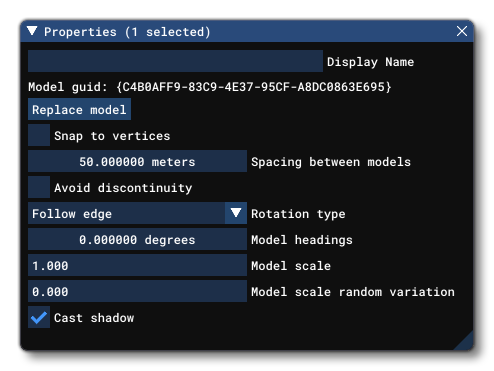
I'd recommend you to model just one fence panel (post to post) and use vector placement in the SDK editor. You can adjust the separation and avoid discontinuity.No this is actually a custom model (scenery object) that wraps all around the airport.
VectorPlacement Objects
 docs.flightsimulator.com

- Messages
- 1,233
- Country

I think the rule is that the entire mesh, as in the vector placed component, has to be a single node. I'd remembered reading somewhere that we cannot turn vector fences around a corner, but I think that only causes the doubled up support posts.
Thanks Rick, this is not a vector model. Its a very large all around single model.

=rk=
Resource contributor
- Messages
- 4,702
- Country

Ya, I hadn't realized you are using a single mesh for the entire fence, definitely explore vector placement. As to your texture issue, that is likely a consequence of the texture UV mapping falling outside the MSFS acceptable range. MCX has a function that will reset 99% of those out of range coordinates.Does anyone know why this fence texture may be stretching like this? It is only happening at certain locations, and I try remodeling that section and it keeps doing it. I have tried single and double siding, to no effect.
Thanks!
=rk=
Resource contributor
- Messages
- 4,702
- Country
Jinx!Thanks Rick, this is not a vector model. Its a very large all around single model.
- Messages
- 1,233
- Country
Ok I now feel stupid! When compiling for MSFS texture parameters, I forgot the old FSX/P3D setting called Alpha Test Level! That was it, it was set at 4, raising it to 40 fixed the issue.
Additionally, MSFS seems to prefer double sided transparencies (?), so I tickled that....although I don't think that had much effect.
Additionally, MSFS seems to prefer double sided transparencies (?), so I tickled that....although I don't think that had much effect.
- Messages
- 1,233
- Country
What's the name of the tool? Your link doesn't work for me.Ya, I hadn't realized you are using a single mesh for the entire fence, definitely explore vector placement. As to your texture issue, that is likely a consequence of the texture UV mapping falling outside the MSFS acceptable range. MCX has a function that will reset 99% of those out of range coordinates.
=rk=
Resource contributor
- Messages
- 4,702
- Country
Sorry, the link was a search result, this one should be cleaner. It really just describes the texture mapping issue and ways to prevent it. You'll still need to read the whole page, or click the "precision" link on the right.
 docs.flightsimulator.com
The tool is Model Converter X. Here's a thread where Arno discussed developing and fine tuning the feature
 www.fsdeveloper.com
and since that video link is broken, here's a new one.
General Principles
docs.flightsimulator.com
The tool is Model Converter X. Here's a thread where Arno discussed developing and fine tuning the feature
MSFS20 - MCX Features
So I've been playing with the new package exporter and for what I do, it's a real convenience. The MSFS material constraints have seemed perplexing, I use Sketchup, with mostly photo derived textures and projecting those textures, requires more UV precision than MSFS is willing to calculate...
www.fsdeveloper.com
and since that video link is broken, here's a new one.