

Hey everyone!
After a few months in development, I finally reached a state where I can release my P3D addon "Fergo Cockpit Camera".
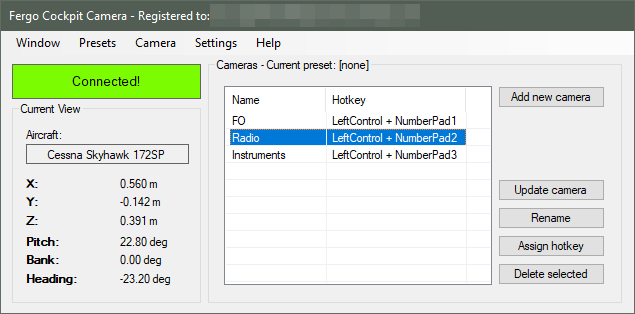
It's a camera add-on that let's you setup multiple virtual cockpit views and assign hotkeys to switch to them (so you can have views for FMC, overhead, pedestal, etc). You can then save all the custom views to a preset (which can be automatically loaded when selecting an aircraft in P3D). In some ways, it's similar to some functionalities that Chase Plane or EZDOK also provides, but my main goal was to create something simpler, less bloated and less intrusive.
Since this is the first release of the add-on, I was hoping to get some feedback and bug reports from the community, as I had a limited testing setup here.
Official Website: https://cockpit.fergonez.net/
The User Manual can be accessed here: https://cockpit.fergonez.net/user_manual.pdf
Some features of Fergo Cockpit Camera:
It's compatible with P3D v4 and was tested on Windows 7 and Windows 10. It requires .NET Framework 4.6.1.
The add-on is free to try for as long as you want, but limited to 3 cameras per preset. If desired, a license removing this limitation can be purchased for 9.90 USD.
Hope you like it and please report any bugs and issues you may find.
KR,
Fergo.
After a few months in development, I finally reached a state where I can release my P3D addon "Fergo Cockpit Camera".
It's a camera add-on that let's you setup multiple virtual cockpit views and assign hotkeys to switch to them (so you can have views for FMC, overhead, pedestal, etc). You can then save all the custom views to a preset (which can be automatically loaded when selecting an aircraft in P3D). In some ways, it's similar to some functionalities that Chase Plane or EZDOK also provides, but my main goal was to create something simpler, less bloated and less intrusive.
Since this is the first release of the add-on, I was hoping to get some feedback and bug reports from the community, as I had a limited testing setup here.
Official Website: https://cockpit.fergonez.net/
The User Manual can be accessed here: https://cockpit.fergonez.net/user_manual.pdf
Some features of Fergo Cockpit Camera:
- Non intrusive design: it doesn't change ANY files in your P3D installation, not even cameras.cfg. All the input processing is done through DirectInput in a standalone fashion.
- Free look mode: click your mouse wheel to look around and use your directional keys to freely navigate in the cockpit. This key mapping can be changed.
- Use either your keyboard or other game device to assign hotkeys to your cameras
- Simple user interface
- No clumsy on-line activation
It's compatible with P3D v4 and was tested on Windows 7 and Windows 10. It requires .NET Framework 4.6.1.
The add-on is free to try for as long as you want, but limited to 3 cameras per preset. If desired, a license removing this limitation can be purchased for 9.90 USD.
Hope you like it and please report any bugs and issues you may find.
KR,
Fergo.
Last edited:


