• Which the release of FS2020 we see an explosition of activity on the forun and of course we are very happy to see this. But having all questions about FS2020 in one forum becomes a bit messy. So therefore we would like to ask you all to use the following guidelines when posting your questions:

    • Tag FS2020 specific questions with the MSFS2020 tag.
    • Questions about making 3D assets can be posted in the 3D asset design forum. Either post them in the subforum of the modelling tool you use or in the general forum if they are general.
    • Questions about aircraft design can be posted in the Aircraft design forum
    • Questions about airport design can be posted in the FS2020 airport design forum. Once airport development tools have been updated for FS2020 you can post tool speciifc questions in the subforums of those tools as well of course.
    • Questions about terrain design can be posted in the FS2020 terrain design forum.
    • Questions about SimConnect can be posted in the SimConnect forum.

    Any other question that is not specific to an aspect of development or tool can be posted in the General chat forum.

    By following these guidelines we make sure that the forums remain easy to read for everybody and also that the right people can find your post to answer it.

FSXA Fitting stuff to sloped terrain model?

Messages
61
Hi everyone, :)

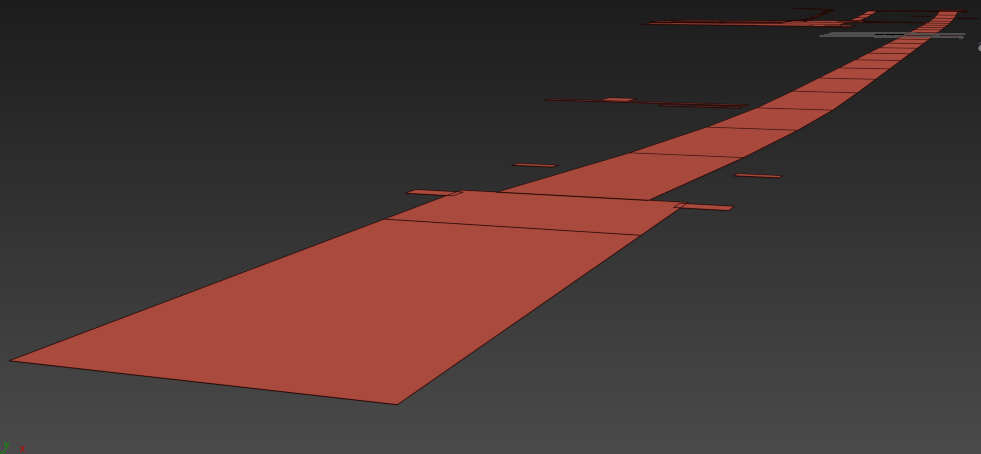
I modeled a sloped terrain for KTEX that fits the reality (sloped runway). However now I want to fit the other layers like: Pavements & Markings & Damages; to the sloped terrain without doing that manually (using slice tool and move tool...etc... So boring). So my question is: Is there any script that can do this job automatically? :confused:

If this is way of making sloped things is completely wrong, then please let me know! :cool:

Here's a quick preview on the pavements fitted into the sloped terrain after a long time of work. :banghead:Rendered in Clay (3ds Max)
1.jpg


2.jpg


Any help is much appreciated! :D
 
take into account that when working with sloped runway you can't work with layers as they are intended. I créated this kind of runway and didn't notice that when placing layers like markings it must be manually placed and was very complicated to get it right. so I realize that all must be textured along with the runway texture. could be some work around which I didn't notice. it was a Little dissapointing .
there is a problem with the ai traffic too. you will see the ai airplane floating over the sloped part of the runway.
 
Thank you for your reply! ;)
so I realize that all must be textured along with the runway texture. could be some work around which I didn't notice.
However I saw the ORBX Sumburgh EGPB, which is made with sloped gPolys besides Markings and Damages as extra layers! :scratchch
there is a problem with the ai traffic too. you will see the ai airplane floating over the sloped part of the runway.
Yes you're right ... That's one thing "negative" about sloped runways.

Any additional ideas? Thank you! :)
 
thinking a Little it could be done in the modelling tool. I remember to have thought on that posibility. you can créate the runway, markings, etc at the same time. there you can manage the layers etc. with tools like snap, you can adjust the height of every layer, of course. I wanted to place the layer manually because it is said that the flickering could be lessen. is something to take into account when creating layers.in this case not know how could be avoided. anyway I think any option is better that mine of manually place the layer because it was hard and a Little failure. Anyway I think it deserve all the mess because sloped runway are great and above all in certain aiports where the flatten and the around mesh not fit at all.
I think the better option is to texture the runway at once. get good resolution textures and enough
 
NO problema I'm not an expert in this things but have fighted a Little with this and know when unspected problems arise, sometimes one spent more time in those Little details that in an entire Project.
 
Back
Top