
- Messages
- 169
- Country

I know almost noone is using but just for a info will post this .... Sir Admin , please move the post to the needed place.
I found that how bad MakeMDL's optimize + Weldpoint destroy the shape.
First this is the result
Blue is the correct shape and Red is when used Optimize + Weldpoint switch is on.
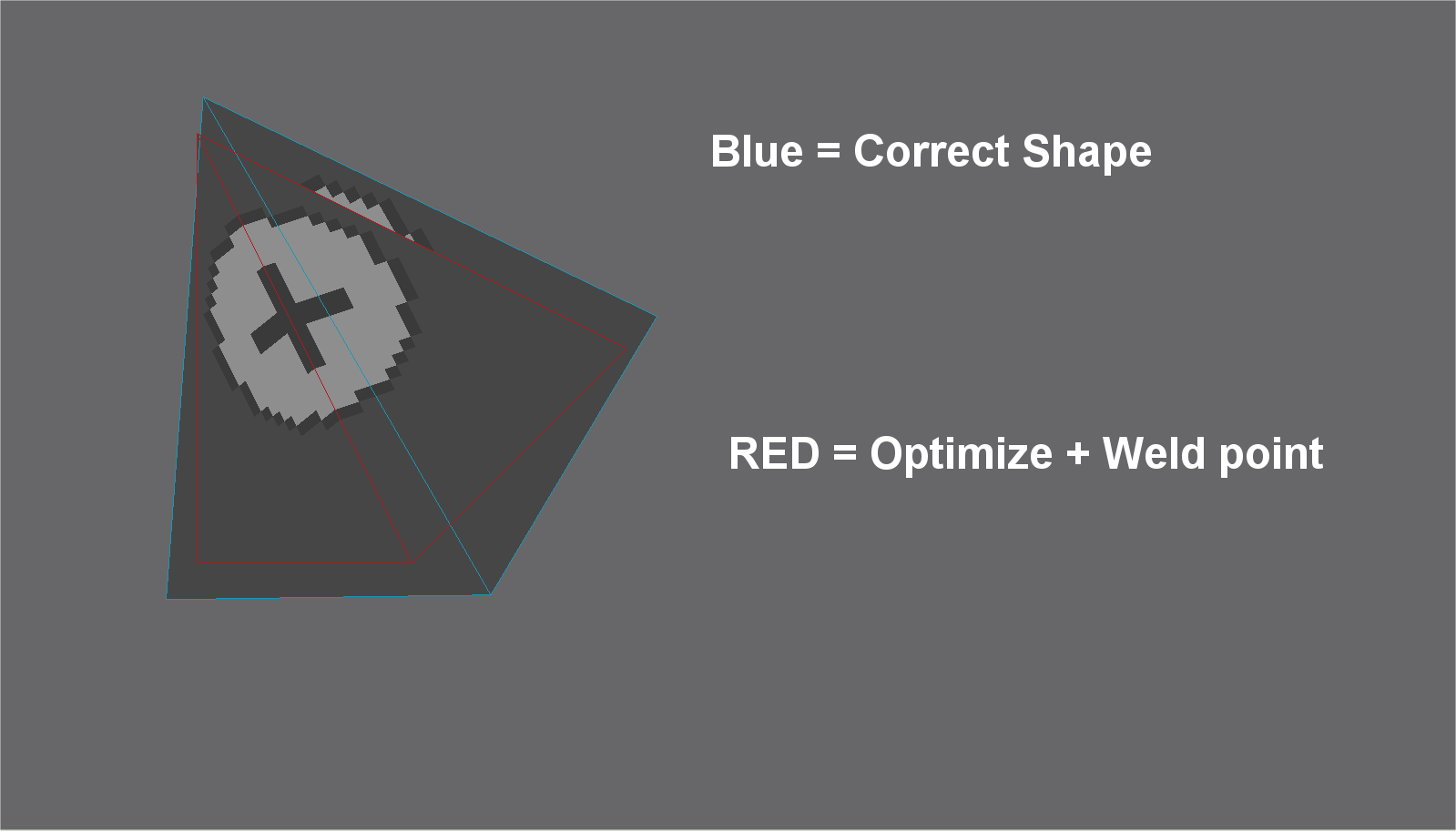

Was first thinking as a result of real number used in program but it was by those 2 switch.
Under is the data from the ASM file exported from the MakeMDL (Can get by Keep Files checked On)
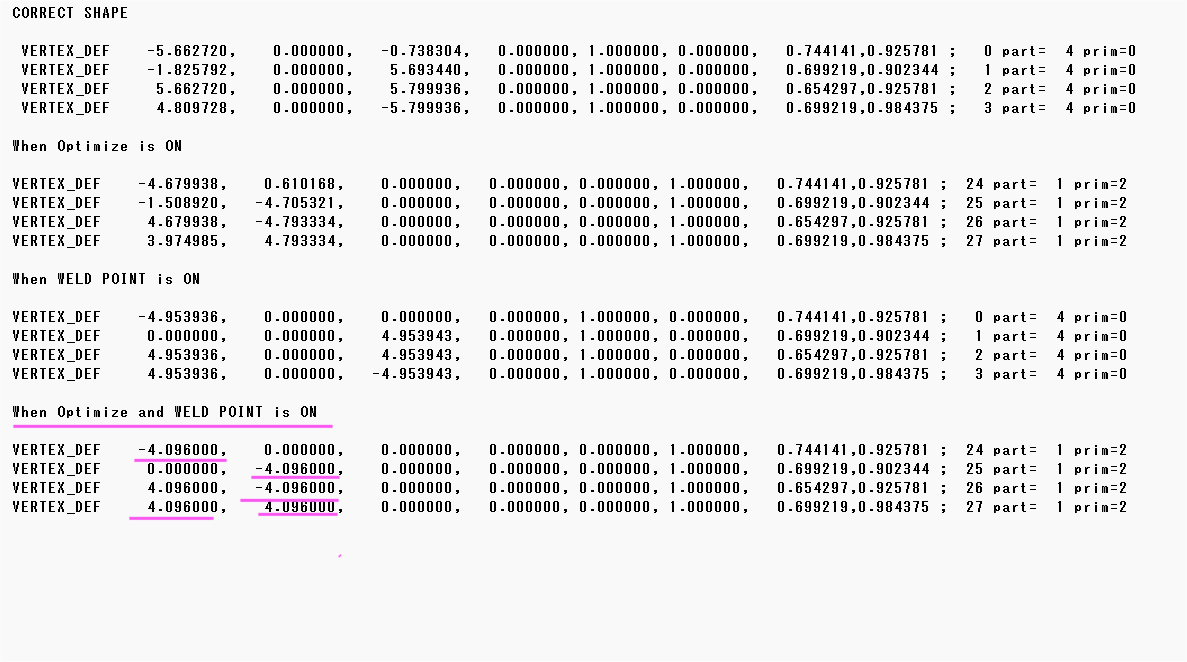
The largest point of this is position is fixed to 4.096
So that was why distorted a lot.
I wonder what was the true meaning of moving those to those number which is power of 2.
Memory use is same and process will be same too.
=== DATA from ASM file ================================================
CORRECT SHAPE
VERTEX_DEF -5.662720, 0.000000, -0.738304, 0.000000, 1.000000, 0.000000, 0.744141,0.925781 ; 0 part= 4 prim=0
VERTEX_DEF -1.825792, 0.000000, 5.693440, 0.000000, 1.000000, 0.000000, 0.699219,0.902344 ; 1 part= 4 prim=0
VERTEX_DEF 5.662720, 0.000000, 5.799936, 0.000000, 1.000000, 0.000000, 0.654297,0.925781 ; 2 part= 4 prim=0
VERTEX_DEF 4.809728, 0.000000, -5.799936, 0.000000, 1.000000, 0.000000, 0.699219,0.984375 ; 3 part= 4 prim=0
When Optimize is ON
VERTEX_DEF -4.679938, 0.610168, 0.000000, 0.000000, 0.000000, 1.000000, 0.744141,0.925781 ; 24 part= 1 prim=2
VERTEX_DEF -1.508920, -4.705321, 0.000000, 0.000000, 0.000000, 1.000000, 0.699219,0.902344 ; 25 part= 1 prim=2
VERTEX_DEF 4.679938, -4.793334, 0.000000, 0.000000, 0.000000, 1.000000, 0.654297,0.925781 ; 26 part= 1 prim=2
VERTEX_DEF 3.974985, 4.793334, 0.000000, 0.000000, 0.000000, 1.000000, 0.699219,0.984375 ; 27 part= 1 prim=2
When WELD POINT is ON
VERTEX_DEF -4.953936, 0.000000, 0.000000, 0.000000, 1.000000, 0.000000, 0.744141,0.925781 ; 0 part= 4 prim=0
VERTEX_DEF 0.000000, 0.000000, 4.953943, 0.000000, 1.000000, 0.000000, 0.699219,0.902344 ; 1 part= 4 prim=0
VERTEX_DEF 4.953936, 0.000000, 4.953943, 0.000000, 1.000000, 0.000000, 0.654297,0.925781 ; 2 part= 4 prim=0
VERTEX_DEF 4.953936, 0.000000, -4.953943, 0.000000, 1.000000, 0.000000, 0.699219,0.984375 ; 3 part= 4 prim=0
When Optimize and WELD POINT is ON
VERTEX_DEF -4.096000, 0.000000, 0.000000, 0.000000, 0.000000, 1.000000, 0.744141,0.925781 ; 24 part= 1 prim=2
VERTEX_DEF 0.000000, -4.096000, 0.000000, 0.000000, 0.000000, 1.000000, 0.699219,0.902344 ; 25 part= 1 prim=2
VERTEX_DEF 4.096000, -4.096000, 0.000000, 0.000000, 0.000000, 1.000000, 0.654297,0.925781 ; 26 part= 1 prim=2
VERTEX_DEF 4.096000, 4.096000, 0.000000, 0.000000, 0.000000, 1.000000, 0.699219,0.984375 ; 27 part= 1 prim=2
I found that how bad MakeMDL's optimize + Weldpoint destroy the shape.
First this is the result
Blue is the correct shape and Red is when used Optimize + Weldpoint switch is on.
Was first thinking as a result of real number used in program but it was by those 2 switch.
Under is the data from the ASM file exported from the MakeMDL (Can get by Keep Files checked On)
The largest point of this is position is fixed to 4.096
So that was why distorted a lot.
I wonder what was the true meaning of moving those to those number which is power of 2.
Memory use is same and process will be same too.
=== DATA from ASM file ================================================
CORRECT SHAPE
VERTEX_DEF -5.662720, 0.000000, -0.738304, 0.000000, 1.000000, 0.000000, 0.744141,0.925781 ; 0 part= 4 prim=0
VERTEX_DEF -1.825792, 0.000000, 5.693440, 0.000000, 1.000000, 0.000000, 0.699219,0.902344 ; 1 part= 4 prim=0
VERTEX_DEF 5.662720, 0.000000, 5.799936, 0.000000, 1.000000, 0.000000, 0.654297,0.925781 ; 2 part= 4 prim=0
VERTEX_DEF 4.809728, 0.000000, -5.799936, 0.000000, 1.000000, 0.000000, 0.699219,0.984375 ; 3 part= 4 prim=0
When Optimize is ON
VERTEX_DEF -4.679938, 0.610168, 0.000000, 0.000000, 0.000000, 1.000000, 0.744141,0.925781 ; 24 part= 1 prim=2
VERTEX_DEF -1.508920, -4.705321, 0.000000, 0.000000, 0.000000, 1.000000, 0.699219,0.902344 ; 25 part= 1 prim=2
VERTEX_DEF 4.679938, -4.793334, 0.000000, 0.000000, 0.000000, 1.000000, 0.654297,0.925781 ; 26 part= 1 prim=2
VERTEX_DEF 3.974985, 4.793334, 0.000000, 0.000000, 0.000000, 1.000000, 0.699219,0.984375 ; 27 part= 1 prim=2
When WELD POINT is ON
VERTEX_DEF -4.953936, 0.000000, 0.000000, 0.000000, 1.000000, 0.000000, 0.744141,0.925781 ; 0 part= 4 prim=0
VERTEX_DEF 0.000000, 0.000000, 4.953943, 0.000000, 1.000000, 0.000000, 0.699219,0.902344 ; 1 part= 4 prim=0
VERTEX_DEF 4.953936, 0.000000, 4.953943, 0.000000, 1.000000, 0.000000, 0.654297,0.925781 ; 2 part= 4 prim=0
VERTEX_DEF 4.953936, 0.000000, -4.953943, 0.000000, 1.000000, 0.000000, 0.699219,0.984375 ; 3 part= 4 prim=0
When Optimize and WELD POINT is ON
VERTEX_DEF -4.096000, 0.000000, 0.000000, 0.000000, 0.000000, 1.000000, 0.744141,0.925781 ; 24 part= 1 prim=2
VERTEX_DEF 0.000000, -4.096000, 0.000000, 0.000000, 0.000000, 1.000000, 0.699219,0.902344 ; 25 part= 1 prim=2
VERTEX_DEF 4.096000, -4.096000, 0.000000, 0.000000, 0.000000, 1.000000, 0.654297,0.925781 ; 26 part= 1 prim=2
VERTEX_DEF 4.096000, 4.096000, 0.000000, 0.000000, 0.000000, 1.000000, 0.699219,0.984375 ; 27 part= 1 prim=2
Last edited:

