
-
Which the release of FS2020 we see an explosition of activity on the forun and of course we are very happy to see this. But having all questions about FS2020 in one forum becomes a bit messy. So therefore we would like to ask you all to use the following guidelines when posting your questions:
- Tag FS2020 specific questions with the MSFS2020 tag.
- Questions about making 3D assets can be posted in the 3D asset design forum. Either post them in the subforum of the modelling tool you use or in the general forum if they are general.
- Questions about aircraft design can be posted in the Aircraft design forum
- Questions about airport design can be posted in the FS2020 airport design forum. Once airport development tools have been updated for FS2020 you can post tool speciifc questions in the subforums of those tools as well of course.
- Questions about terrain design can be posted in the FS2020 terrain design forum.
- Questions about SimConnect can be posted in the SimConnect forum.
Any other question that is not specific to an aspect of development or tool can be posted in the General chat forum.
By following these guidelines we make sure that the forums remain easy to read for everybody and also that the right people can find your post to answer it.
You are using an out of date browser. It may not display this or other websites correctly.
You should upgrade or use an alternative browser.
You should upgrade or use an alternative browser.
FS2004 Autothrottle Disconnect XML
- Thread starter beroun
- Start date

- Messages
- 1,451
- Country

Hello Peter
So, you need to override the autothrottle when the aircraft is 800 ft above ground (airport height, to be more precise).
Let's see what can we do in this regard. First of all, we need to refine your requirements:
All the best,
Sergio Kauffman.
So, you need to override the autothrottle when the aircraft is 800 ft above ground (airport height, to be more precise).
Let's see what can we do in this regard. First of all, we need to refine your requirements:
- Do you need it as a button?
- As a part on a specific aircraft panel?
- As a single "gauge"?
All the best,
Sergio Kauffman.

- Messages
- 203
- Country

Many Thanks Sergio
If possible please both xml's for single gauge (installed in panel - so disconnect always working)
and as a button (disconnect working only when the button is selected) - Please note, I am familiar with panel buttons install.
Also, of possble the AT disconnect at 800ft altitude should be only on descent, since I migh be using the AT at take-off below 800ft.
Again Many Thanks
Best Regards
Peter Bendl
If possible please both xml's for single gauge (installed in panel - so disconnect always working)
and as a button (disconnect working only when the button is selected) - Please note, I am familiar with panel buttons install.
Also, of possble the AT disconnect at 800ft altitude should be only on descent, since I migh be using the AT at take-off below 800ft.
Again Many Thanks
Best Regards
Peter Bendl
- Messages
- 1,451
- Country
Hi Peter
I was thinking about the gauge layout. This is a doodle, very simple:
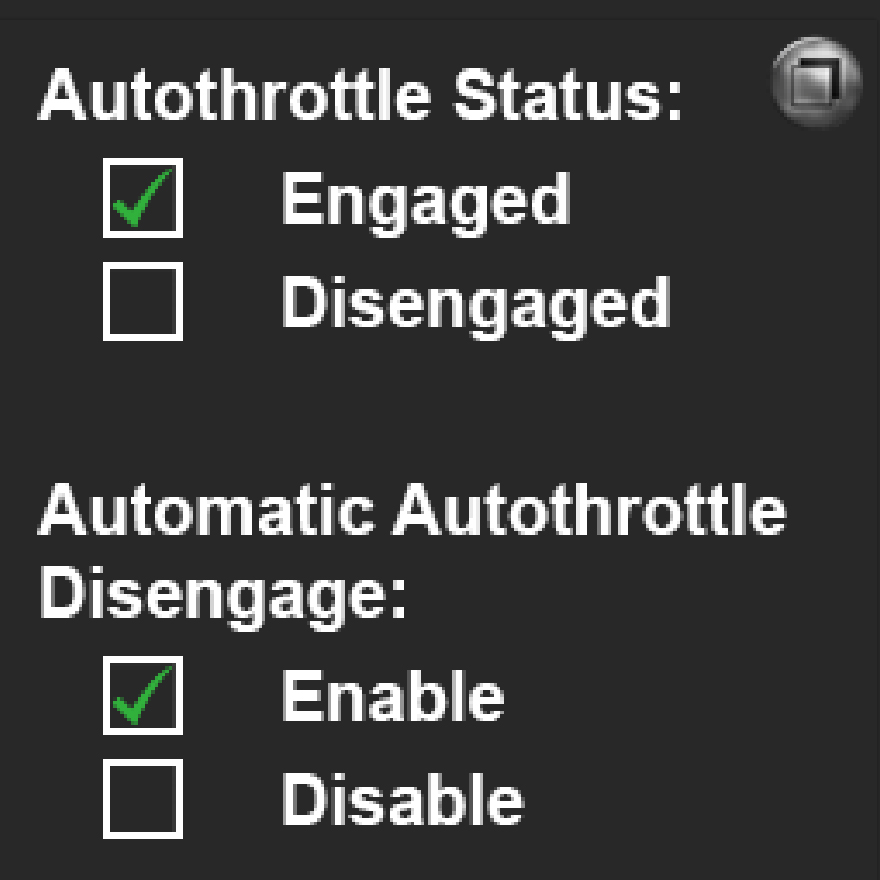
The image's real size is 255 x 255 pixels and the small graphic on the top right corner might be the gauge icon.
I know... it is bland as heck. Anything you want me to modify, let me know.
Also, it could have an audible alert if you want.... that might be "iteration 2" for the gauge.
For this instance, I have proposed two mouse areas (big ones!) in order to do the mouse "aiming" more amicable:

Mouse area 1:
Top right corner; it will be to show/hide the gauge and its layout.
Mouse area 2:
The one at the bottom. It will enable the auto throttle automatic disconnect function each and every time the aircraft is less than 800ft. Got it right?
Note:
I called a mouse area a "click spot" as well.
Ahh... another thing. I need to know if the autopilot you are planing to use in tandem with this gauge have custom variables related to the autothrottle itself.
I am asking, because may be problems in some instances.I will try to use it with the default Learjet 60 for FS9.
See??? FS9 doesn't have the Learjet 60... I was meaning the 45.
Cheers!
Sergio.
I was thinking about the gauge layout. This is a doodle, very simple:
The image's real size is 255 x 255 pixels and the small graphic on the top right corner might be the gauge icon.
I know... it is bland as heck. Anything you want me to modify, let me know.
Also, it could have an audible alert if you want.... that might be "iteration 2" for the gauge.
For this instance, I have proposed two mouse areas (big ones!) in order to do the mouse "aiming" more amicable:
Mouse area 1:
Top right corner; it will be to show/hide the gauge and its layout.
Mouse area 2:
The one at the bottom. It will enable the auto throttle automatic disconnect function each and every time the aircraft is less than 800ft. Got it right?
Note:
I called a mouse area a "click spot" as well.
Ahh... another thing. I need to know if the autopilot you are planing to use in tandem with this gauge have custom variables related to the autothrottle itself.
I am asking, because may be problems in some instances.
See??? FS9 doesn't have the Learjet 60... I was meaning the 45.
Cheers!
Sergio.
Last edited:
- Messages
- 203
- Country
Hi Sergio,
Again! Many Thanks for pursuing this.
ICON IN PANEL:
I think that the small icon in panel, can just turn green when the "AT auto disangane" is on. (click green). Second click would remove green and turn the auto disangage off.
Audible alert would be icing on the cake
PLAIN GAUGE-ON ALL THE TIME:
The gauge it self when added to the panel.cfg, would simply trigger the "AT auto disangage" all the time (no on and off functionality)
On AP - I am using many different APs but to my knowledge non have the custom variables. The AT is totally independent - I think.
Cheers,
Peter
Again! Many Thanks for pursuing this.
ICON IN PANEL:
I think that the small icon in panel, can just turn green when the "AT auto disangane" is on. (click green). Second click would remove green and turn the auto disangage off.
Audible alert would be icing on the cake
PLAIN GAUGE-ON ALL THE TIME:
The gauge it self when added to the panel.cfg, would simply trigger the "AT auto disangage" all the time (no on and off functionality)
On AP - I am using many different APs but to my knowledge non have the custom variables. The AT is totally independent - I think.
Cheers,
Peter
- Messages
- 1,451
- Country
Hi Peter
I have a "working" version for now. After this, I will implement all changes you've just suggested.
For this first iteration, I will include the code for both gauges:
Now, the code for ATT_Automatic_Override_ICON.xml:
NOTE:
I assumed a "random" number for the panel ID number; which is 8005. If for some reason you already have it somewhere else, please let me know.
For now, it seems that if the MACH button is selected on the autopilot (if any in the aircraft you're flying) this function is not working very well for now.
The main reason, is that I apparently didn't match the proper A:Var with its paired K:event. In this first itaration, I tested on the Learjet 45 as I mentioned.
I will attach the gauge version 1 with a modified panel.cfg for the Lear.
Note 2:
MAKE A COPY OF EVERYTHING before you do any change.
Here it is a capture from the simulator itself

Try it and tell me if in IAS mode is doing what you need.
P.S.1: If you can, please post an image with the exact layout you need for a) the gauge itself and b) The icon you want me to include.
P.S.2: I think I made a mess with my own "naming convention" for the task at hand... sorry about that.
All the best,
Sergio.

I have a "working" version for now. After this, I will implement all changes you've just suggested.
For this first iteration, I will include the code for both gauges:
- ATT_Automatic_Override.xml
- ATT_Automatic_Override_ICON.xml
HTML:
<Gauge Name="Autothrottle Automatic Override" Version="1.0">
<!-- BEGIN OF INITIALIZATION SECTION-->
<Update Hidden="Yes">
<!-- VARS INIT Section -->
<!-- Variables initialization values in "do it once" script -->
(L:ATT_init,bool) !
if{
0 (>L:Automatic_ ATT_Disengage,bool) <!-- This sets ATT automatic disengage to be OFF as default initial value-->
1 (>L:ATT_init,bool)
}
quit
</Update>
<!-- G A U G E L O G I C -->
<Element>
<Image Name="ATT_Automatic_Override.bmp" ImageSizes="255,255"/>
<!-- Autothrottle Status: "engaged" -->
<Element>
<Position X="33" Y="42"/>
<Select>
<Value>(A:AUTOTHROTTLE ACTIVE,bool) (A:AUTOPILOT MACH HOLD,bool) or</Value>
<Failures>
<SYSTEM_ELECTRICAL_PANELS Action="0"/>
</Failures>
<Case Value="0">
<Image Name="NULL.bmp" ImageSizes="19,19"/>
</Case>
<Case Value="1">
<Image Name="ATT_tick_mark.bmp" Bright="Yes" ImageSizes="19,19"/>
</Case>
</Select>
</Element>
<!-- Autothrottle Status: "disengaged" -->
<Element>
<Position X="33" Y="72"/>
<Select>
<Value>(A:AUTOTHROTTLE ACTIVE,bool) ! (A:AUTOPILOT MACH HOLD,bool) ! or</Value>
<Failures>
<SYSTEM_ELECTRICAL_PANELS Action="0"/>
</Failures>
<Case Value="0">
<Image Name="NULL.bmp" ImageSizes="19,19"/>
</Case>
<Case Value="1">
<Image Name="ATT_tick_mark.bmp" Bright="Yes" ImageSizes="19,19"/>
</Case>
</Select>
</Element>
<!-- Autothrottle Automatic Override Status: "Enabled (ON)" -->
<Element>
<Position X="33" Y="186"/>
<Select>
<Value>(L:Automatic_ ATT_Disengage,bool)</Value>
<Failures>
<SYSTEM_ELECTRICAL_PANELS Action="0"/>
</Failures>
<Case Value="0">
<Image Name="NULL.bmp" ImageSizes="19,19"/>
</Case>
<Case Value="1">
<Image Name="ATT_tick_mark.bmp" Bright="Yes" ImageSizes="19,19"/>
</Case>
</Select>
</Element>
<!-- Autothrottle Automatic Override Status: "Disabled (OFF)" -->
<Element>
<Position X="33" Y="216"/>
<Select>
<Value>(L:Automatic_ ATT_Disengage,bool) !</Value>
<Failures>
<SYSTEM_ELECTRICAL_PANELS Action="0"/>
</Failures>
<Case Value="0">
<Image Name="NULL.bmp" ImageSizes="19,19"/>
</Case>
<Case Value="1">
<Image Name="ATT_tick_mark.bmp" Bright="Yes" ImageSizes="19,19"/>
</Case>
</Select>
</Element>
<!-- Automatic Autothrottle Override: If IAS is selected -->
<Element>
<Select>
<Value>
(L:Automatic_ ATT_Disengage,bool) (A:AUTOTHROTTLE ACTIVE,bool) (A:RADIO HEIGHT,feet) 800 < and and
if{ (>K:AP_PANEL_SPEED_HOLD) }
</Value>
</Select>
</Element>
<!-- Automatic Autothrottle Override: If MACH is selected -->
<Element>
<Select>
<Value>
(L:Automatic_ ATT_Disengage,bool) (A:AUTOPILOT MACH HOLD,bool) (A:RADIO HEIGHT,feet) 800 < and and
if{ (>K:AP_PANEL_MACH_HOLD) }
</Value>
</Select>
</Element>
</Element>
<!-- M O U S E L O G I C -->
<Mouse>
<!-- M.1 =================== SHOW/HIDE GAUGE VIA ICON===============-->
<Area Left="204" Top="0" Width="52" Height="52">
<Tooltip>Show/Hide Toggle / (LMB)</Tooltip>
<Cursor Type="Hand"/>
<Click Kind= "LeftSingle+RightSingle">
8005 (>K:PANEL_ID_TOGGLE)
</Click>
</Area>
<!-- M.2 =================== ATT Automatic Disengage =============== -->
<Area Left="80" Top="175" Width="172" Height="80">
<Tooltip>ATT Automatic Override Toggle (LMB)</Tooltip>
<Cursor Type="Hand"/>
<Click Kind="LeftSingle">
(M:Event) 'LeftSingle' scmp 0 ==
if{ (L:Automatic_ ATT_Disengage,bool) ! (>L:Automatic_ ATT_Disengage,bool) }
</Click>
</Area>
</Mouse>
</Gauge>Now, the code for ATT_Automatic_Override_ICON.xml:
NOTE:
I assumed a "random" number for the panel ID number; which is 8005. If for some reason you already have it somewhere else, please let me know.
HTML:
<Gauge Name="ATT_Automatic_Override_ICON" Version="1.0">
<Image Name="ATT_Automatic_Override_Icon.bmp" ImageSizes="19,19"/>
<Mouse>
<Area Left="0" Right="19" Top="0" Bottom="19">
<Tooltip>Show/Hide Toggle</Tooltip>
<Cursor Type="Hand"/>
<Click Kind= "LeftSingle+RightSingle">
8005 (>K:PANEL_ID_TOGGLE)
</Click>
</Area>
</Mouse>
</Gauge>For now, it seems that if the MACH button is selected on the autopilot (if any in the aircraft you're flying) this function is not working very well for now.
The main reason, is that I apparently didn't match the proper A:Var with its paired K:event. In this first itaration, I tested on the Learjet 45 as I mentioned.
I will attach the gauge version 1 with a modified panel.cfg for the Lear.
Note 2:
MAKE A COPY OF EVERYTHING before you do any change.
Here it is a capture from the simulator itself
Try it and tell me if in IAS mode is doing what you need.
P.S.1: If you can, please post an image with the exact layout you need for a) the gauge itself and b) The icon you want me to include.
P.S.2: I think I made a mess with my own "naming convention" for the task at hand... sorry about that.
All the best,
Sergio.
Attachments
Last edited:
- Messages
- 203
- Country
My goodness Sergio, this is amazing.
Did not realize the complexity, thought it will be a sinmple xml. So I am really greatfull for your time and effort and even feel bit guilty to put you throug this,
I will soon install this to few of my aircraft and send you detail findings. Can't wait to dive into it.
Again, MANY THANKS!!!!!
Peter
Did not realize the complexity, thought it will be a sinmple xml. So I am really greatfull for your time and effort and even feel bit guilty to put you throug this,
I will soon install this to few of my aircraft and send you detail findings. Can't wait to dive into it.
Again, MANY THANKS!!!!!
Peter
- Messages
- 203
- Country
Hi Sergio,
Perhaps I did not give it enough time but sofar no luck. Have istalled all as per instructions to few of my aircraft. See the screen-shots of one (my AT button is the orange one in the middle) and your ATT disconnect button is above it).
Maybe I was not clear enough defining the requirement:
"Automatically Disconnect the Autothrottle at 800 ft (above ground) altitude on approach"
Few observations:
Perhaps I got it all wrong - seniar moment are quite frequesnt now
Again apprecite your efforts very much - and yes, now many names of the tutors you mentioned above - Tom Gibson tought me a lot also.
Cheers and any help much appreciated,
Peter
Perhaps I did not give it enough time but sofar no luck. Have istalled all as per instructions to few of my aircraft. See the screen-shots of one (my AT button is the orange one in the middle) and your ATT disconnect button is above it).
Maybe I was not clear enough defining the requirement:
"Automatically Disconnect the Autothrottle at 800 ft (above ground) altitude on approach"
Few observations:
- Clicking the ATT disconnect button opens the window with check marks. (I was hoping that clicking this button just triggres the AT disconnect at 800ft altitude, that is the reason why I thought that the button could turn green when selected). I can do the buttons (gray/green), so this is not an issue for me.
- In other words my engaged AT (orange) button would at 800ft switch off automatically without me clicking it while the ATT disconnect button (above it) is engaged - green)
- Truly, I do not need the window with "Autothrotte Status" and Automatic Autothrottle Override" since the AT disconnect button (when turned green) would indicate that the Override (AT disconnect at 800ft is engaged)
Perhaps I got it all wrong - seniar moment are quite frequesnt now
Again apprecite your efforts very much - and yes, now many names of the tutors you mentioned above - Tom Gibson tought me a lot also.
Cheers and any help much appreciated,
Peter
Attachments


- Messages
- 1,451
- Country
Hi Peter
Understoood!
I made some changes: The gauge will only work in the "test bed" aka Learjet 45 (not true, but grant me that eccentricity for now); Then we can adapt as needed.
There you go; two screen captures with the modified version of the gauge (aka V2):
With the ATT overide "OFF":

With the ATT overide "ON":

I did a fast hop from Portland to Seattle and the gauge worked in my computer. I will attach the gauge version 2.
Just to be as clear as I'm able:
I believe this happens due my PC own speed to respond to the gauge instructions. As a side note, you may test if the gauge is working if you switch it to "ON" while the Lear is on the runway and try to
engage the AP IAS button. The gauge won't alow the IAS button to be pushed in; that was my first clue!
If the button is to your liking, in the ATT_Automatic_Override_V2 and the panel.cfg included, will show only the ATT push button just above the AOA gauge on the main panel (it looks "more natural" in that size
and position):

NOTE:
If you set the ATT OVRD to ON while the aircraft is on the ground; then the AP IAS button cannot be engaged.
Conversely, the ATT OVRD can be engaged when you are using the AP IAS button while climbing (above the required 800ft AGL).
Let me know your thoughts on this one.
Sergio.

Understoood!
I made some changes: The gauge will only work in the "test bed" aka Learjet 45 (not true, but grant me that eccentricity for now); Then we can adapt as needed.
There you go; two screen captures with the modified version of the gauge (aka V2):
With the ATT overide "OFF":
With the ATT overide "ON":
I did a fast hop from Portland to Seattle and the gauge worked in my computer. I will attach the gauge version 2.
Just to be as clear as I'm able:
- We are in the development stage.
- Things will be "calibrated" as needed (which I already did, now the gauge itself will be only a push button -if that's ok with you-).
- You need to test the gauge in the default Learjet 45; with the panel.cfg precicely as it came out of the box: no other 3th. gauges on it!!!
- Make a copy ot the original panel.cfg (the one "out of the box") and replace it with the one provided on the ATT Override Gauge V2.zip file.
- Copy the folder named ATT_Automatic_Override_V2 to the panel folder of the default Learjet 45 (not in you root FS9's gauge folder).
- Test it.
HTML:
<!-- Automatic Autothrottle Override: If IAS is selected -->
<Element>
<Select>
<Value>
(L:Automatic_ ATT_Disengage,bool) (A:AUTOTHROTTLE ACTIVE,bool) (A:RADIO HEIGHT,feet) 800 < and and
if{ (>K:AP_PANEL_SPEED_HOLD) }
</Value>
</Select>
</Element>I believe this happens due my PC own speed to respond to the gauge instructions. As a side note, you may test if the gauge is working if you switch it to "ON" while the Lear is on the runway and try to
engage the AP IAS button. The gauge won't alow the IAS button to be pushed in; that was my first clue!
If the button is to your liking, in the ATT_Automatic_Override_V2 and the panel.cfg included, will show only the ATT push button just above the AOA gauge on the main panel (it looks "more natural" in that size
and position):
NOTE:
If you set the ATT OVRD to ON while the aircraft is on the ground; then the AP IAS button cannot be engaged.
Conversely, the ATT OVRD can be engaged when you are using the AP IAS button while climbing (above the required 800ft AGL).
Let me know your thoughts on this one.
Sergio.
Attachments
Last edited:
- Messages
- 203
- Country
Ho Sergio,
Have tested in default Lear and it works perfect! Also, as a curiosity, have tested in my B767 complex panel (which includes AT arming) and works great also (pictures showing speed disconnects at/below 800ft are included).
So again, I am very gretfull for all your efforts. Much appreciated!
PS. you can send me a private message in Flightsim (beroun) with your email, I would like to zip you this B767 aircraft with my own panel mods including your great AS disconnect.
Cheers
Peter
Have tested in default Lear and it works perfect! Also, as a curiosity, have tested in my B767 complex panel (which includes AT arming) and works great also (pictures showing speed disconnects at/below 800ft are included).
So again, I am very gretfull for all your efforts. Much appreciated!
PS. you can send me a private message in Flightsim (beroun) with your email, I would like to zip you this B767 aircraft with my own panel mods including your great AS disconnect.
Cheers
Peter


