• Which the release of FS2020 we see an explosition of activity on the forun and of course we are very happy to see this. But having all questions about FS2020 in one forum becomes a bit messy. So therefore we would like to ask you all to use the following guidelines when posting your questions:

    • Tag FS2020 specific questions with the MSFS2020 tag.
    • Questions about making 3D assets can be posted in the 3D asset design forum. Either post them in the subforum of the modelling tool you use or in the general forum if they are general.
    • Questions about aircraft design can be posted in the Aircraft design forum
    • Questions about airport design can be posted in the FS2020 airport design forum. Once airport development tools have been updated for FS2020 you can post tool speciifc questions in the subforums of those tools as well of course.
    • Questions about terrain design can be posted in the FS2020 terrain design forum.
    • Questions about SimConnect can be posted in the SimConnect forum.

    Any other question that is not specific to an aspect of development or tool can be posted in the General chat forum.

    By following these guidelines we make sure that the forums remain easy to read for everybody and also that the right people can find your post to answer it.

FSDS 3.5.1 Not Finding Drive

Messages
400
Country
us-texas
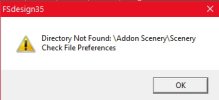
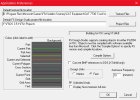
For some strange sudden reason (Picture 1) I cannot make FSDS 3.5.1 recognize my FSX on drive D (Picture 2). Have been arguing windows10 for about a week now with no luck. I would say right around the big new 10 updates. Not sure if that has anything to do with it. Any suggestions how to correct this problem?? Many thanks.


for some reason
 

Attachments

  • FSDS 1.jpg
    FSDS 1.jpg
    16.1 KB · Views: 132
  • FSDS 2.jpg
    FSDS 2.jpg
    85.7 KB · Views: 128
Are you trying to compile to Addon Scenery/scenery? It is not displayed in your Preferences image. Perhaps MS did a security update and no longer allows FSDS to access the Program Files folder. It has been suggested since Win7 to not install FS into any Program Files folders due to security limitations.
 
Yes sir I am. Have always used Path like: D:\Program Files\Microsoft Games\FSX\Addon Scenery\CAT Equipment\CAT 773G Truck\scenery. So now MS is going to stop this??
Appreciate your help. So I need to reinstall FSX outside the Program Files folder??
 
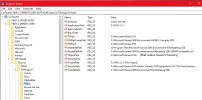
Just a quick note. Fixed problem today. You have to go to regedit to make this correction. Thanks for your time and help.
 

Attachments

  • FSDS Regedit Error.jpg
    FSDS Regedit Error.jpg
    172.6 KB · Views: 136
Back
Top