• Which the release of FS2020 we see an explosition of activity on the forun and of course we are very happy to see this. But having all questions about FS2020 in one forum becomes a bit messy. So therefore we would like to ask you all to use the following guidelines when posting your questions:

    • Tag FS2020 specific questions with the MSFS2020 tag.
    • Questions about making 3D assets can be posted in the 3D asset design forum. Either post them in the subforum of the modelling tool you use or in the general forum if they are general.
    • Questions about aircraft design can be posted in the Aircraft design forum
    • Questions about airport design can be posted in the FS2020 airport design forum. Once airport development tools have been updated for FS2020 you can post tool speciifc questions in the subforums of those tools as well of course.
    • Questions about terrain design can be posted in the FS2020 terrain design forum.
    • Questions about SimConnect can be posted in the SimConnect forum.

    Any other question that is not specific to an aspect of development or tool can be posted in the General chat forum.

    By following these guidelines we make sure that the forums remain easy to read for everybody and also that the right people can find your post to answer it.

FSXA FSX Gmax not exporting

Messages
137
Country
unitedstates
Hello and thank you for your help and time!

After having gone from windows 7 to windows 10pro, I'm having a problem with the FSX Gmax exporting anything.

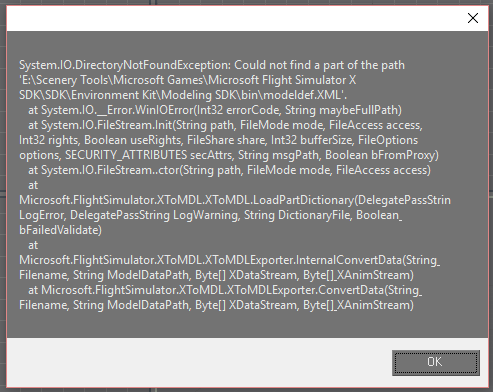
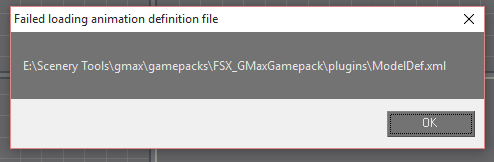
This is what's coming up when I try to export a model. I don't know if it's a windows 10 thing or not, but I think you all can help me get this worked out.
000500.png


000501.png


000502.png
 
Hi,

First make sure you right click the GMAX program/icon and choose Run as Administrator (if available in Win10).
 
Hello Tom!!
Yes I am running it as admin, I also tried running Gmax in compatibility mode. I tried deleting the gmax.ini file and letting gmax build a new one, but none of that has helped.
 
Hi Kenny,

My ModelDef.xml file is located in the SDK's folder, and my GMAX looks for that one instead. I don't know why yours is looking in the GMAX/gamepacks/FSX_GmaxGamepack/plugins folder, but perhaps to get rid of the first error message you need to paste in a copy of the ModelDef.xml file from your FSX SDK into that folder?
 
OK, I had to reinstall the Microsoft Flight Simulator X SDK and that fixed it. For some reason the SDK did not install correctly the first time.

Thanks for the help Tom!
 
Back
Top