

- Messages
- 10,158
- Country

Hello All,
I am getting a ControlPad to work in MSFS (Similar to SR22 but diff layout, same code/template). But... My buttons turn white. An emissive issue.
How do I fix this?
I am using my own textures, except their Decal. Decal material and plastic material (for buttons) has Black as the Emissive base color (Emissive color). But when the powers up the entire button shows nearly bright white. Only the Decals Material should illuminate.
Many thanks for any input you might have.
Bill
LHC
<Component ID="AS1000_CONTROLPAD">
<DefaultTemplateParameters>
<LONG_CLICK_TIME>1</LONG_CLICK_TIME>
</DefaultTemplateParameters>
<UseTemplate Name="ASOBO_AS1000_ControlPad_Template">
<SIMVAR_POWER_SETTING>LIGHT PANEL POWER SETTING:1</SIMVAR_POWER_SETTING>
<CIRCUIT_ID>33</CIRCUIT_ID>
<POTENTIOMETER>15</POTENTIOMETER>
<DISPLAY>ControlPad</DISPLAY>
<ANIM_NEVER_FAILS/>
<ID>1</ID>
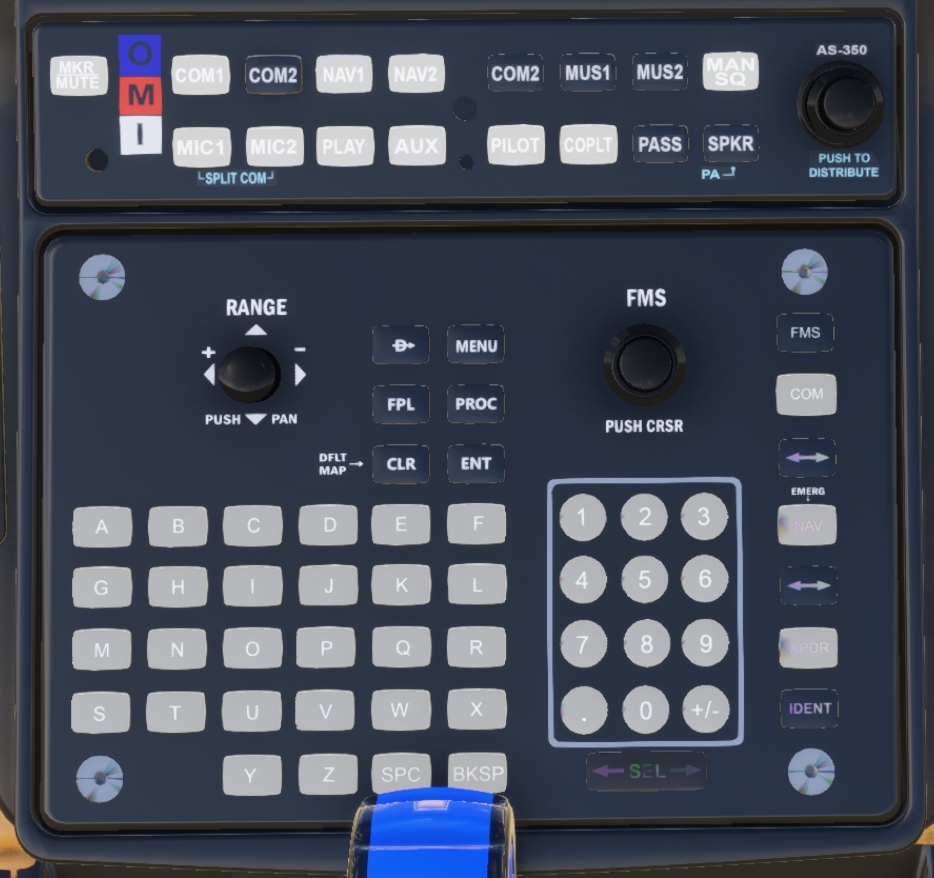
I am getting a ControlPad to work in MSFS (Similar to SR22 but diff layout, same code/template). But... My buttons turn white. An emissive issue.
How do I fix this?
I am using my own textures, except their Decal. Decal material and plastic material (for buttons) has Black as the Emissive base color (Emissive color). But when the powers up the entire button shows nearly bright white. Only the Decals Material should illuminate.
Many thanks for any input you might have.
Bill
LHC
<Component ID="AS1000_CONTROLPAD">
<DefaultTemplateParameters>
<LONG_CLICK_TIME>1</LONG_CLICK_TIME>
</DefaultTemplateParameters>
<UseTemplate Name="ASOBO_AS1000_ControlPad_Template">
<SIMVAR_POWER_SETTING>LIGHT PANEL POWER SETTING:1</SIMVAR_POWER_SETTING>
<CIRCUIT_ID>33</CIRCUIT_ID>
<POTENTIOMETER>15</POTENTIOMETER>
<DISPLAY>ControlPad</DISPLAY>
<ANIM_NEVER_FAILS/>
<ID>1</ID>