

- Messages
- 1,451
- Country

Hello lads
When I start the Bell 429, I honestly belived that she deserved a "super nice" and high resolution gauges (I was wrong...) and still I am. However, I fell in a turmoil and I am paying with blood for being so naive!
The combination of 3D gauge eye candy, details in the VC and gauges are killing the model. I began taking in mind the top resolution in FS9: 1024x1024 pixels per image. Looking the instruments, the "more logical" gauge size to think of were the LCD's.
Based on that size limit and taking in mind that "there are no limits for XML gauge images (wrong...)", I decided to take a background with an arbitrary resolution of 772 x 1028 pixels (well... not necessarily).
In my model, they have the next dimensions:
Base: 20.11 cm (0.2011 m)
Height: 27.46 cm (0.2746 m)
Collectively with the dimensions, I have the following resolutions rounded to two decimals:
Horizontally: 772 pixels / 20.11 cm = 38.38 pixels/cm
Vertically: 1028 pixels / 27.46 cm = 37.43 pixels/cm
Also, I layout the polygons to place the gauges in eleven sections:
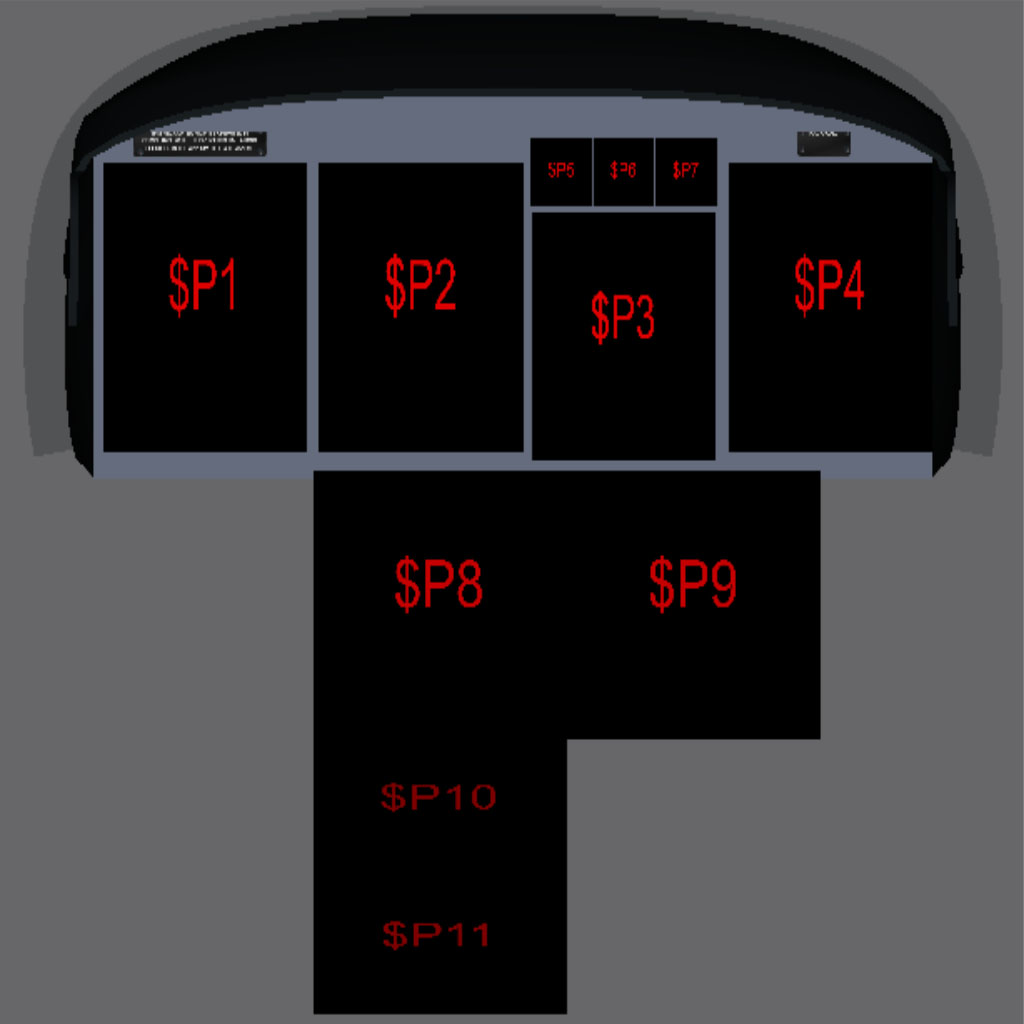
All have texture sizes of 1024x1024 pixels, with the exception of the 3 smallest (512x512)
The 2D panels with guages in place look like this:

and the complete VC:

In short, what could I do to enhance the performance?
a) Reduce the gauge size? Bear in mind that my XML code is SUPER BAD and it may be a factor as well...
b) Remove details from the cabin and VC?
c) delete all 2D panel entries?
d) Delete the helicopter files from my HD (including gmax models)?
I ran some test in the simulator (FS9) without gauges and my fsp are steady at 40 (that value has been set and fixed by me within the simulator). On the other hand, with the most basic animations and gauges in place, the fps dropped dramatically between 8 - 12 fps in the Seattle Tacoma area (with 0% of AI traffic present ). I really want to bring you the best I can create, constrained only by my lack of knowledge; however I don't know the limits for FS9 very well and I badly need to do something about it.
Any thoughts or commentaries would be very appreciated.
In advance, thank you all.
Sergio.
When I start the Bell 429, I honestly belived that she deserved a "super nice" and high resolution gauges (I was wrong...) and still I am. However, I fell in a turmoil and I am paying with blood for being so naive!
The combination of 3D gauge eye candy, details in the VC and gauges are killing the model. I began taking in mind the top resolution in FS9: 1024x1024 pixels per image. Looking the instruments, the "more logical" gauge size to think of were the LCD's.
Based on that size limit and taking in mind that "there are no limits for XML gauge images (wrong...)", I decided to take a background with an arbitrary resolution of 772 x 1028 pixels (well... not necessarily).
In my model, they have the next dimensions:
Base: 20.11 cm (0.2011 m)
Height: 27.46 cm (0.2746 m)
Collectively with the dimensions, I have the following resolutions rounded to two decimals:
Horizontally: 772 pixels / 20.11 cm = 38.38 pixels/cm
Vertically: 1028 pixels / 27.46 cm = 37.43 pixels/cm
Also, I layout the polygons to place the gauges in eleven sections:
All have texture sizes of 1024x1024 pixels, with the exception of the 3 smallest (512x512)
The 2D panels with guages in place look like this:
and the complete VC:
In short, what could I do to enhance the performance?
a) Reduce the gauge size? Bear in mind that my XML code is SUPER BAD and it may be a factor as well...
b) Remove details from the cabin and VC?
c) delete all 2D panel entries?
d) Delete the helicopter files from my HD (including gmax models)?
I ran some test in the simulator (FS9) without gauges and my fsp are steady at 40 (that value has been set and fixed by me within the simulator). On the other hand, with the most basic animations and gauges in place, the fps dropped dramatically between 8 - 12 fps in the Seattle Tacoma area (with 0% of AI traffic present
). I really want to bring you the best I can create, constrained only by my lack of knowledge; however I don't know the limits for FS9 very well and I badly need to do something about it. Any thoughts or commentaries would be very appreciated.
In advance, thank you all.
Sergio.


 if you have a mixture of rectangular and square mappings you can lay the rectangular one on their side for a better fit and rotate the axis to suit when mapping