
-
Which the release of FS2020 we see an explosition of activity on the forun and of course we are very happy to see this. But having all questions about FS2020 in one forum becomes a bit messy. So therefore we would like to ask you all to use the following guidelines when posting your questions:
- Tag FS2020 specific questions with the MSFS2020 tag.
- Questions about making 3D assets can be posted in the 3D asset design forum. Either post them in the subforum of the modelling tool you use or in the general forum if they are general.
- Questions about aircraft design can be posted in the Aircraft design forum
- Questions about airport design can be posted in the FS2020 airport design forum. Once airport development tools have been updated for FS2020 you can post tool speciifc questions in the subforums of those tools as well of course.
- Questions about terrain design can be posted in the FS2020 terrain design forum.
- Questions about SimConnect can be posted in the SimConnect forum.
Any other question that is not specific to an aspect of development or tool can be posted in the General chat forum.
By following these guidelines we make sure that the forums remain easy to read for everybody and also that the right people can find your post to answer it.
You are using an out of date browser. It may not display this or other websites correctly.
You should upgrade or use an alternative browser.
You should upgrade or use an alternative browser.
Generate lod msfs 2024
- Thread starter Blomotom
- Start date


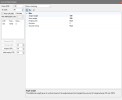
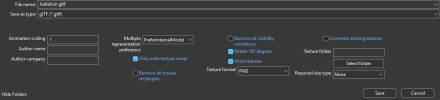
how lod generator work please ? I dont have option to generate xml option with limit minsize. (i dont understand what minsize is ?)Easiest way is to load your blender generated GLTF into MCX and use the LOD generator......piece of cake. When exporting the gltf, click generate XML option with Limit MinSize option.
You're welcome
Attachments
Last edited:
Thats where the xml file comes in , you need to do a little bit of coding.ok thank you very much. How can I find out or adjust the distance at which the object's level of detail changes? i dont have understand this point. Exemple i can see at 1m my object with 120 000 triangle but how meter for my object with 60 000 triangle ?

- Messages
- 1,239
- Country

MCX does that for you automatically within the generated xml.....thats the beauty of itok thank you very much. How can I find out or adjust the distance at which the object's level of detail changes? i dont have understand this point. Exemple i can see at 1m my object with 120 000 triangle but how meter for my object with 60 000 triangle ?
For msfs2024 its an equation that mcx approximates very well.

- Messages
- 887
- Country

For msfs 2024 you should really set all the minSize to zero, the game will handle the Lod switch when the limits are hit
My Lod video was made for 2020
You can always set Lod limits above the hard coded ones, but this requires you to look at the appearance of the object in the game and say, hey, at that distance I don't see any details, so I can switch to a lower Lod (less details -higher Lod Number) and save on performance
Be wise when doing Lod blindly, the decimate.modifier helps, but is very fast at breaking geometry and UV layout
Good Lod making is adjusting manually the model for each Lod, and often creating it from scratch (especially for lower detail lods)
My Lod video was made for 2020
You can always set Lod limits above the hard coded ones, but this requires you to look at the appearance of the object in the game and say, hey, at that distance I don't see any details, so I can switch to a lower Lod (less details -higher Lod Number) and save on performance
Be wise when doing Lod blindly, the decimate.modifier helps, but is very fast at breaking geometry and UV layout
Good Lod making is adjusting manually the model for each Lod, and often creating it from scratch (especially for lower detail lods)
Hello, thank you in first time. I have generate 4 lods with MCX and generate the xml
<?xml version="1.0" encoding="utf-8"?>
<ModelInfo guid="{46cbe588-8fd7-4c1c-a1f8-cc7ad1437d52}" version="1.1">
<LODS>
<LOD minSize="60" ModelFile="ballefoin_LOD0.gltf"/>
<LOD minSize="40" ModelFile="ballefoin_LOD1.gltf"/>
<LOD minSize="20" ModelFile="ballefoin_LOD2.gltf"/>
<LOD minSize="5" ModelFile="ballefoin_LOD3.gltf"/>
</LODS>
</ModelInfo>
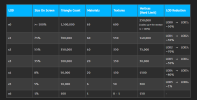
i have respected all number of triangle and vertices by LOD (see screenshot)
i have put export files in modelib folder (source)
i have build the project
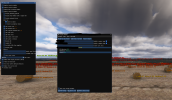
But when i debug lod i see only lod 0. Could you help me (see screenshot)
<?xml version="1.0" encoding="utf-8"?>
<ModelInfo guid="{46cbe588-8fd7-4c1c-a1f8-cc7ad1437d52}" version="1.1">
<LODS>
<LOD minSize="60" ModelFile="ballefoin_LOD0.gltf"/>
<LOD minSize="40" ModelFile="ballefoin_LOD1.gltf"/>
<LOD minSize="20" ModelFile="ballefoin_LOD2.gltf"/>
<LOD minSize="5" ModelFile="ballefoin_LOD3.gltf"/>
</LODS>
</ModelInfo>
i have respected all number of triangle and vertices by LOD (see screenshot)
i have put export files in modelib folder (source)
i have build the project
But when i debug lod i see only lod 0. Could you help me (see screenshot)
Attachments
Hello. all files (ballefoin_LOD0.bin. ballefoin_LOD0.gltf, ballefoin_LOD1.bin, ballefoin_LOD1.gltf etc) are in \PackageSources\Scenery\lflxx\MyModelLib\models\ballefoinAre the gltf's in your project folder?
Respecting the LOD values makes no difference, they should still be loaded by the sim (even though they may not display).
check your private message. Thank you for your help.can you share your XML, gltf's, bins and textures? I'll take a look at it.