• Which the release of FS2020 we see an explosition of activity on the forun and of course we are very happy to see this. But having all questions about FS2020 in one forum becomes a bit messy. So therefore we would like to ask you all to use the following guidelines when posting your questions:

    • Tag FS2020 specific questions with the MSFS2020 tag.
    • Questions about making 3D assets can be posted in the 3D asset design forum. Either post them in the subforum of the modelling tool you use or in the general forum if they are general.
    • Questions about aircraft design can be posted in the Aircraft design forum
    • Questions about airport design can be posted in the FS2020 airport design forum. Once airport development tools have been updated for FS2020 you can post tool speciifc questions in the subforums of those tools as well of course.
    • Questions about terrain design can be posted in the FS2020 terrain design forum.
    • Questions about SimConnect can be posted in the SimConnect forum.

    Any other question that is not specific to an aspect of development or tool can be posted in the General chat forum.

    By following these guidelines we make sure that the forums remain easy to read for everybody and also that the right people can find your post to answer it.

P3D v4 GP Main texture does not appear in Ground Polygon Editor

Messages
267
Country
belgium
P3Dv4, ADE GP_2244, GP_2244
I want to add taxi and runway lines to an old P3Dv4 scenery (EBBL Kleine Brogel).

Iinstalled ADE 1.78 and GP_2244 14 days ago.
I draw my first line for a taxiway, the Ground Polygon Editor appears,
but I can only enter the line width.
Nothing appears in the main texture window (see photo).

Peter
 

Attachments

  • 11.jpg
    11.jpg
    23.4 KB · Views: 25
Merci Claude.

That is a good (not stupid) question.
I add the prokey to the 'plugins folder'.
But then I get an error message.
ADE has encountered an error... and is closing.

Then "right-click" on the prokey.
Click on "Properties".
Click on "General".
Check the box next to "Unblock".
Click on "Apply".
Click on "OK".
I now have the "Pro version".
I thought that back then you also had to enter your details (email and serial).
I bought a ProKey years ago, so I have those details.
But the problem is not solved.

And the 32-64 patcher is also installed.

Peter
 
In fact my question was because I could not remember if the program is still updated or not; for instance FSC is now "closed" as one of its author died some years ago and the partner decided to stop any new development, it remains that one has to have the license to use the program. Like you I have the full set and mostly use the program to correct some errors. I'm not a specialist on programming on FSX (I find not necessary for me to upgrade, FSX is just "passe temps" as we say in French!). My main distraction as a retired finance executive is video editing and 3D use of the Adobe Creative Cloud set of programs.
 
Some questions.

1. Do you have the files Texture_Def.txt and Texture_Def_Base.txt in your main ADE folder?

2. Do the files above look something like this?

gp_PatternedLines_40F|0|40F|false
gp_PatternedLines_Backed_40F|0|40F|false
gp_ParkingDes|0|0|false
gp_Patterns|0|0|false
gp_LineBase|20F|20F|true
gp_Asphalt-dark|20F|20F|true
gp_Asphalt-light|20F|20F|true
gp_Asphalt-medium|20F|20F|true
gp_Concrete|20F|20F|true
gp_Dirt|20F|20F|true
gp_Gravel|20F|20F|true
gp_Red_20F|20F|20F|true
gp_White_20F|20F|20F|true
gp_Yellow_20F|20F|20F|true
gp_CrossHatch_Red|20F|20F|false
gp_CrossHatch_White|20F|20F|false
gp_CrossHatch_Yellow|20F|20F|false
gp_Signs_Black|0|0|false
gp_Signs_Red|0|0|false
gp_Signs_White|0|0|false
gp_Signs_Yellow|0|0|false
gp_TwyShoulder_100F|100F|0|false
gp_Transparent|0|0|true
taxiway_marks|0|56F|false

3. When you go to Tools/GP Texture Editor and use the drop down box at the top, do you get a listing of the gp_ names similar to that I listed above?
 
Hi Tom,

1. I do not have these two files (Texture_Def.txt and Texture_Def_Base.txt).

2. Therefore, I do not have the contents of these files either.

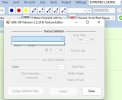
3. If I go to Tools/GP Texture Editor and use the drop-down box,

nothing appears. (see photo).
Peter
 

Attachments

  • 12.jpg
    12.jpg
    34 KB · Views: 20
If you do not have those files then the program did not install correctly. Reinstall the program.
 
Your other option would be to copy the contents of the file I posted above and save two copies as the file names I listed above. They should go into your main ADE folder.

But other parts of the ADE GP system may also be missing. If so, you will need to reinstall.
 
Thanks Tom,

I think a reinstall is the best solution.
Otherwise I might keep struggling.

Thanks anyway.
Peter
 
Back
Top