• Which the release of FS2020 we see an explosition of activity on the forun and of course we are very happy to see this. But having all questions about FS2020 in one forum becomes a bit messy. So therefore we would like to ask you all to use the following guidelines when posting your questions:

    • Tag FS2020 specific questions with the MSFS2020 tag.
    • Questions about making 3D assets can be posted in the 3D asset design forum. Either post them in the subforum of the modelling tool you use or in the general forum if they are general.
    • Questions about aircraft design can be posted in the Aircraft design forum
    • Questions about airport design can be posted in the FS2020 airport design forum. Once airport development tools have been updated for FS2020 you can post tool speciifc questions in the subforums of those tools as well of course.
    • Questions about terrain design can be posted in the FS2020 terrain design forum.
    • Questions about SimConnect can be posted in the SimConnect forum.

    Any other question that is not specific to an aspect of development or tool can be posted in the General chat forum.

    By following these guidelines we make sure that the forums remain easy to read for everybody and also that the right people can find your post to answer it.

FSX Ground illuminating light?

mskhan1991

Resource contributor
Messages
935
Country
pakistan
anybody here know how to do this kind of ground illumination? Any help would be appreciated.
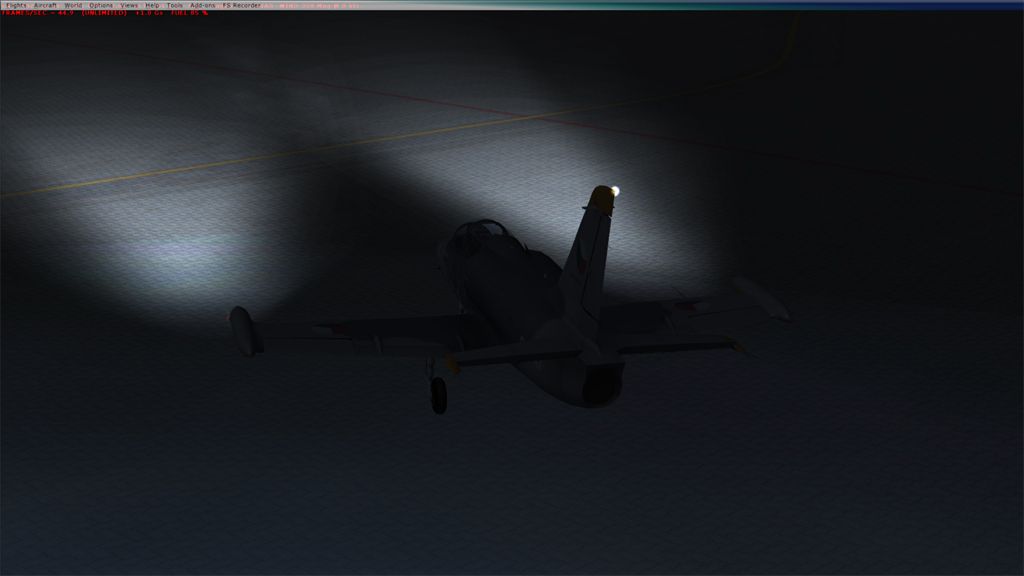
Untitled-1copy_zpsfd8ebff5.jpg
 
what for ? Airplane or Scenery ?

Definitely for scenery since the topic is in scenery objects forum.

However, if nobody has found a way is there a possibility anyone can mention how you do it for an aircraft. Maybe I'll try with that.
 
If it's just ground splashes you want, then the ramplight isn't for it really, and that light method thread doesn't work for ground polys I find.

I use a very faint DSXT 5 texture as a ground poly (same for both diffuse and self-illumination); during the day it doesn't show at all and during the night looks good.
 
I think it is possible via .fx too, so you can make the lights for dawn/dusk less bright or any other effect parameter. :scratchch
 
There is in the WIKI. Effects lights are not for ground splashes like what you describe above though. You want a ground poly for scenery.
 
Those lights are good for illuminating anything that comes within their range, such as the user aircraft, AI aircraft, fuel trucks, etc.

On the other hand, they do not work well during low visibility (foggy) conditions... I've never discovered a method to overcome that defect. :o
 
Hej Bill

After years of searching I have foud the ground lights for
my scenery. But there is one problem, I hav made my own
light poles so I ask you if it would be possible to get a set
of your ramplights without any pole.

Thank you in advance.

Floda
 

Attachments

  • ESGG 45angel.jpg
    ESGG 45angel.jpg
    125 KB · Views: 931
  • ESGG Top Down.jpg
    ESGG Top Down.jpg
    121.2 KB · Views: 805
Hej Bill

After years of searching I have foud the ground lights for
my scenery. But there is one problem, I hav made my own
light poles so I ask you if it would be possible to get a set
of your ramplights without any pole.

Thank you in advance.

Floda

I provided the .gmax source files so you should be able to Merge them into your own Pole scene:
400_foot_square_groundsplash.gmax and
200_foot_square_groundsplash.gmax
 
ground lights

Hi Bill ;)

Thank you for the reply and for sharing your work with us.

I saw thouse Gmax files but I have no typerating for Gmax.

Is there an other way to do it? Do I have to merge the light effect with my pole or can I creat a seperat light effect from your Gmax files?

I would be happy if I could make a BGL with just the light splash.

THX in advance and best regards.

Floda
 
I used just the light splash, right now don't know if this is a separate file or just edited the mdl file, I want to thanks to Bill for those great lights too. :D
 
Hola Senor Bernardo !!

Can you pleas explane what you have done. Make it simple if you can.

Best Reagards

Floda
 
Hola señor Floda ¡
I can't remember exactly, but I think just editing the Gmax file, deleting the pole and done. :cool: don't remember to have any special problema when exporting.
 

Attachments

  • Ramplights_VDE.jpg
    Ramplights_VDE.jpg
    80.8 KB · Views: 688
Last edited:
ground lights

Hi Bill :)

I am glad to tell you that your suggestion "using the Gmax source file" does
work wonderful. I don't know what I did wrong the first time but now I can
add your light beam to my poles and it works like charm.
Thank's also to Roby for encouraging me not to give up.

I have planted 42 lightbeams and the frame drop is only from 98 to 92.6 fps
as you can see on attachement. The entire airport (ESGG.bgl) did only increase 2kb.

Thank you Bill and Best Regards.

Floda
 
ground lights

Hi Bill .

Happiness is short sometimes. When I put all light spots in my airport I only
investigated the result in Top down mood.

Today as I flew over the airport I saw this unexpected thing. Every light spot
made light grey square spot on the ramp.

So for the moment I am:confused: but not exhausted thank's to the forum.

Any help is appreciated.

Floda
 

Attachments

  • Top down.jpg
    Top down.jpg
    299 KB · Views: 691
  • night.jpg
    night.jpg
    117.9 KB · Views: 723
  • 35 angle.jpg
    35 angle.jpg
    247.1 KB · Views: 702
Are they planes or gound polys? Planes will flicker when you fly above them.

You may have not set the specular to "off".
 
Back
Top