
-
Which the release of FS2020 we see an explosition of activity on the forun and of course we are very happy to see this. But having all questions about FS2020 in one forum becomes a bit messy. So therefore we would like to ask you all to use the following guidelines when posting your questions:
- Tag FS2020 specific questions with the MSFS2020 tag.
- Questions about making 3D assets can be posted in the 3D asset design forum. Either post them in the subforum of the modelling tool you use or in the general forum if they are general.
- Questions about aircraft design can be posted in the Aircraft design forum
- Questions about airport design can be posted in the FS2020 airport design forum. Once airport development tools have been updated for FS2020 you can post tool speciifc questions in the subforums of those tools as well of course.
- Questions about terrain design can be posted in the FS2020 terrain design forum.
- Questions about SimConnect can be posted in the SimConnect forum.
Any other question that is not specific to an aspect of development or tool can be posted in the General chat forum.
By following these guidelines we make sure that the forums remain easy to read for everybody and also that the right people can find your post to answer it.
You are using an out of date browser. It may not display this or other websites correctly.
You should upgrade or use an alternative browser.
You should upgrade or use an alternative browser.
FSX Grounpoly Transparency
- Thread starter klam
- Start date


- Messages
- 453
- Country

Hi Klam,
For an apron textures that doesn't look repetitive use seamless tiled image of an asphalt or concrete or concrete blocks. Seamless tile doesn't mean that the texture won't be repetitive, you also need to make sure that texture is monotone rather than duotone.
To make apron/runway/taxiway nicely fitted in to the default or custom environment you need to make more realistic edges for the runway/taxi/apron layout that gradually blends with one or another object or both (Use Alpha Channel).. Every bit of pieces is separate polygon which will be a layer like one on top of another (Layers defined in Model Converter X). See this source that may be helpful too.
For an apron textures that doesn't look repetitive use seamless tiled image of an asphalt or concrete or concrete blocks. Seamless tile doesn't mean that the texture won't be repetitive, you also need to make sure that texture is monotone rather than duotone.
To make apron/runway/taxiway nicely fitted in to the default or custom environment you need to make more realistic edges for the runway/taxi/apron layout that gradually blends with one or another object or both (Use Alpha Channel).. Every bit of pieces is separate polygon which will be a layer like one on top of another (Layers defined in Model Converter X). See this source that may be helpful too.
Hi fsfox,
Thank you for your input. Actually I know about seamless texture or anything that you mentioned above. I'm wondering how do you overlay photoreal on the groundpoly so that it darkens and lightens your groundpoly? Take a look on post 8 by Tic here ( http://fsdeveloper.com/forum/threads/ground-poly-question.387865/)
Thank you for your input. Actually I know about seamless texture or anything that you mentioned above. I'm wondering how do you overlay photoreal on the groundpoly so that it darkens and lightens your groundpoly? Take a look on post 8 by Tic here ( http://fsdeveloper.com/forum/threads/ground-poly-question.387865/)

- Messages
- 1,510
- Country

You'd need to put a shade of gray on the alpha channel of the overlaying textures and process them as DXT5. Darker gray = more transparent, lighter gray = less transparent. You may find you'll want to use varying shades of gray making the grass areas more transparent than the runways/taxiways for example. If you use PhotoShop pull up the channels palette (Window > Channels) and make a new "Alpha 1" channel, fill it with your desired shade of gray, convert the .psd to DXT5 .dds with Imagetool (or you can export directly from PS as .dds with the Nvidia PhotoShop Plugin).
Jim
Jim
- Messages
- 1,510
- Country
You just make some new polys in gmax or whatever and use different textures to texture them. I'd guess that Tic sliced up the same imagery he used for the photoreal into 1024px chunks and applied it to a bunch of square polys overtop of his runways & taxiways. When you open the model in the GP wizard those textures will show up separately, you just need to adjust the layering so they layer above your tiling taxiway & runway textures. I think the default is layer 8 so put your overlays at layer 12 for example. Actually if you have any aspirations of P3D2 compatibility start at layer 16 and work your way upwards in increments of 4. GP shadows don't work correctly on layers below 16 in P3D2.
- Messages
- 1,510
- Country
You can do both, put your tiling taxiways at layer 16, your photoreal overlay at layer 20, and more dirt/stains at layer 24 for example. Then you might come along and do another layer at 28 for your runway and taxiway markings, maybe even another at 32 overtop of everything else for baked ground occlusions from all your buildings. Vary the transparency of any/all layers by adjusting the lightness/darkness of the alpha channels in the textures.
The only GP I did was an ultra-high resolution synthesized 2cm affair where all the layering was done in photoshop and the textures were just tiled on planes in gmax. It did have lofted taxiway markings overlaying it and the runway was done with a tiling texture with some skid marks overlayed on top. It was a royal pain (seemingly endless copying and pasting, clone stamping, etc. in PhotoShop to synthesize the textures), if I ever do another GP I will use tiling textures with overlays.
The only GP I did was an ultra-high resolution synthesized 2cm affair where all the layering was done in photoshop and the textures were just tiled on planes in gmax. It did have lofted taxiway markings overlaying it and the runway was done with a tiling texture with some skid marks overlayed on top. It was a royal pain (seemingly endless copying and pasting, clone stamping, etc. in PhotoShop to synthesize the textures), if I ever do another GP I will use tiling textures with overlays.

jtanabodee
Resource contributor
- Messages
- 3,924
- Country

Oh I'm sorry that I forgot to capture that part, the satellite photo overlay to prevent repetitive texture.
But the main idea is the same as Jim said.
I use satellite photo but I desaturate it to be just back and white. Since the shading of the taxiway and runway does not need to be sharp and crisp, I rescale it to fit in just only one 1024x1024 (in case that you want to use it in FS9 version). Then I copy the texture, paste it in alpha channel and revert it. The dark area will be white in alpha. This will make the black stain become move visible and the white area/normal grey texture of the real runway become more transparent to make asphalt texture more visible. It is hard to explain and you need to try and see how it looks and come back to adjust how transparent the alpha channel (black) it should be.
I make a big polygon to make satellite photo fit in the reference plane.
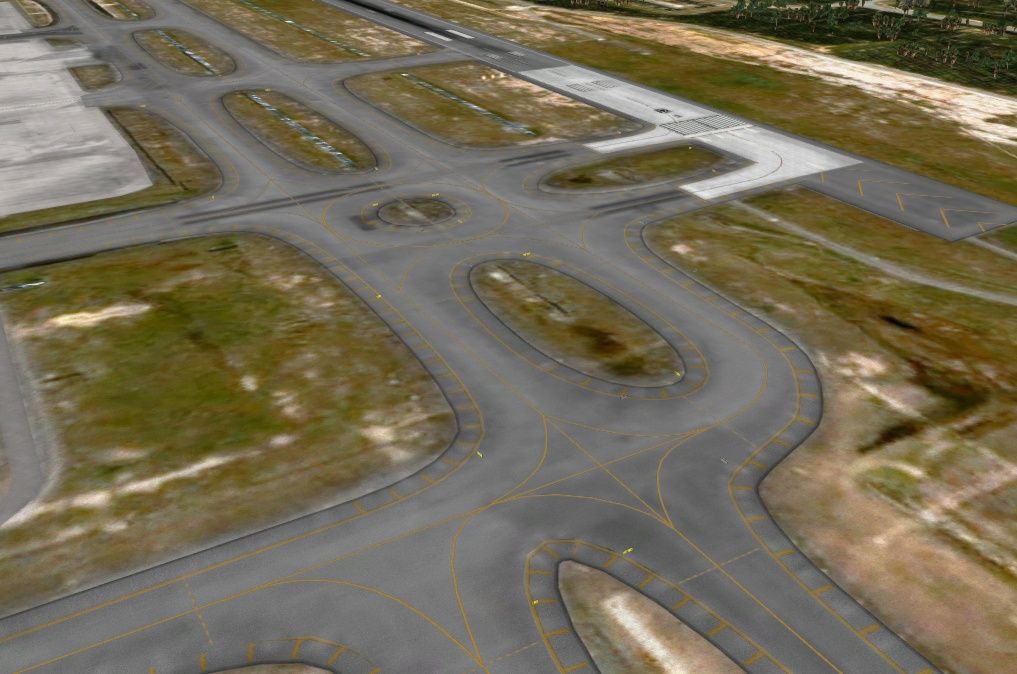
Here is the picture of KLIA taxiway. The overlay satellite photo is just only a big polygon that cover almost all the airport.
But the main idea is the same as Jim said.
I use satellite photo but I desaturate it to be just back and white. Since the shading of the taxiway and runway does not need to be sharp and crisp, I rescale it to fit in just only one 1024x1024 (in case that you want to use it in FS9 version). Then I copy the texture, paste it in alpha channel and revert it. The dark area will be white in alpha. This will make the black stain become move visible and the white area/normal grey texture of the real runway become more transparent to make asphalt texture more visible. It is hard to explain and you need to try and see how it looks and come back to adjust how transparent the alpha channel (black) it should be.
I make a big polygon to make satellite photo fit in the reference plane.
Here is the picture of KLIA taxiway. The overlay satellite photo is just only a big polygon that cover almost all the airport.
Last edited:
jtanabodee
Resource contributor
- Messages
- 3,924
- Country
Yes, I do that too. Thanks for asking. The glass area in this layer need to be totally black in alpha, 100% transparent. So that the photoscenery under it will be visible clearly.

- Messages
- 168
- Country

Hi Klam,
For an apron textures that doesn't look repetitive use seamless tiled image of an asphalt or concrete or concrete blocks. Seamless tile doesn't mean that the texture won't be repetitive, you also need to make sure that texture is monotone rather than duotone.
To make apron/runway/taxiway nicely fitted in to the default or custom environment you need to make more realistic edges for the runway/taxi/apron layout that gradually blends with one or another object or both (Use Alpha Channel).. Every bit of pieces is separate polygon which will be a layer like one on top of another (Layers defined in Model Converter X). See this source that may be helpful too.
Is it possible to make the "edge" on the main runway texture (maybe problematic for UVW Map) or is better to build a specific texture for this use and apply over a new polygon along the runway?
jtanabodee
Resource contributor
- Messages
- 3,924
- Country
I think if you have the edge in the same material with the surface of taxi way, you might do that comfortably.
However, if you have a taxiway that turns 90 degree you can try it first. If the taxi way is not large, the texture might not be stretch too much and looks acceptable. But if you taxiway is somewhat 30+ meters, you will see the texture stretch along to outer edge and compressed on the inner edge.
It is depends on your decision actually.
However, if you have a taxiway that turns 90 degree you can try it first. If the taxi way is not large, the texture might not be stretch too much and looks acceptable. But if you taxiway is somewhat 30+ meters, you will see the texture stretch along to outer edge and compressed on the inner edge.
It is depends on your decision actually.