• Which the release of FS2020 we see an explosition of activity on the forun and of course we are very happy to see this. But having all questions about FS2020 in one forum becomes a bit messy. So therefore we would like to ask you all to use the following guidelines when posting your questions:

    • Tag FS2020 specific questions with the MSFS2020 tag.
    • Questions about making 3D assets can be posted in the 3D asset design forum. Either post them in the subforum of the modelling tool you use or in the general forum if they are general.
    • Questions about aircraft design can be posted in the Aircraft design forum
    • Questions about airport design can be posted in the FS2020 airport design forum. Once airport development tools have been updated for FS2020 you can post tool speciifc questions in the subforums of those tools as well of course.
    • Questions about terrain design can be posted in the FS2020 terrain design forum.
    • Questions about SimConnect can be posted in the SimConnect forum.

    Any other question that is not specific to an aspect of development or tool can be posted in the General chat forum.

    By following these guidelines we make sure that the forums remain easy to read for everybody and also that the right people can find your post to answer it.

Having trouble with sketchup/Model maker X

Messages
65
Country
us-california
Hi.
I have just started to use sketchup, and have made a couple of small addons for FSX.
Here is the trouble I am having.

First. Sketchup
I am trying to create a sign for FSX.
The sign is 4'11" Long, 1'8" Tall and is 5" Deep.
The face (WORDING) for the sign is.
4'9" Long. 1'5" Tall.
I have tried making the sign Taller and wider. but I get 2 of the faces.?
Can the sign be made as short and wide as I am trying to make it, or is it just that one size.?

2ND. Model Converter X
I have tried to add Night textures to the sign, but I get (black and white checkers) where the face is.
And get this error message.
Failed to load texture. sign_face_LM.dds

Any help would be greatly appreciated.
Thank You
Amanda
 
Hi.
I have just started to use sketchup, and have made a couple of small addons for FSX.
Here is the trouble I am having.

First. Sketchup
I am trying to create a sign for FSX.
The sign is 4'11" Long, 1'8" Tall and is 5" Deep.
The face (WORDING) for the sign is.
4'9" Long. 1'5" Tall.
I have tried making the sign Taller and wider. but I get 2 of the faces.?
Hello:

I'm not sure what you mean by: "I get 2 of the faces". :scratchch

FYI: If you try to "Pull" (aka "extrude") a face of an object with the "Move" (crossed arrows) tool, it may follow and distort the object geometry in an undesirable manner; IMHO, one should always either use the "Push-Pull" (stamp-handle) tool or the Scale tool etc. to modify an objects proportions. :idea:


Can the sign be made as short and wide as I am trying to make it, or is it just that one size.?

Regarding re-sizing ("Scaling" up the size) of the sign in Sketchup:

1.) Sketchup Menu > Camera > Standard Views > 'Iso'

2.) Sketchup Menu > click 'Arrow' cursor from the Icon toolbar; drag a box around all parts of the sign to "Select" it (parts turn Blue)

3.) Right-click and 'Make a Group' of the sign parts

4.) Click the new sign 'group' to Select it (bounding box and edges appears as Blue lines)

5.) Sketchup Menu > Tools > Scale (Green frame handles appear on bounding box of sign group)

6.) Hover cursor over Green frame handle at upper diagonal corner of sign (...on opposite side from bounding box bottom corner)

a.) In 'Scale' mode, hovering cursor over Green frame handle at upper diagonal corner, 'double arrow' appears over handle

b.) In 'Scale' mode with 'double arrow' on upper diagonal corner Green handle, click-hold left Mouse button and 'Drag' up / out

c.) In Value Control Box (aka "VCB") at bottom right of Sketchup workspace status bar, notice Scale factor 'percent' when dragging

d.) Drag to 'any' percent size, then immediately type on keyboard actual percent of original size you want sign 'scaled' up to

e.) Click in blank area of workspace to end Scale operation


NOTE: Sketchup Menu > Edit > "Undo Scale" to undo last (Scale) operation if needed


2ND. Model Converter X
I have tried to add Night textures to the sign, but I get (black and white checkers) where the face is.
And get this error message.
Failed to load texture. sign_face_LM.dds

Any help would be greatly appreciated.
Thank You
Amanda

The "night" texture must be made from an edited copy of the daytime texture, then saved with a "_LM" (underscore character and the letters "LM") suffix at the end of the daytime texture file name.

That night texture must be in the same folder and in the same Ex: *.DDS file format as the daytime textures ...when exporting from ModelConverterX (aka "MCX").

BTW: "_LM" means "LightMap" (... not "Lockheed Martin") ;)


Hope this helps with the Sketchup learning process ! :)

GaryGB
 
Last edited:
Thank you Gary.
It helps.
What I mean by 2 faces......I get 2 of the wording side by side.
I'll post a screenshot of it.
 
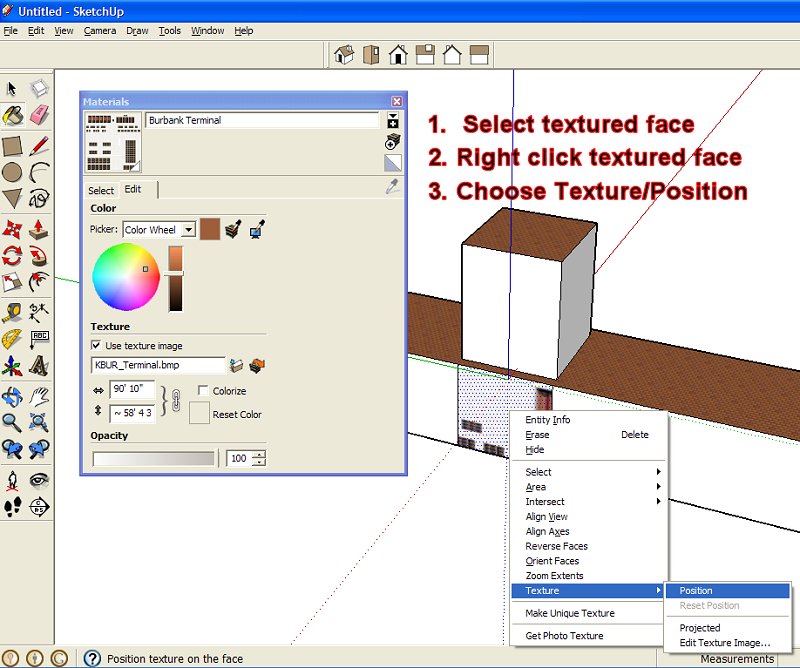
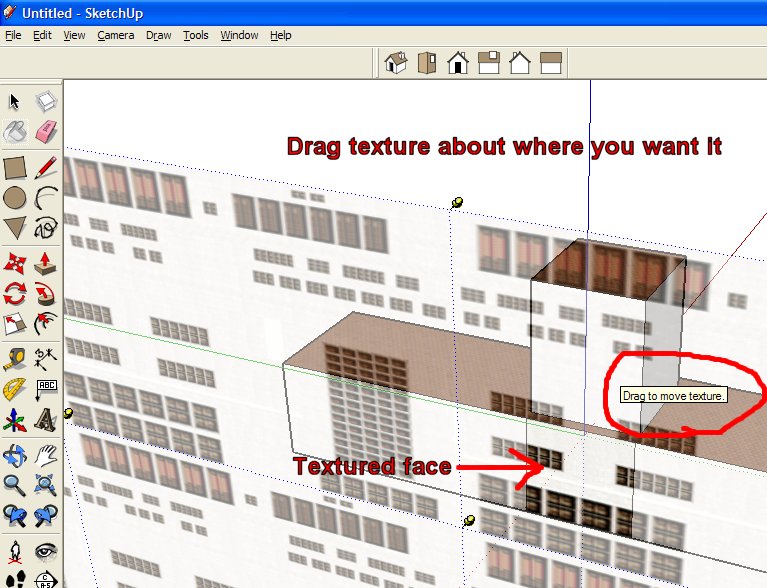
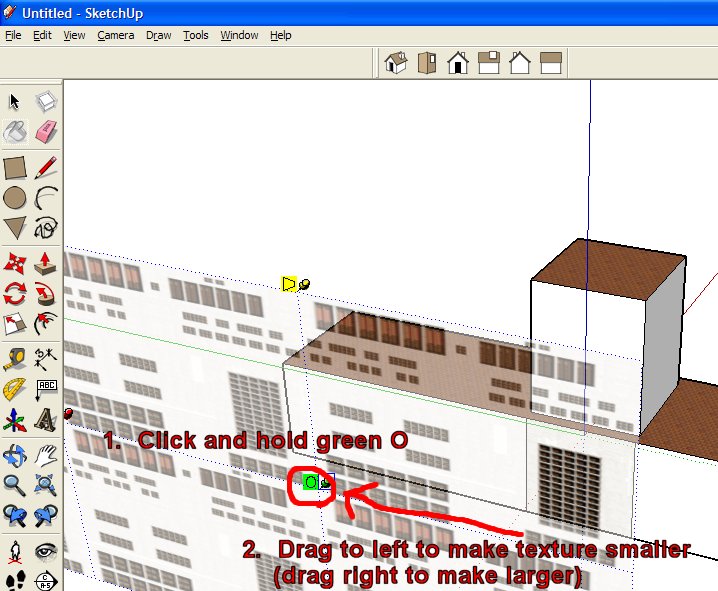
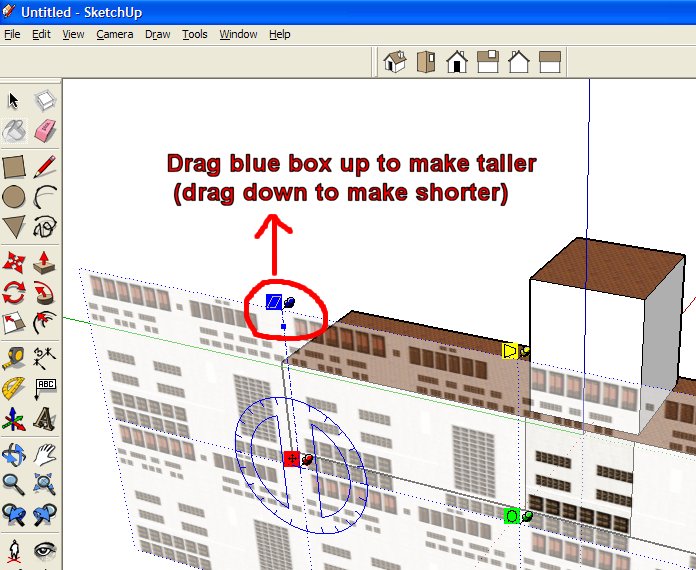
Perhaps these images will help you stretch your texture over the sign, so you only see it once:

sketchup_texture_position.jpg


sketchup_texture_drag.jpg


sketchup_texture_resize.jpg


sketchup_texture_taller.jpg


You can press ENTER to get back to the normal screen, with your face now properly texture mapped.

These are from this simple tutorial:

http://www.calclassic.com/sketchup_tutorial.htm

Hope this helps,
 
Back
Top