
• Which the release of FS2020 we see an explosition of activity on the forun and of course we are very happy to see this. But having all questions about FS2020 in one forum becomes a bit messy. So therefore we would like to ask you all to use the following guidelines when posting your questions:

    • Tag FS2020 specific questions with the MSFS2020 tag.
    • Questions about making 3D assets can be posted in the 3D asset design forum. Either post them in the subforum of the modelling tool you use or in the general forum if they are general.
    • Questions about aircraft design can be posted in the Aircraft design forum
    • Questions about airport design can be posted in the FS2020 airport design forum. Once airport development tools have been updated for FS2020 you can post tool speciifc questions in the subforums of those tools as well of course.
    • Questions about terrain design can be posted in the FS2020 terrain design forum.
    • Questions about SimConnect can be posted in the SimConnect forum.

    Any other question that is not specific to an aspect of development or tool can be posted in the General chat forum.

    By following these guidelines we make sure that the forums remain easy to read for everybody and also that the right people can find your post to answer it.

FSXA Help on GMAX modelling

Status
Not open for further replies.
Messages
77
Country
india
Hi friends..
I am designing an airport for FSX and struggling to design a a descent terminal and other airport building using Gmax....
Could anyone please provide me a tutorial on modelling in Gmax as I have no knowledge about Gmax modelling as I am much more familiar with google sketchup... and not with Gmax

I want to make such terminals and buildings similar to below images:
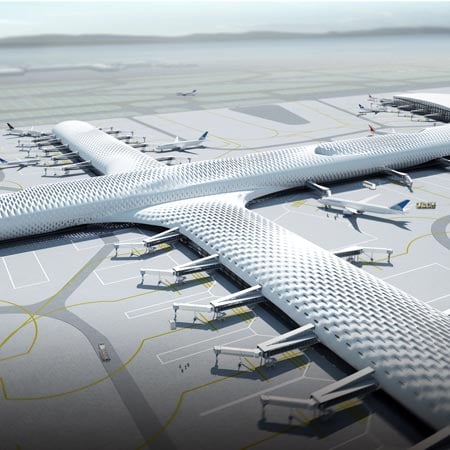
courtesystudiofuksas1sq.jpg


t53.jpg


Terminal22_900x600.ashx


Can anyone please help me....I am really struggling spending sleepless nights but cant design a good descent terminals and buildings.
I need help on texturing of the building as well along with night lightings...

Any help will be highly appreciated

Regards
Dreamaero
 
Last edited:
I think those buildings can be model in Gmax. I'm not sketch up user so I don't know about it.
In Gmax, you can use primitive box and select vertices that you way to modify by using soft selection. When you move the vertices all other vertices in the range will move but different degree of moving. So the shape can be smoothly curve like that.
The first building, I think you have to use texture and bump mapping.
The second one, you can use loft technique. Making cross section and do lofting along the line.
The last picture is very tricky. But you can begin with a box but a number of sections to make more vertices than a simple box. Then use soft selection and move the vertices of the edge of the roof down and the other vertices will move along nicely.

You have to try different ways and see which way satisfy your need.
Or you can try making other things and come back later.
There are many tutorial in YouTube. Follow them you will get more experience and them come back to make these buildings.
 
Thanks for your prompt reply.. friends

jtanabodee,Hi :)

The first building, I think you have to use texture and bump mapping.
The second one, you can use loft technique. Making cross section and do lofting along the line.

Could you please provide some more details about bump mapping & loft technique. Making cross section and do lofting along the line.


I did not understand what you mean by these..I am using Gimp to make textures so will bump map work on it.


There are many tutorial in YouTube. Follow them you will get more experience and them come back to make these buildings.

lastly... could you please provide me some links to the video tutorials that will help me achieve my goal.

Thanks alot
Takecare
Regards
Dreamaero


fsfox,

This relates to your personal message...I do not wish to pursue any course...as Flight simulation is only my hobby I am not professionally into it.. I prefer to learn it through freely available tutorials.
Thanks for the reply.:)

Regards

Dreamaero
 
All I can say is that any good hobby costs.... Yes sure, you can do the hobby free, but as soon as you reach some point in your hobby - it asks for something in return.. It can be money, it can be sleepless nights , it can be risk.. it can be anything else. I did my FS hobby for 15 years for free as Virtual pilot, then I fed up and at the same time I didnt want to leave my hobby.. The cost was Money and time consumption for learning. Im pretty sure that the explanation of bump maps, displacement maps, Parallax, refraction, reflection, specularity, is far not enough. You need to understand modeling wery well, vertexes, planes, edges, geometry subdivisions, splines, NURBS modeling, Animation, light and types of lights.. rendering engines like mental ray and v-ray. First you need to technically understand this and then practice, and then make yourself an artist and then bring your art in to the game, any game not only flight simulator..
So this is game development ( CG and programing ) many people became game devs in the school.
But anyway good luck in your self education, good start tho...
That airport can be modeled in sketchup too.
 
Last edited:
I'm sorry dreamaero but I cannot remember which video that I watched in the past, tons of them have passed my eyes.
But it is easy to search by yourself the keywords that I told you.

You can search "loft" in help of gmax. They have a nice explanation about lofting a bridge.
There is a long way to go along the 3d modeller. You have to read a lot.

There is no way to know all of them in one night, better get sleep.....Ha, ha.
It is a hobby and no rush about that.

Please search in gmax, there are a lot of document in help file and tutorial which is a separation download.
I think it is OK to take a course of learning if you wish. But it is not available in my town and I have no time to attend the class.
To myself, I only do searching in google, gmax help, or a book about 3dsmax (which is close enough guideline to use with gmax).
English is not your barrier. So please search and read then try making it in Gmax.

If you don't know what to search, that time to ask. That's all.


By the way, what airport are those?
 
Last edited:
hi Tic and fsfox.. howz life my friends,:)
I will do a detail search on the topic in gmax and also experiment with gmax regarding the modelling aspects.
The airport images I uploaded are as follows:

the 1st image is an artistic impression of Shenzen International Airport under construction in China

2nd image is an artistic impression of the new Terminal coming up at Heathrow.

While the 3rd image is the actual Dublin International Airport's Terminal 2.

Did you like it.:)

Well, Tic, I have become a big fan of yours as yesterday I read some of your other posts about New Light Splash.., Suspicious Specular, Window reflection, etc..
I liked it very much. I have some doubts regarding the specular alpha, diffuse alpha and the 3 planes that you used in the light splash post... I also read the Lighting process at Leaming fields made by Bill Leaming (n4gix) However, I have several doubts regarding Speculars and fresnal ramps...etc etc... Which I would like to ask you after I finish learning the modelling aspects in Gmax. Once I am fine with Modelling in Gmax I will be moving on to texturing and lighting.... I will first try it on my own and if any problems arise and I cant find solutions anywhere then I will ask.

Take care and regards

Dreamaero
 
I suggest you put your terminal projects on hold while you learn gmax. To do justice to those buildings, you'll be using gmax at an advanced level. If you expect yourself to create these structures while you are a beginner, you may find yourself deeply frustrated.

From your questions, I assume you aren't really aware of the complexity of gmax. That's not meant to dissuade you from trying, on the contrary. I'm just sharing that gmax is quite complex, and needs your attention before you'll learn it. Its worth your attention, once you understand it, you'll love it. Understanding it takes repetition and practice, and to add learning gradually, you need to be producing simple models that give you immediate feedback when you are using the tool correctly or when you are not.

I found gmax quite impossible to use when I started. I googled gmax tutorials, and began to simply do the tutorials. I did not know why I was doing what the tutorials said, and I wondered during this process if I was using my time well, but I kept at it. One day, it "clicked". I understood the stack structure. That opened the door, and learning the tool was fairly straightforward after that.

Once you reach that point, then start thinking about these "very" complex structures. They will test you dearly, in modelling and material development and mapping. If you try before you have any sense of the tool, they could break your will to continue.
 
Yes I quite agree with everyone, I remember when I started to model, that was sketchup too, I have grown as sketchup expert and G-max was impossible to learn to me because it is very different. True, you must put on hold FS dreams, forget what you know how to "Google Sketchup" and concentrate on Autodesk.
Personal Advice from my experience to learn G-max is not to learn Gmax, but go to students.autodesk.com. read agreement then register as student (Show your Actual school if you are still pupil if not then School were you studied) Find 3DS MAX 2011/2012 and download for FREEEEEEEEEEEEEEEEE
Don't be silly starter, don't download 2013, 2014 versions, as they are pretty much useless for you, you don't need those new features.

I strongly assure you that by learning 3ds max you'll finally shoot two rabbits with one bullet, so as soon as you are familiar with 3ds max - you know G-max instantly. 3ds max will give you understanding of materials, lights, rendering and everything you even cannot imagine...

For learning..: Google is your most powerful tool ever. Then Comes Youtube's how to's and tutorials...
take a look on
digitaltutors web site that offers great courses even for free as trial and is very cheap.. (chose 3ds max)
3ds max welcome screen offers little guide on how to videos..
 
Last edited:
...go to students.autodesk.com. read agreement then register as student (Show your Actual school if you are still pupil if not then School were you studied)...

Are you suggesting obtaining Max under false pretences? I looked the link you give and only those actually in education (or working there) are entitled to an educational licence. :(

I have another suggestion: GMax has a set of tutorials bundled with the downloads, they're there to be used and learned from. Yes, they're a bit tedious; of course we all want to build a masterpiece straight off; yes I know the P-38 is the wrong way round for FS. But they do teach you the basic tools! There are things in there you'll come back to again and again. And you're not going to build anything half-decent until you learn to use the tools properly.

Then start a project...
 
As an owner of 3dsmax, and a gmax user for many years, I would argue that gmax may be the preferred (and free .. legally) version of "max" to start with. Learning the "max" interface is not easy, and starting with the simplest tool is the best way to learn. Gmax is a simplified version of 3dsmax 4.

I had very little trouble using 3dsmax when I first got it, due to my experience with GMAX.
 
Are you suggesting obtaining Max under false pretences? I looked the link you give and only those actually in education (or working there) are entitled to an educational licence. :(

LoL.. Look I was learning 3DS MAX a while ago, I have finished a course, so I'm not in education and Im not teacher and Im not working there.. Do you suggest me to delete the student version of 3ds max and never get back to it until I make a purchase ? I dont think you would do so, first off all because person is self educating too.. And self education is an education.
BTW I will let everyone know if some day Ill get arrested for it.
And Yes, just because I have an account that I set up when I was attending private course, i do download all software from autodesk that I like.. Maya, Autocad, etc.. and do the updates and receiving support from autodesk, and they never told me like "Hey, your course has finished, your activity is illegal.." No.. Im not so superstitious and Im not intimidated that I can get punished just because I want to learn and Autodesk gave me this opportunity for free without checking my Student certificate as Adobe do.. Thats why Autodesk made it free (educational) and at the same time prevented themselves from piracy.
 
I suspect no one would expect student software that doesn't time-out to be un-installed on graduation. However, I think its wrong for you to recommend another person falsify student status on this website.

I'm sure somewhere we all agreed to behave legally. If not, we should anyway.
 
Well, Tic, I have become a big fan of yours as yesterday I read some of your other posts about New Light Splash.., Suspicious Specular, Window reflection, etc..
I liked it very much. I have some doubts regarding the specular alpha, diffuse alpha and the 3 planes that you used in the light splash post... I also read the Lighting process at Leaming fields made by Bill Leaming (n4gix) However, I have several doubts regarding Speculars and fresnal ramps...etc etc... Which I would like to ask you after I finish learning the modelling aspects in Gmax. Once I am fine with Modelling in Gmax I will be moving on to texturing and lighting.... I will first try it on my own and if any problems arise and I cant find solutions anywhere then I will ask.

Take care and regards

Dreamaero

Thanks for your comment.

I would recommend not to go over the issue of 3dsmax licence any more on this thread. I smell someone keep an eye on this and the thread will be closed.

Please go with gmax. It is complex enough already and free. Or you can continue your work on SketchUp. Lots of people cannot tolerate the complexity of gmax and go back to SketchUp. It is a nice program and you can work a lot with that. I'm not a SketchUp user not because it is not good but it came to my knowledge after I have started my work with gmax already.

Begin with simple boxy buildings. May be a small airport near you. Don't model a complex international airport. Even a skill modeller, it can take years to develop.

Build anything you want by working with tutorials and you will get familiar with the tools. No need to be Flight Sim related objects. You will learn every time you build. I modeled a lot in the past, telephone, chairs, cars anything they have in tutorial. Even now I get back to tutorial form times to times and learn something new more each time. Tutorial is my teacher and gmax is my class.
 
Last edited:
Yes... I believe you, Gmax is really complex. I will do what Tic says. I too believe with Tic and Bob. Whatever I use to learn be it 3DS Max or Gmax I will always use a legal means...As it means alot afterwards.. The most important of this is that we get timely updates and support. I too disagree with fsfox, illegal means should be avoided at all cost.
I will learn making small objects first...then after mastering Gmax I will move on to complex ones.
All my queries have been answered this thread can be closed.
By the way how to get this thread closed any idea. If possible please delete this thread from the forum forever.

Take care
Dreamaero
 
Last edited:
We don't delete threads here (unless they are spam), because then valuable knowledge would get lost. But I'll close this one now, since it is drifting from the original topic.
 
Status
Not open for further replies.
Back
Top