
-
Which the release of FS2020 we see an explosition of activity on the forun and of course we are very happy to see this. But having all questions about FS2020 in one forum becomes a bit messy. So therefore we would like to ask you all to use the following guidelines when posting your questions:
- Tag FS2020 specific questions with the MSFS2020 tag.
- Questions about making 3D assets can be posted in the 3D asset design forum. Either post them in the subforum of the modelling tool you use or in the general forum if they are general.
- Questions about aircraft design can be posted in the Aircraft design forum
- Questions about airport design can be posted in the FS2020 airport design forum. Once airport development tools have been updated for FS2020 you can post tool speciifc questions in the subforums of those tools as well of course.
- Questions about terrain design can be posted in the FS2020 terrain design forum.
- Questions about SimConnect can be posted in the SimConnect forum.
Any other question that is not specific to an aspect of development or tool can be posted in the General chat forum.
By following these guidelines we make sure that the forums remain easy to read for everybody and also that the right people can find your post to answer it.
You are using an out of date browser. It may not display this or other websites correctly.
You should upgrade or use an alternative browser.
You should upgrade or use an alternative browser.
FSX How to make an island
- Thread starter Fly7634
- Start date


http://www.fsdeveloper.com/forum/threads/how-to-make-an-island.440824/page-2#post-779848
Thank you very much George,
The island is there OK , but the whole of QMID11 is water .
l now must find a way redraw the land as it was originally .
Thank you again
George
Fly7634 aka George:
If the actual GUID SBuilderX uses to create the compiled CVX vector Hydro poly from:
9_Pts_Legacy_LWM_Water_NoFlatten in GHD's 'worked example' SBX file Appended to SBuilderX
...is not available via the default FSX Terrain.Cfg, you may need to install the "Modified Terrain.Cfg":
http://www.fsdeveloper.com/forum/threads/terrain-cfg-fix.3290/
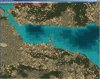
FYI: Here's the above SBuilderX project in an otherwise default FSX with the "Modified Terrain.Cfg" installed:
Hope this helps !

GaryGB
Attachments
Last edited:

- Messages
- 311
- Country

Have you got this working yet.
I have created a few islands (in the same scenery file) and found it to be relatively easy BUT I did not use ADE (and I thought that it wasn't possible to create an island using ADE but Have I missed something as I didn't read all the posts).
I used SBX which I was led to believe was either the only way or the easiest way to create islands.
I also have some notes I created for drawing islands using SBX which might be helpful should you want them.
I have created a few islands (in the same scenery file) and found it to be relatively easy BUT I did not use ADE (and I thought that it wasn't possible to create an island using ADE but Have I missed something as I didn't read all the posts).
I used SBX which I was led to believe was either the only way or the easiest way to create islands.
I also have some notes I created for drawing islands using SBX which might be helpful should you want them.
@ GaryGB
Thank you for your interest . l did what you have suggested but again there is a HUGE problem which l don't think it can be solved .
You appreciate that the coastlines in FSX are , to say the least , UGLY . The presentation of Greece is even worse with so many thousands
of miles of coasline and islands . In order to have a decent presentation you have to install an Add-on ( GRcoastlines ) made by Greek
enthousiasts and which is so very close to reality and Google . If you install it , then the island disappears of course (pls see attached) .
So we are back to square one , but if l remember correctly , a few years back in that same position l made an island with what you would
probably call an anorthodox way . With SBX l filled the whole QMID11 with land , and then with ADE , (there was a visible trace of the
coastline) , l drew with water the coastline from both sides eliminating the land around my fictional island . Only l don't remember how
l did tha land part . l'll keep trying .
Thank you again
George
Thank you for your interest . l did what you have suggested but again there is a HUGE problem which l don't think it can be solved .
You appreciate that the coastlines in FSX are , to say the least , UGLY . The presentation of Greece is even worse with so many thousands
of miles of coasline and islands . In order to have a decent presentation you have to install an Add-on ( GRcoastlines ) made by Greek
enthousiasts and which is so very close to reality and Google . If you install it , then the island disappears of course (pls see attached) .
So we are back to square one , but if l remember correctly , a few years back in that same position l made an island with what you would
probably call an anorthodox way . With SBX l filled the whole QMID11 with land , and then with ADE , (there was a visible trace of the
coastline) , l drew with water the coastline from both sides eliminating the land around my fictional island . Only l don't remember how
l did tha land part . l'll keep trying .
Thank you again
George
Attachments


- Messages
- 12,244
- Country

I think you must have extra polygons in your project.Thank you very much George,
The island is there OK , but the whole of QMID11 is water .
l now must find a way redraw the land as it was originally .
Thank you again
George
Create a new project and append either my or Gary's SBX and show us the SBX screen:

Hi again, Fly7634 aka George:
I agree improvements need to be made in 'default' FS scenery for the area of Greece (which has historically been inaccurate).
The efforts of FSGreece:
http://www.fsgreece.com/index.php/kefallinia-cephalonia-lgka/
...and Yiannis Dermitzakis' grcoastlines.zip are a good contribution to those enhancements.
"Greek Coastlines
Other files which are related to, or may be required by, this file:
Revised, high detailed coastlines of Greece (mainland and all the islands) for FSX. The western coastlines of Turkey are also included.
Filename: grcoastlines.zip
License: Freeware
Added: 3rd November 2006, 04:14:26
Downloads: 29035
Author: Yiannis Dermitzakis
Size: 2895k"
https://library.avsim.net/search.php?SearchTerm=grcoastlines.zip&CatID=root&Go=Search
NOTE: Of particular interest, IMHO, would be how to customize your CVX vector scenery to properly display via a CVX vector 'Exclude-and-Replace' procedure ...when the <1> and only following file is also actively loaded from elsewhere in the FS Scenery Library GUI 'stack of layers':
[grcoastlines.zip (de-archived) install path]\Scenery\GRcoastlines.BGL
GHD's worked example is, of course, properly structured so as to enable creation of an island within the context of a genuinely default installation of terrain scenery files.
If we have add-ons installed, they may add complexity to the scenery customization process.
I am inclined to agree with GHD that there may be another CVX vector BGL involved in the file milieu at the project location from either yourself, or some other add-on scenery package.
You should ultimately be able to achieve your goal, but you will likely have to do some more detective work to see what you may need to "Exclude-and-Replace".
Some pertinent info:
ACES FSX Global Terrain expert Adam Szofran said:
"With the FS9 Resample tool, the water mask punched a hole in your image to reveal default water beneath.
With the FSX Resample tool, we wanted to allow more flexibility, so we changed how the water mask works and we also added a blend mask. Now the water mask triggers reflective and specular water effects, but it doesn't punch a hole in your image. The benefit of this is that you can now paint the water any color you want. For example, if your source imagery contains murky brown swamp water, you can now get the muck to show up in FSX with reflections and specular effects. If you'd rather just see the default water colors, you have to use a blend mask to punch a hole in your image to reveal the default textures below. Note, however, that the default textures revealed by the blend mask might not be water; they could very well be land textures! Therefore, if you want to guarantee that the blend mask will expose default water textures, you need to create a water polygon (a big square one will do) that covers the area where you want water to appear. For information about creating water polygons, look for the documentation of the shp2vec tool in the FSX SDK.
Good luck,
Adam"
https://www.avsim.com/forums/topic/...-default-water/?do=findComment&comment=558800
Luis Feliz-Tirado said:
"It is important to remember that the Flight Simulator world is entirely made of land. Any water that displays is a Hydro Polygon, so if it is excluded, then the underlying land will show instead. Therefore, when excluding a Hydro Polygon, the designer must replace it by another that covers the same extent, the entire area that was covered by the default water, or land will display in the uncovered parts, (unless, of course, you are replacing a lake or river, in which case, just remove the old and draw the new.)"
IMHO, important factors to be considered when working with land or water class terrain scenery is 'layers' and 'priority' ...when attempting to implement excludes, holes, blend masks, and land / water masks.
The importance of these factors increases when one has any number of add-on 3rd party terrain scenery installed and set active in ones FS configuration, as one will be dealing with more than just the FS "default" scenery layers ...and these may be interposed between ones project added to the FS Scenery Library GUI as a 'top' priority Area layer.
In FSX / P3D it is possible to:
* "Exclude specific" CVX vector objects within a LOD-9 / QMID-11 quad
...by intersecting the poly-line or polygon object with a small pair of vector objects, each having the proper GUID
...or to:
* "Exclude All" types of CVX vector objects within a LOD-9 / QMID-11 quad
...by covering all poly-line or polygon objects with a single QMID-11 sized vector object, having a proper GUID
FYI: By first viewing all active CVX vector terrain BGLs locally-mapped to cover a project area in FSX / P3D SDK SH2VEC, and identifying the GUIDs for vector objects in those BGLs that one wishes to exclude, one can then implement a successful "exclude and replace" procedure and/or determine what additional land / water class polygons may be required to change the terrain attributes displayed when "masks" and/or "holes" are implemented in higher priority terrain texture layers.
NOTE: To perform the above cited inspection of CVX vector and/or certain other terrain BGLs, use "TMFViewer"
FSX SDK:
[FSX SDK install path]\Environment Kit\Terrain SDK\TmfViewer.exe
P3Dv2/v3 SDK:
[P3D SDK install path]\Environment SDK\TmfViewer.exe
P3Dv4 SDK:
[P3Dv4 SDK install path]\World\Terrain\tmfviewer.exe
BTW: Many- (but not all !) terrain scenery CVX vector object "exclude and replace"- as well as other functions- may be implemented via ADE as an alternative to SBuilderX.
PS: An excellent tutorial on how to utilize "excludes" and other aspects of the terrain scenery SDK is here:
https://library.avsim.net/esearch.php?CatID=fsxsd&DLID=141643
"Terrain Design for Flight Simulator X
This simple illustrated document explains the basic concepts in Flight Simulator X terrain, and how to change them using SBuilder for FS X. Make new water bodies, roads, vehicle traffic, airport flattens, remove autogen, add more detail - anybody can do it easily and quickly.
My most sincere apologies - I am unable, for lack of free time, to offer support of any kind. For questions or problems, please post in the Avsim scenery design forum.
Filename: terrain_design_for_flight_simulator_x.zip
License: Freeware
Added: 14th December 2009, 13:29:15
Downloads: 16639
Author: Luis Feliz-Tirado
Size: 3991kb"
NOTE: ADE users may be particularly interested in a class mapping reference for Airport Boundary / Background polygons which is included with the above tutorial package in:
[Terrain_Design for Flight Simulator X install path]\Additional_documents\Airport_ground_mask.xls
Also, a pertinent quote from the "Common Problems" section of the above tutorial:
"Park Polygons
Problem: I drew a polygon in the water and assigned a land class value, but my new island does not display.
Reason: Land class polygons no longer display on water.
Solution: To make an island, draw a Hydro Polygon and make a hole in it for the island."
Hope this helps !
GaryGB
I agree improvements need to be made in 'default' FS scenery for the area of Greece (which has historically been inaccurate).
The efforts of FSGreece:
http://www.fsgreece.com/index.php/kefallinia-cephalonia-lgka/
...and Yiannis Dermitzakis' grcoastlines.zip are a good contribution to those enhancements.
"Greek Coastlines
Other files which are related to, or may be required by, this file:
- Greek Waterports (Download #117775) (=airport BGLs)
- Greek Coastlines (Download #93142) (=only <1> CVX vector BGL: GRcoastlines.BGL)
- Greek Water Ports 2 Project (Download #118702) (=airport BGLs)
Revised, high detailed coastlines of Greece (mainland and all the islands) for FSX. The western coastlines of Turkey are also included.
Filename: grcoastlines.zip
License: Freeware
Added: 3rd November 2006, 04:14:26
Downloads: 29035
Author: Yiannis Dermitzakis
Size: 2895k"
https://library.avsim.net/search.php?SearchTerm=grcoastlines.zip&CatID=root&Go=Search
NOTE: Of particular interest, IMHO, would be how to customize your CVX vector scenery to properly display via a CVX vector 'Exclude-and-Replace' procedure ...when the <1> and only following file is also actively loaded from elsewhere in the FS Scenery Library GUI 'stack of layers':
[grcoastlines.zip (de-archived) install path]\Scenery\GRcoastlines.BGL
GHD's worked example is, of course, properly structured so as to enable creation of an island within the context of a genuinely default installation of terrain scenery files.
If we have add-ons installed, they may add complexity to the scenery customization process.
I am inclined to agree with GHD that there may be another CVX vector BGL involved in the file milieu at the project location from either yourself, or some other add-on scenery package.
You should ultimately be able to achieve your goal, but you will likely have to do some more detective work to see what you may need to "Exclude-and-Replace".
Some pertinent info:
ACES FSX Global Terrain expert Adam Szofran said:
"With the FS9 Resample tool, the water mask punched a hole in your image to reveal default water beneath.
With the FSX Resample tool, we wanted to allow more flexibility, so we changed how the water mask works and we also added a blend mask. Now the water mask triggers reflective and specular water effects, but it doesn't punch a hole in your image. The benefit of this is that you can now paint the water any color you want. For example, if your source imagery contains murky brown swamp water, you can now get the muck to show up in FSX with reflections and specular effects. If you'd rather just see the default water colors, you have to use a blend mask to punch a hole in your image to reveal the default textures below. Note, however, that the default textures revealed by the blend mask might not be water; they could very well be land textures! Therefore, if you want to guarantee that the blend mask will expose default water textures, you need to create a water polygon (a big square one will do) that covers the area where you want water to appear. For information about creating water polygons, look for the documentation of the shp2vec tool in the FSX SDK.
Good luck,
Adam"
https://www.avsim.com/forums/topic/...-default-water/?do=findComment&comment=558800
Luis Feliz-Tirado said:
"It is important to remember that the Flight Simulator world is entirely made of land. Any water that displays is a Hydro Polygon, so if it is excluded, then the underlying land will show instead. Therefore, when excluding a Hydro Polygon, the designer must replace it by another that covers the same extent, the entire area that was covered by the default water, or land will display in the uncovered parts, (unless, of course, you are replacing a lake or river, in which case, just remove the old and draw the new.)"
IMHO, important factors to be considered when working with land or water class terrain scenery is 'layers' and 'priority' ...when attempting to implement excludes, holes, blend masks, and land / water masks.
The importance of these factors increases when one has any number of add-on 3rd party terrain scenery installed and set active in ones FS configuration, as one will be dealing with more than just the FS "default" scenery layers ...and these may be interposed between ones project added to the FS Scenery Library GUI as a 'top' priority Area layer.
In FSX / P3D it is possible to:
* "Exclude specific" CVX vector objects within a LOD-9 / QMID-11 quad
...by intersecting the poly-line or polygon object with a small pair of vector objects, each having the proper GUID
...or to:
* "Exclude All" types of CVX vector objects within a LOD-9 / QMID-11 quad
...by covering all poly-line or polygon objects with a single QMID-11 sized vector object, having a proper GUID
FYI: By first viewing all active CVX vector terrain BGLs locally-mapped to cover a project area in FSX / P3D SDK SH2VEC, and identifying the GUIDs for vector objects in those BGLs that one wishes to exclude, one can then implement a successful "exclude and replace" procedure and/or determine what additional land / water class polygons may be required to change the terrain attributes displayed when "masks" and/or "holes" are implemented in higher priority terrain texture layers.
NOTE: To perform the above cited inspection of CVX vector and/or certain other terrain BGLs, use "TMFViewer"
FSX SDK:
[FSX SDK install path]\Environment Kit\Terrain SDK\TmfViewer.exe
P3Dv2/v3 SDK:
[P3D SDK install path]\Environment SDK\TmfViewer.exe
P3Dv4 SDK:
[P3Dv4 SDK install path]\World\Terrain\tmfviewer.exe
BTW: Many- (but not all !) terrain scenery CVX vector object "exclude and replace"- as well as other functions- may be implemented via ADE as an alternative to SBuilderX.
PS: An excellent tutorial on how to utilize "excludes" and other aspects of the terrain scenery SDK is here:
https://library.avsim.net/esearch.php?CatID=fsxsd&DLID=141643
"Terrain Design for Flight Simulator X
This simple illustrated document explains the basic concepts in Flight Simulator X terrain, and how to change them using SBuilder for FS X. Make new water bodies, roads, vehicle traffic, airport flattens, remove autogen, add more detail - anybody can do it easily and quickly.
My most sincere apologies - I am unable, for lack of free time, to offer support of any kind. For questions or problems, please post in the Avsim scenery design forum.
Filename: terrain_design_for_flight_simulator_x.zip
License: Freeware
Added: 14th December 2009, 13:29:15
Downloads: 16639
Author: Luis Feliz-Tirado
Size: 3991kb"
NOTE: ADE users may be particularly interested in a class mapping reference for Airport Boundary / Background polygons which is included with the above tutorial package in:
[Terrain_Design for Flight Simulator X install path]\Additional_documents\Airport_ground_mask.xls
Also, a pertinent quote from the "Common Problems" section of the above tutorial:
"Park Polygons
Problem: I drew a polygon in the water and assigned a land class value, but my new island does not display.
Reason: Land class polygons no longer display on water.
Solution: To make an island, draw a Hydro Polygon and make a hole in it for the island."
Hope this helps !
GaryGB
Last edited:
l managed to do it right , BUT , as l mentioned to GaryGB in my particular case and at the particular position , the island will disappear after
activating the add-on to make the coastline decent . Of course it's useful , and thank you for it , if you want to make an island in the open sea .
activating the add-on to make the coastline decent . Of course it's useful , and thank you for it , if you want to make an island in the open sea .
< Bumped for edits to my post immediately above >
Perhaps GHD might further advise us on how to customize your CVX vector scenery to properly display via a CVX vector 'Exclude-and-Replace' procedure ...when this <1> and only following file is also actively loaded from elsewhere in the FS Scenery Library GUI 'stack of layers':
[grcoastlines.zip (de-archived) install path]\Scenery\GRcoastlines.BGL
It would seem that one may need to "Exclude-an-Exclude-Then-Replace"; or, worded differently, one may need to punch a hole in the GRcoastlines.BGL CVX vector exclude, then replace the CVX vector terrain land class, shoreline, and adjacent Hydro polygon ...for your fictional island.
GaryGB
http://www.fsdeveloper.com/forum/threads/how-to-make-an-island.440824/page-2#post-779929
@ GaryGB
Thank you Gary for the useful information , but as l mentioned in my last post to you , there is this drawback of the terrain of FSX in Greece
when one wants to create an island near exkisting shore . Of course there is no problem in the open sea .
Perhaps GHD might further advise us on how to customize your CVX vector scenery to properly display via a CVX vector 'Exclude-and-Replace' procedure ...when this <1> and only following file is also actively loaded from elsewhere in the FS Scenery Library GUI 'stack of layers':
[grcoastlines.zip (de-archived) install path]\Scenery\GRcoastlines.BGL
It would seem that one may need to "Exclude-an-Exclude-Then-Replace"; or, worded differently, one may need to punch a hole in the GRcoastlines.BGL CVX vector exclude, then replace the CVX vector terrain land class, shoreline, and adjacent Hydro polygon ...for your fictional island.
GaryGB
Last edited:
Aw, c'mon, George ...I have full confidence in your ability to solve this one (and I really enjoy learning from your screenshots too) !
GaryGB
http://www.fsdeveloper.com/forum/threads/how-to-make-an-island.440824/page-2#post-779937
Creating an island near shore is no different than creating one in the open sea. One may need to redraw the existing coastline, that is all.
I agree with GHD's statement.
Assuming one only needed to accommodate a single add-on file for the above project area, one could:
1.) Copy Yiannis Dermitzakis' grcoastlines.bgl into a new \Scenery sub-folder nested under a top-folder named ex: Greek Coastlines
2.) FSX Menu > World > Scenery Library... > click [Add Area] button
a.) Add Greek Coastlines to the FS Scenery Library GUI 'stack of layers'
b.) Place GHD's worked example BGL at a position 1-layer above Greek Coastlines in the 'stack of layers'
c.) Click OK, and refresh the FSX flight session
...then, one may see this: (...in an otherwise default FSX with the "Modified Terrain.Cfg" installed):
In this scenario, GHD's SBX project could be appended to SBuilderX and edited with GHD's permission to:
1.) Modify the island to its 'intended' shape; then within the island area itself...
a.) Add any desired shorelines
b.) Modify as desired, Land Class / Water class textures to types more compatible to the region
2.) 'Select' all vector polygons and poly-lines
3.) Compile a CVX vector BGL
Many thanks to GHD (aka "George Davison" / "Golf-HotelDelta") for sharing his insights with us again !
GaryGB
Attachments

Last edited:
- Messages
- 311
- Country
Fly7634 I have NO knowledge on creating islands using ADE and I haven't read every reply so far BUT when I created my islands I used SBuilderX after it was suggested I do when I too was trying to create an island for my water airport when using ADE.
I now have two projects for my scenery one made using ADE for the airport, runways, taxipaths, and some scenery and one made using SBuilderX just for my islands and I found using SBX was very easy and not complicated. The only problem I found doing my scenery using 2 separate scenery programs was getting the two different compiled sceneries to blend together which really wasn't too difficult using satellite imagery as a template in both.
I am happy to put together a document stating the steps if required.
Gary I was under the impression that you could only make islands using SBX or maybe that it is possible using ADE but not as easy?
I now have two projects for my scenery one made using ADE for the airport, runways, taxipaths, and some scenery and one made using SBuilderX just for my islands and I found using SBX was very easy and not complicated. The only problem I found doing my scenery using 2 separate scenery programs was getting the two different compiled sceneries to blend together which really wasn't too difficult using satellite imagery as a template in both.
I am happy to put together a document stating the steps if required.
Gary I was under the impression that you could only make islands using SBX or maybe that it is possible using ADE but not as easy?
http://www.fsdeveloper.com/forum/threads/how-to-make-an-island.440824/page-2#post-779945
Gary I was under the impression that you could only make islands using SBX or maybe that it is possible using ADE but not as easy?
Hi John:
GHD (aka "George Davison" / "Golf-HotelDelta") is also very familiar with ADE, and I'm wondering if he may have a *.AD4 project file for ADE that is an equivalent version of his *.SBX project file for SBuilderX that he may be willing to share with us for learning purposes in this thread ?
AFAIK, the 'custom version' of XML2SHP by Winfried Orthmann that ADE uses is capable of processing GUIDs for nearly all the same terrain vector polygon objects that SBuilderX does (except for ex: highway traffic ground vehicles etc.).
So IIUC, one 'should' be able to make an equivalent of the above worked example CVX vector BGL via ADE, provided one can assign the "render priority" for vector polygons / poly-lines via controls and drawing layers in the ADE GUI that is functionally comparable to what exists in the above 'worked example' SBuilderX *.SBX project.
GaryGB
Last edited:
- Messages
- 311
- Country
Thanks Gary
I had it wrong.
I just searched all the threads I created in the past and found this one (http://www.fsdeveloper.com/forum/th...reate-an-island-using-ade.413526/#post-611730) where Jon (Scruffyduck) advised "Yes it is possible but I think most people would do it with SBuilderX."
I had it wrong.
I just searched all the threads I created in the past and found this one (http://www.fsdeveloper.com/forum/th...reate-an-island-using-ade.413526/#post-611730) where Jon (Scruffyduck) advised "Yes it is possible but I think most people would do it with SBuilderX."
@ GaryGB
Thanks Gray . What you have outlined seems like a heck of a job , just to make an island .
Like GHD (aka George) said , if one decides to make an island near existing shore , using the way he kindly shared , all he has to do is
redraw the actual coastine . (Not an easy task in some cases)
Thanks Gray . What you have outlined seems like a heck of a job , just to make an island .
Like GHD (aka George) said , if one decides to make an island near existing shore , using the way he kindly shared , all he has to do is
redraw the actual coastine . (Not an easy task in some cases)
- Messages
- 12,244
- Country
It is fairly easy to use Google as background and copy the coastline.@ GaryGB
if one decides to make an island near existing shore , using the way he kindly shared , all he has to do is
redraw the actual coastine . (Not an easy task in some cases)