
• Which the release of FS2020 we see an explosition of activity on the forun and of course we are very happy to see this. But having all questions about FS2020 in one forum becomes a bit messy. So therefore we would like to ask you all to use the following guidelines when posting your questions:

    • Tag FS2020 specific questions with the MSFS2020 tag.
    • Questions about making 3D assets can be posted in the 3D asset design forum. Either post them in the subforum of the modelling tool you use or in the general forum if they are general.
    • Questions about aircraft design can be posted in the Aircraft design forum
    • Questions about airport design can be posted in the FS2020 airport design forum. Once airport development tools have been updated for FS2020 you can post tool speciifc questions in the subforums of those tools as well of course.
    • Questions about terrain design can be posted in the FS2020 terrain design forum.
    • Questions about SimConnect can be posted in the SimConnect forum.

    Any other question that is not specific to an aspect of development or tool can be posted in the General chat forum.

    By following these guidelines we make sure that the forums remain easy to read for everybody and also that the right people can find your post to answer it.

P3D v4 I'm Seeing Multiple Jetways in P3Dv4 at KATL

Messages
1,267
Hi,

I have the ImagineSim KATL for both FSX and P3Dv4. There are no problems with the jetways in FSX. But in P3Dv4, I'm seeing 2 jetways during the animation:
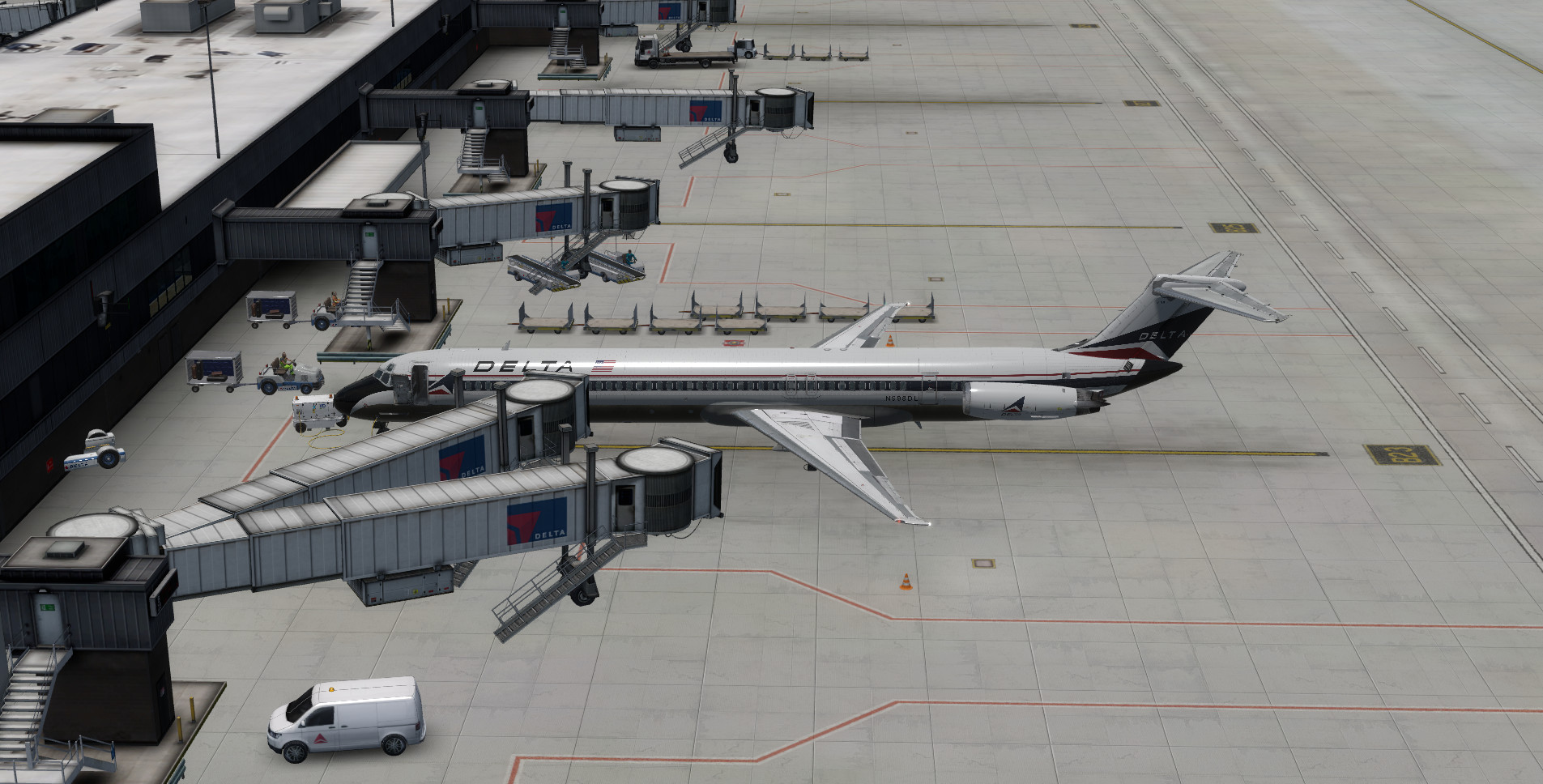

Jetway.jpg


Apparently, The jetway that is docking up to the plane is the SODE jetway and the other is the static jetway.

I've read the manual regarding this and followed the instructions. It just says to remove the Jetway_01.bgl file, which is the static jetway, from the Scenery folder and make sure there are no multiple jetway files in the ProgramData\12bPilot\SODE folder. There is NO jetway_01.bgl file in the Scenery folder and there are NO multiple jetway files for P3Dv4 in ProgramData\12bPilot\SODE folder. There is one SODE file for FSX and one SODE file for P3Dv4. I can remove the KATL SODE jetway and xml files for FSX and that will fix the problem and remove the static jetway in P3Dv4. But the problem is that it also removes the SODE jetways in FSX, which is what I expected. So I replaced the file. The manual says no more about this and it should work in both FSX and P3Dv4 without having the multiple jetways. What else could be causing the multiple jetways in P3Dv4? As I've said, it works fine in FSX. But if I delete or remove the files in ProgramData\12bPilot\SODE folder so that there are no multiiple files, I no longer have multiple jetways in P3Dv4 but the jetways in FSX are gone. There must be a way to fix this problem without effecting the SODE in FSX.

Ken.
 
Last edited:
Hi Ken...

There is a way.
However, it is very time-consuming.

I would first need to know whether there are two different files in ProgramData\12bPilot\SODE\SimObjects.
One for FSX and one for P3Dv4.

And whether there are also two files for FSX and P3Dv4 in ProgramData\12bPilot\SODE\xml.

If there are two different files, you can change them.
Then it will work without any problems.
 
Hi Ken...

There is a way.
However, it is very time-consuming.

I would first need to know whether there are two different files in ProgramData\12bPilot\SODE\SimObjects.
One for FSX and one for P3Dv4.

Yes. There are 2 different files, one is named "ImagineSim_KATL," which is for FSX, and the other is named ImagineSim_KATL3_PD4, which is for P3Dv4. There are no 2 files with the exact same names.


And whether there are also two files for FSX and P3Dv4 in ProgramData\12bPilot\SODE\xml.

There are also 2 different files in the xml, one for FSX and the other for P3D. There are no 2 files with the same name. How would I change the files?

Ken.
 
Last edited:
I have looked at the xml files.
FSX and P3Dv4 both use the same model names.
So the xml of the P3D can also access the FSX models.

Could you send me the two files for FSX and P3Dv4 from ProgramData\12bPilot\SODE\SimObjects
“ImagineSim_KATL”
“ImagineSim_KATL3_PD4”
can be sent.

Also by e-mail, if too large for the attachment here.
Or by download from a cloud.

Since FSX and P3D use the same model names, I would have to change the spelling in some files (sim.cfg, model.cfg), as well as the spelling of the model folder and the 3D models (mdl file) for the P3D itself.
 
I have looked at the xml files.
FSX and P3Dv4 both use the same model names.
So the xml of the P3D can also access the FSX models.

Could you send me the two files for FSX and P3Dv4 from ProgramData\12bPilot\SODE\SimObjects
“ImagineSim_KATL”
“ImagineSim_KATL3_PD4”
can be sent.

Also by e-mail, if too large for the attachment here.
Or by download from a cloud.

Since FSX and P3D use the same model names, I would have to change the spelling in some files (sim.cfg, model.cfg), as well as the spelling of the model folder and the 3D models (mdl file) for the P3D itself.

Hi Mike,

I've noticed that there are two SODE folders for P3Dv4, one in ProgramData\12bPilot\SODE\ and the other one in Lockheed Martin\Prepar3D v4\KATL AtlantaP3Dv4\SODE\jetways. I don't understand why the installer installed both the SimObjects and the xml in two different location. In both locations, they contain the folders SimObjects and XML with the exact same files. I don't know if you have this addon. Since you said that both files, one for FSX and one for P3D v4 have the same model names, I'm thinking that deleting the files and folders for P3Dv4 in ProgramData\12bPilot\SODE should solve the problem, since the main KATL Atlanta addon also has the very same SimObjects and xml files and folders as the one found in ProgramData. This way, you won't have to go through the trouble changing the names in the xml. I'll send you the files from ProgramData\12bPilot\SODE\SimObjects shortly.

Ken.
 
Last edited:
Hi Ken,

I have now looked at the two folders with the 3D objects for FSX and P3Dv4.
The only difference is the folder name (“ImagineSim_KATL” for FSX and “ImagineSim_KATL3_PD4” for P3Dv4)

I also noticed that the content of the xml files for FSX and P3Dv4 is almost the same.
In the P3D xml there is for each SimObject the addition
<TargetSim ID=“P3Dv4”/>

My suggestion would be to remove the xml file for P3D (ImagineSim_KATL3_PD4_Stands.xml) from ProgramData\12bPilot\SODE\xml.
Also remove the folder for P3Dv4 (ImagineSim_KATL3_PD4) from ProgramData\12bPilot\SODE\SimObjects.

As the Jetways are native FSX objects (created with the FSX SDK), they are also displayed in P3D.
And the corresponding xml contains the placement coordinates of the jetways.
Since every simulator FSX to P3D can read the xml via SODE and call the corresponding objects, you only need the SODE files and folders for FSX.

The Scenery Designer confuses the user only by the different folders and file names, although the content is the same.
The designer certainly assumes that the end user only runs one simulator.

You should also remove all SODE files and folders under Lockheed Martin\Prepar3D v4\KATL AtlantaP3Dv4\SODE\jetways.

The official SODE folders are
ProgramData\12bPilot\SODE\SimObjects
and
ProgramData\12bPilot\SODE\xml !!!

And this is the only place where SODE files and folders belong.
Anything else will only cause errors and make it more difficult to find the errors.

It should only work well with the FSX-SODE files.
 
Back
Top