• Which the release of FS2020 we see an explosition of activity on the forun and of course we are very happy to see this. But having all questions about FS2020 in one forum becomes a bit messy. So therefore we would like to ask you all to use the following guidelines when posting your questions:

    • Tag FS2020 specific questions with the MSFS2020 tag.
    • Questions about making 3D assets can be posted in the 3D asset design forum. Either post them in the subforum of the modelling tool you use or in the general forum if they are general.
    • Questions about aircraft design can be posted in the Aircraft design forum
    • Questions about airport design can be posted in the FS2020 airport design forum. Once airport development tools have been updated for FS2020 you can post tool speciifc questions in the subforums of those tools as well of course.
    • Questions about terrain design can be posted in the FS2020 terrain design forum.
    • Questions about SimConnect can be posted in the SimConnect forum.

    Any other question that is not specific to an aspect of development or tool can be posted in the General chat forum.

    By following these guidelines we make sure that the forums remain easy to read for everybody and also that the right people can find your post to answer it.

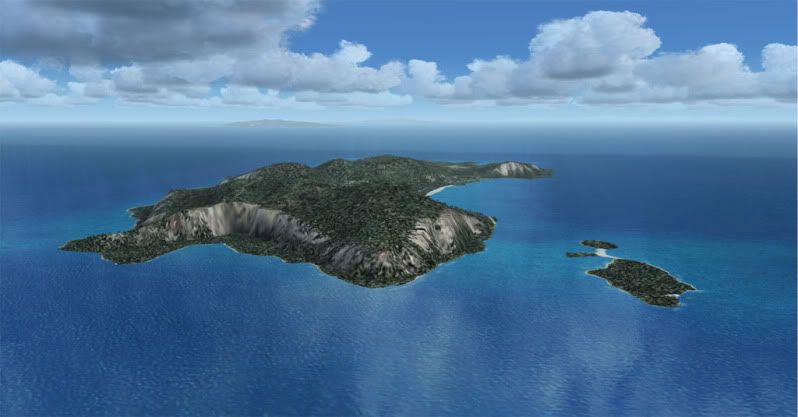
FS2004 island

Messages
72
Country
ca-ontario
Hey guys,

I'm trying to create a lil island, very small just to test out since I just started learning. I did everything following the Creating High-Detail FS Ground Polygons tutorial.

But it doesn't show up above the water, so I might have done something wrong. How can I make it appear above water? is there an asm tweak for that?

I've created an island in Sbuilder but I can't put photoreal in Sbuilder. So I'm experimenting with gmax.

Any help is welcomed for a newbie

Nicholas
 
Gmax will make a better island shape......

Easy to export...Do you have Gamepacks 2004 or FSX?

After exporting your model. Use the BGL converter and add your location.
There are tutorials and instructions for the BGL in your SDK's...
You don't need to adjust for altitude. The Island will use the bottom of your model. So to sink it a bit. Lower the altitude to -25 feet.

DG:eek:
 
Hey guys,

I did a plane poly with the island texture on it, to see how it is, but my problem now if how to create the island? I can't seem to find a way to create a custom shape that's smooth without going just bevel. Like smooth elevation.

Can anyone lightened me on that please?

Nicholas

a21e3ed5.jpg
 
thnx I've been trying to do this tutorial but no luck, as it seems that this tutorial I need to buy some software.

thnx nyways
 
I think it is not good to make an island with gmax. You will lose your autogen, coastline, surf etc. and it is difficult to make a smooth contour of the land like the way mesh do.
Please download this file:
http://www.ptsim.com/sbuilderx/terrain_design_for_flight_simulator_x.zip
Just copy to the internet explore and download will begin instantly.
Unzip this document and look for making island inside the tutorial. You will find the way to make island without difficulty and hundred times easier than gmax.

The rough guide line is:
1. Make an exclusion of all terrain type around the area you want to make an island.
2. The exclusion you made will exclude water as big as QMID 11. You can take a look at the default terrain by using TMFViewer.exe inside the terrain SDK. (just follow the tutorial how to do this) and you will find how big it will be excluded.
3. Draw the water to cover what has been disappear. Make it a little bigger than QMID11. View QMID 11 from the menu bar of S-builder and use slice tool to cut the polygon to fit the QMID grid.
4. Then draw a polygon to cover your island by looking at satellite picture and click on left button make it a hole. Then it will ask which is parent of the hole. You have to click on the border of the water you just did.
5. Make sure that you have mesh of that area in FSX. The mesh will show up nicely. Like this island in the gulf of Thailand. No photoscenery needed, no other texture needed, just the default texture. The island looks nice enough, don't you think? And frame rate is much better too.

kohkaig.jpg
 
Last edited:
ok thanks, unfortunately I'm using FS2004. I'll give it a try using the tutorial though.

I want to add satellite photos to the lil island, but in sbuilder fs2004, I have no idea, sbuilderx has an option but not sbuilder fs2004
 
that could be usefull for me though, thanks Jtanabodee, i've been trying to do de same thing but with FsxKml, with little success, anyway sbuilder for fs2004 can't do that?.
 
You can do this in FS2004 too but mesh is not as good as FSX due to game engine.

Look at this picture the same island in FS2004
koh-1.jpg


I'm not sure about tutorial in FS2004. But in the same website of PTsim you can find the same questions asking about island.
Rough guide line is:
1. You have to know where your project is by looking at the lower right screen of S-builder (for FS9) Look at my work at Samui Island in the gulf of Thailand.


s-builder01.jpg


You have to look at the red circle LOD5 indicated 74 28. That means you have to look at Scenery/World/scenery/(your continent here)asia and find the file HL974280.bgl
2. Use S-builder and append this file. Choose the file that is your project. Mine is HL974280.bgl

s-builder02.jpg


All the LWM will show up in Sbuilder and you will see the water body in your project. If the satellite picture show your island over the water body, you have to delete that polygon until there is no water in the area. (red arrow)

s-builder03.jpg


Then after remove all the water, the remaining water will be like this:

s-builder04.jpg


Now mesh will show up, since water hold the height to zero. You can compile the file and rename it as HL9XXXX0.bgl. Of course, you have to back up your file first.
3. Now write the polygon of your island, the water that still missing and compile them to your project's add on scenery.
4. Make sure that all the island area you just did have its own Landclass. You can use S-builder to add Landclass. If you don't, you will have island that was cut in square LOD that contain no landclass. The area of land without landclass will show nothing.
This mini tutorial will help you a little. If you have any more questions, you can ask more. But doing some research in Google will show up a lot of ideas.:D
 
Last edited:
thank you very much!

But I have a problem with the append, it keeps saying Invalid LMW BGL file
 
by the way,

can you do a small tutorial how to get your island the elevation? that is have some volume? my lil island is like 9m high.
 
Thanks Jtanabodee, very apreciated, I will jump to sbuilder :rolleyes:, and fskKml left for making traffic and flatten :mad:,.
Nixpilot the mesh usually are done with payware profesional tools, from aerial imagery. or someone who have the mesh for that aerea and uploading them, people have been making mess in other ways but this is far beyond my knowledge
 
hey!

I have a question for the gmax pros in fsdeveloper.

I've made a custom island model but when I go on it, my airplane sinks to the bottom of it, I want to make it such as FS recognize it as land.

Thnx

Nicholas
 
by the way,

can you do a small tutorial how to get your island the elevation? that is have some volume? my lil island is like 9m high.
If you have this problem, I'm sure that you chose the wrong file. There are a lot of them.
AP9XXXX0.bgl is for airport.
HL9XXXX0.bgl is for Land and water.
HP9XXXX0.bgl is for.........I cannot remember:D
You might pick the wrong one. Please try again.
hey!

I have a question for the gmax pros in fsdeveloper.

I've made a custom island model but when I go on it, my airplane sinks to the bottom of it, I want to make it such as FS recognize it as land.

Thnx

Nicholas
You need to make a platform for that. And it has to be flat. You cannot harden polygon in gmax to be landable island.
I have done gmax and displace map without any luck.
http://fsdeveloper.com/forum/showthread.php?t=17970
 
Last edited:
damn it... so complicated, now when I view my island in FS, not only it's not a land, but now the texture is messed up, tiles of the textures on it.

here's what it is:

c78433d0.jpg


I don't know how to fix the tiling.

This is my UWV wrap settings:

d82171eb.jpg
 
Hi Nixpilot,
Would you mind sending you satellite picture and the coordinate of the picture to me. I can do s-builder for you. Making island in sbuilder is much simpler than gmax.
Best Regards,
Tic
 
I already tried to do it in sbuilder, on got to textured polygon but when I use flatten polys to get the elevation it uses the FS textures instead of my textures, therefore it overlaps my textured poly.
 
Oh, I forget to tell you a very important thing.:p
When you draw a polygon and make it LWM land, you need to put the height of the poly to -9999 (four 9 only not thing less or more) and the land mask will take height from mesh.

Sbuilder.jpg


Good luck!
 
Last edited:
do you know how to add mesh in sbuilder?

Cause I don't have a clue, i've tried but didn't find how to.
 
Back
Top