
• Which the release of FS2020 we see an explosition of activity on the forun and of course we are very happy to see this. But having all questions about FS2020 in one forum becomes a bit messy. So therefore we would like to ask you all to use the following guidelines when posting your questions:

    • Tag FS2020 specific questions with the MSFS2020 tag.
    • Questions about making 3D assets can be posted in the 3D asset design forum. Either post them in the subforum of the modelling tool you use or in the general forum if they are general.
    • Questions about aircraft design can be posted in the Aircraft design forum
    • Questions about airport design can be posted in the FS2020 airport design forum. Once airport development tools have been updated for FS2020 you can post tool speciifc questions in the subforums of those tools as well of course.
    • Questions about terrain design can be posted in the FS2020 terrain design forum.
    • Questions about SimConnect can be posted in the SimConnect forum.

    Any other question that is not specific to an aspect of development or tool can be posted in the General chat forum.

    By following these guidelines we make sure that the forums remain easy to read for everybody and also that the right people can find your post to answer it.

Landing Lights(SOLVED)

krispy1001

Resource contributor
Messages
707
Country
unitedstates
Hi everyone!

I am working on getting my landing lights to work. But I am having no success. Below is an image of how I have my poly setup and what I have for effect and visibility. I followed the SDK on setting up the landing light effect.
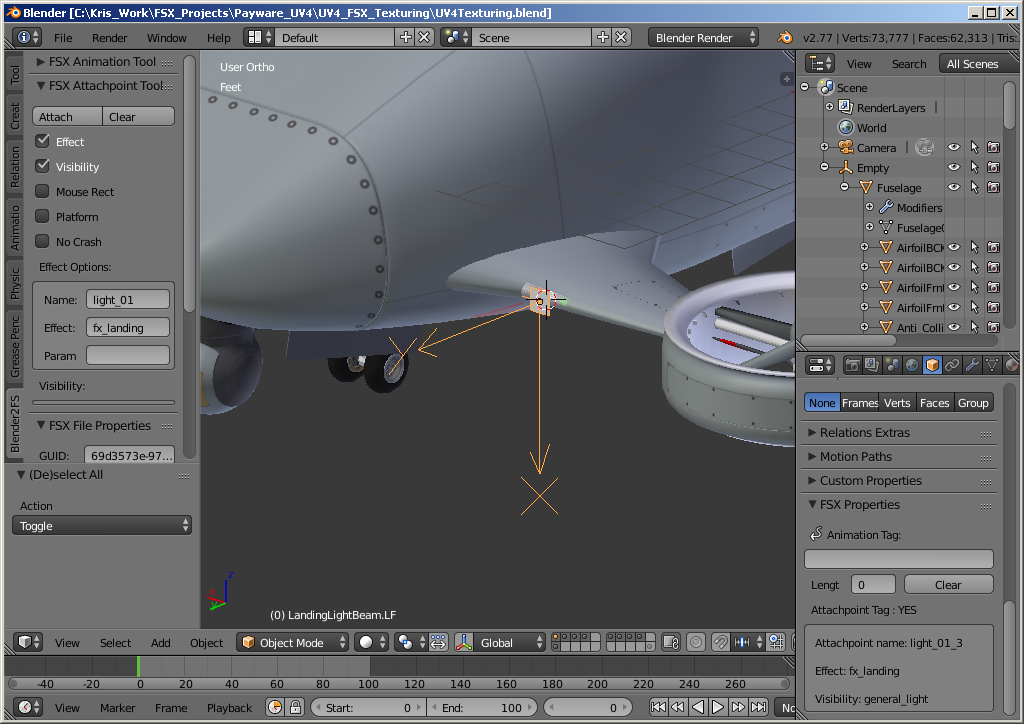
upload_2016-9-16_15-44-5.png


Thank you for any help!!
 
There is a difference between the orientation that the SDK dictates and the orientation that you should use with Blender. Don't know that by heart, so you'll need to check that in the B2X manual.

Nice model Kris, you rock!

I was working on attached effects lately as well, and that totally mixed up. I didn't get an attached effect visible in the VC, and when I changed to the exterior view this effect appeared in the landing lights.:eek:
 
There is a difference between the orientation that the SDK dictates and the orientation that you should use with Blender. Don't know that by heart, so you'll need to check that in the B2X manual.

Nice model Kris, you rock!

I was working on attached effects lately as well, and that totally mixed up. I didn't get an attached effect visible in the VC, and when I changed to the exterior view this effect appeared in the landing lights.:eek:
Hi Daan!

Thanks!

I read the Blender2FSX tool set manual. I setup my landing light poly as per manual and still I do not have landing light. All the other lights on my aircraft work good. Below is the visibility xml code that I am using. Also below is an image of my Blender file setup.

Code:
<PartInfo>
        <Name>general_light</Name>
        <AnimLength>100</AnimLength>
        <Visibility>
            <Parameter>
                <Sim>
                    <Variable>LIGHT LANDING</Variable>
                    <Units>bool</Units>
                </Sim>
            </Parameter>
        </Visibility>
</PartInfo>

upload_2016-9-16_19-26-23.png
 
Craziest things!!!!!!

You have to apply a texture to the poly used as your light effect. That is completely different than other effects like "NO Crash". Also the SDK does not say anything about adding a material to the poly.

So Mystery solved at least concerning Blender and Landing Light effects. So if you are working with Blender and you add a "general light" effect you must apply a material to your poly used.

Thanks, Kris!
 
Hello

I have a problem when I want to export a single effect in Scenery
I have attached a picture and file .Blend

if anyone can help me

thank you


Link .blend:

http://s000.tinyupload.com/index.php?file_id=93305598782844278867

Hi FSX3D!

An effect needs a visibility! See image Below:

upload_2016-9-22_9-54-10.png


And remember just as I found out you need to apply a simple material for the effect to be seen in FSX. Note: the visibility that I used checks to see if aircraft lights are on. So you will have to use a different visibility. One more suited for what you are trying to accomplish.

Thanks, Kris
 
Hi and thank you chris

I just want a simple effect (not like on an airplane)
such an effect (sound) is played all the time

I tried to choose a tag
I thought "visibility" was only for aircraft


Thank you so much for all you do! :)
 
Hi Chris,

I still have the same problem :(
is what I need to store the file "effect" in a specific folder?

Is what you would have a blend file for example please?

I have assigned a "material" and I tagged visibility

I have exactly the same error :(


thank you for your help
 
Hi Chris,

I still have the same problem :(
is what I need to store the file "effect" in a specific folder?

Is what you would have a blend file for example please?

I have assigned a "material" and I tagged visibility

I have exactly the same error :(


thank you for your help

Hi FSX3D!

I do not do very much with scenery items. So I do not know what type of effect or the visibility that you need to attache to the effect. You need to get in contact with one of the scenery designers.

I am saying that the effect needs a visibility just because of what I see in the modeldef.xml file. If you go through the modeldef.xml file you will see that effect need a visibility. See code example below.

Code:
<PartInfo>
    <Name>windshield_nonprecip</Name>
    <Visibility>
      <Parameter>
        <Code>
          (A:AMBIENT PRECIP STATE, flags) 3.0 &gt; if{ 0 } els{ 1 }
        </Code>
      </Parameter>
    </Visibility>
  </PartInfo>

But because I do not work on scenery projects that often I can not be certain. Sorry, but I do not know how to answer your question.

Thanks, Kris
 
Hello,

Thank you for the answer.
It's okay it's easy to do this with MCX

Thank you and good luck :)
 
Back
Top