
• Which the release of FS2020 we see an explosition of activity on the forun and of course we are very happy to see this. But having all questions about FS2020 in one forum becomes a bit messy. So therefore we would like to ask you all to use the following guidelines when posting your questions:

    • Tag FS2020 specific questions with the MSFS2020 tag.
    • Questions about making 3D assets can be posted in the 3D asset design forum. Either post them in the subforum of the modelling tool you use or in the general forum if they are general.
    • Questions about aircraft design can be posted in the Aircraft design forum
    • Questions about airport design can be posted in the FS2020 airport design forum. Once airport development tools have been updated for FS2020 you can post tool speciifc questions in the subforums of those tools as well of course.
    • Questions about terrain design can be posted in the FS2020 terrain design forum.
    • Questions about SimConnect can be posted in the SimConnect forum.

    Any other question that is not specific to an aspect of development or tool can be posted in the General chat forum.

    By following these guidelines we make sure that the forums remain easy to read for everybody and also that the right people can find your post to answer it.

(Live) METAR weather data for Aerofly FS 2

Messages
572
Country
unitedstates
A project I've been keeping an eye on...... https://www.aerofly.com/community/f...data-for-aerofly-fs-2/&postID=73440#post73440
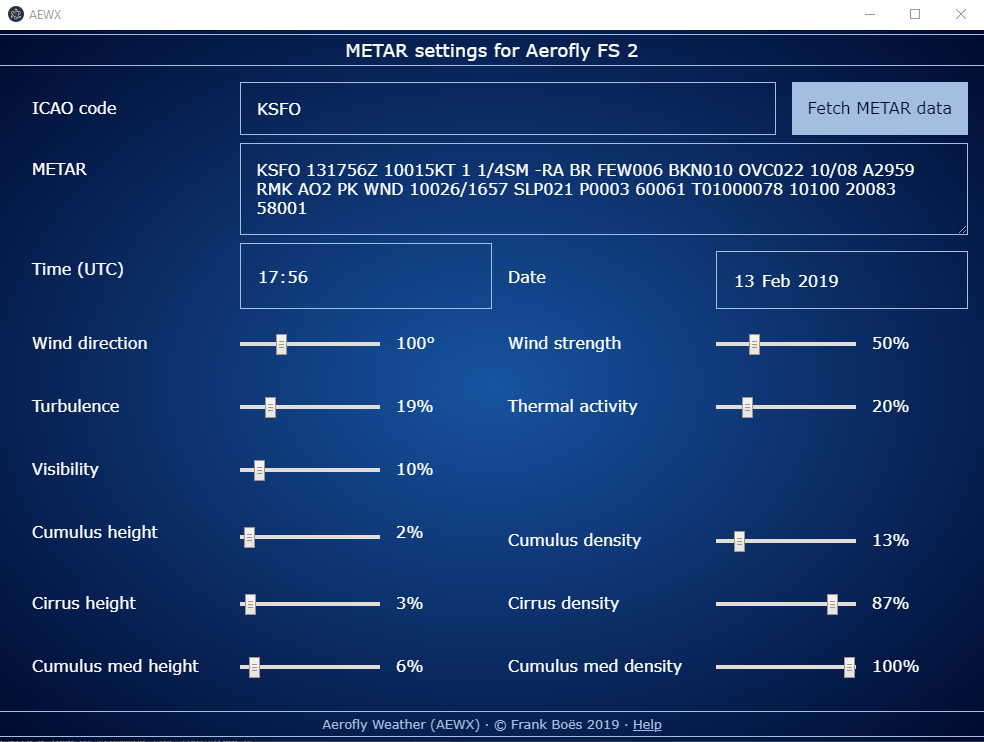
For me weather is one of the main challenging aspects of every flight simulator. Aerofly FS 2 offers some controls to change the in-game weather - but I always forgot about them, or did not take the time to set them to real world conditions, let alone set the time correctly. But wouldn't it be cool to set the weather conditions (and time) to real-life conditions by just the press of a button? To brave the the same wind conditions, wind gusts, or dark and foggy nights like real-world pilots have to do right now?

Actually there are plenty of sources for real-world aviation weather in a machine readable format called METAR. On the other hand Aerofly FS 2 stores its weather settings in its main configuration file. So...

I build a small tool called Aerofly-Weather (short: AeroWX) which copies the METAR weather and time information to your configuration file while Aerofly FS 2 is not running. AeroWX imports METAR weather information from an internet service (like AVWX and CheckWX) or accepts direct input of METAR strings (e.g. to supply METAR data for your favourite hurricane).
Keep in mind that while your simulation is running, your weather will not be updated. You may set your weather before starting AFS2, but the tool cannot change it while AFS2 is running (as for now).

AeroWX has been tested on Windows 10 and the STEAM-version of AFS2. AeroWX is a little rough around the edges, comes with no warranty or support of any kind, is a strain on the eyes, requires you to actually read its manual, and its installation requires Node.js and at least three terminal commands. You have been warned.
1f609.png


So here it is: https://www.npmjs.com/package/aerofly-weather
https://www.npmjs.com/package/aerofly-weather

373-2130e086.png
 
https://www.aerofly.com/community/f...data-for-aerofly-fs-2/&postID=75794#post75794

It's me again.

By now I have completed step 4 of my roadmap to live weather in Aerofly FS2 and present the Aerofly Wettergerät. Like its predecessor it copies METAR weather reports into your AFS2 configuration file, and comes as a command-line utility as well as a desktop application: https://github.com/fboes/aerofly-wettergeraet

It is somewhat uglier than "Aerofly-Weather" (AeroWX), but more than ten times smaller in download size, has a smaller memory footprint, and does not require a manual (until you run into trouble) or any secondary software anymore.

Even more important: It is the last step I needed to finish before tackling step 5, the integrated "Aerofly Wettergerät DLL", which will update weather while AFS2 is running, without any further button mashing required. As the demo DLL now compiles on my rig and the first relevant symbols have been exchanged, I am confident that step 5 is in our reach, even though it may take some considerable time. I'll keep you posted.


Back
Top