
• Which the release of FS2020 we see an explosition of activity on the forun and of course we are very happy to see this. But having all questions about FS2020 in one forum becomes a bit messy. So therefore we would like to ask you all to use the following guidelines when posting your questions:

    • Tag FS2020 specific questions with the MSFS2020 tag.
    • Questions about making 3D assets can be posted in the 3D asset design forum. Either post them in the subforum of the modelling tool you use or in the general forum if they are general.
    • Questions about aircraft design can be posted in the Aircraft design forum
    • Questions about airport design can be posted in the FS2020 airport design forum. Once airport development tools have been updated for FS2020 you can post tool speciifc questions in the subforums of those tools as well of course.
    • Questions about terrain design can be posted in the FS2020 terrain design forum.
    • Questions about SimConnect can be posted in the SimConnect forum.

    Any other question that is not specific to an aspect of development or tool can be posted in the General chat forum.

    By following these guidelines we make sure that the forums remain easy to read for everybody and also that the right people can find your post to answer it.

Material template editor broken (last dev release)

Messages
126
Country
germany
Hi Arno,

I already reported this bug back in 2019 and you fixed it a couple of days later. Today I downloaded the very last dev-version of MCX and the material editor bug occured again.
When trying to create a template from an existing material of the loaded model, MCX crashes as soon as I try to close this window.
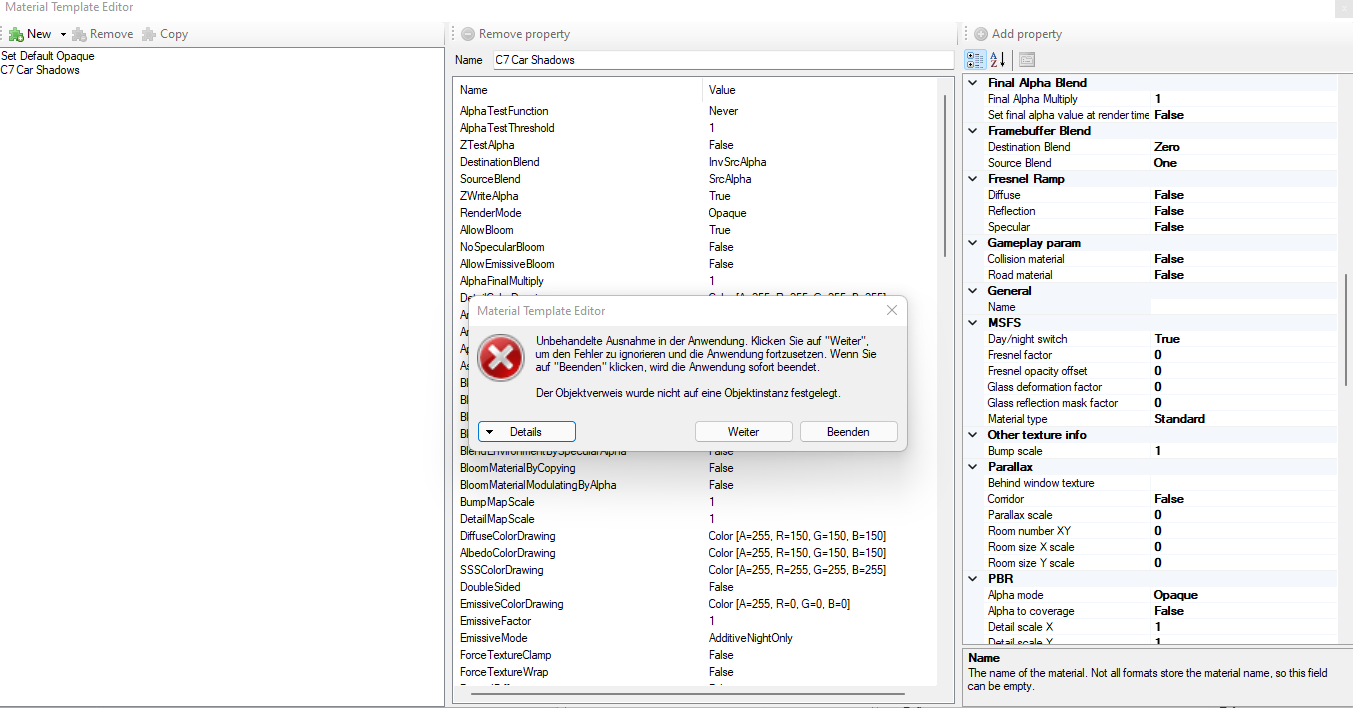

1642859965009.png


Cheers, Volker
 
Hi Volker,

Thanks for reporting, I'll have a look.
 
Hi,

I have found the bug, it is something different then last time. It was caused by the material name being null. It will be fixed in the next development release.
 
Hi Arno,
tried the newsest MCX. The initial bug is of course solved but there seems to be another one. I loaded a model and created a mat-template ("C7-Trees" in this example). The template is correctly stored in the mcx template folder. But as soon as I once completey close the material-editor window (after creating the template) and open it again, the template is not shown anymore in the dropdown menu.

Screenshot (53).png


Cheers, Volker
 
I found this: After deleting the empty (and doubled) "name" tag and "Mat Comparison" tag, MCX shows the template correctly in the corresponding menu.


bug.png
 
Hi,

It was the last line that caused the bug indeed. I have fixed it now, that attribute should not have been included in the template.

The Name does not have to be removed. It is not a double attribute, it's just that your material has an empty name.
 
Back
Top