
• Which the release of FS2020 we see an explosition of activity on the forun and of course we are very happy to see this. But having all questions about FS2020 in one forum becomes a bit messy. So therefore we would like to ask you all to use the following guidelines when posting your questions:

    • Tag FS2020 specific questions with the MSFS2020 tag.
    • Questions about making 3D assets can be posted in the 3D asset design forum. Either post them in the subforum of the modelling tool you use or in the general forum if they are general.
    • Questions about aircraft design can be posted in the Aircraft design forum
    • Questions about airport design can be posted in the FS2020 airport design forum. Once airport development tools have been updated for FS2020 you can post tool speciifc questions in the subforums of those tools as well of course.
    • Questions about terrain design can be posted in the FS2020 terrain design forum.
    • Questions about SimConnect can be posted in the SimConnect forum.

    Any other question that is not specific to an aspect of development or tool can be posted in the General chat forum.

    By following these guidelines we make sure that the forums remain easy to read for everybody and also that the right people can find your post to answer it.

MCX 1.7 and development release bugs.

Messages
13
Country
unitedstates
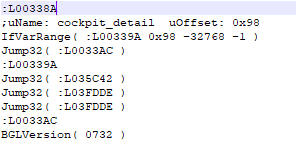
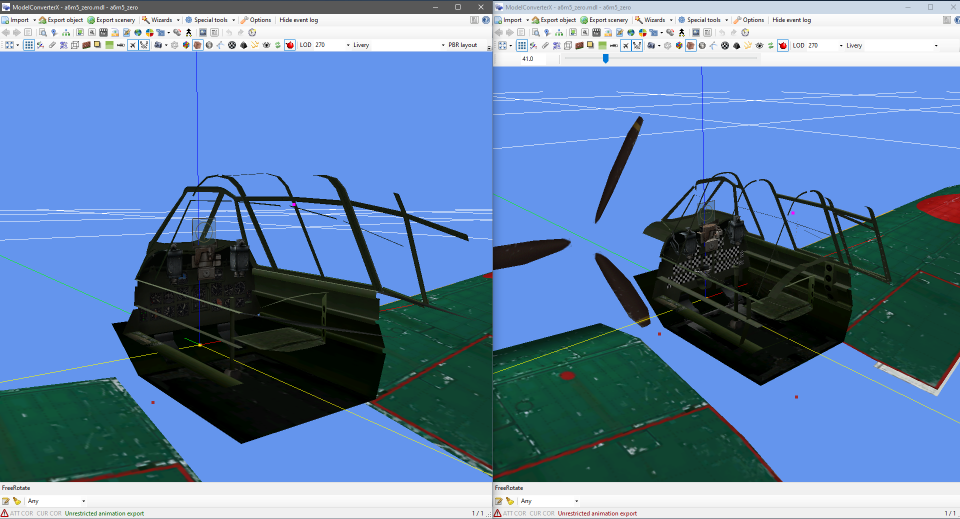
With v1.7 stable and v1.8.250804-devrelo gen_model variable looks to be not functional with CFS2 and FS04 models. Even the "Hover over the variable name to see help" doesn't work. Next, load times. I have no idea what is going on but I have watched it just hang as the black DOS window for over 1 minute (Timed with phone's stopwatch so not a joke/exaggeration). With the development release if click on the External, LOD, Livery or PBR Layout drop downs you can't get mouse zoom back by clicking on the model and dragging it around like past version. The only way to get zoom back is the Esc key or restart MCX. If this is intended behavior I'm not a fan. Probably a really low priority as this only effects CFS2 player flyable aircraft, the variable cockpit_detail (98 in v1.5) needs to be able to use the value of -1. This is the only way to get the full detail cockpit. Using gen_model 1 get you a version with no moving parts prop and no working gauges.
1755217172098.png


1755216865773.png
 
Hi Allen SOH, I too see long start times initially in that Windows session. On my Win 11 I have One Drive turned off. I believe that Windows is waiting for One Drive to respond before continuing with MCX. Just my theory. The long start time is only for the first time I start MCX. After that start time is normal.

Ed
 
When a .NET application first runs, the Intermediate Language (IL) code needs to be compiled into native machine code by the JIT compiler. This compilation process, while offering runtime optimization benefits, introduces a delay, particularly for larger applications.
 
Hi Allen,

What kind of specs does your PC have? I have never seen MCX take that long to startup.

What setting do you use for "use conditions" in the options? Do you have it at the default value of visibility condition or did you revert it to user specified?

I probably need to check the min and max values I allow for gen_model, might well be I do not allow -1 now.
 
Hi Allen,

I just had a look at this issue. The tooltip not showing for some variables was a bug indeed. I will add that back in the next development release.

1760767389603.png


In my previous reply I mentioned I would check the gen_model, but reading your post again it was the cockpit_detail variable that you wanted to give a value of -1. I have looked into that and the variable is an unsigned int16, which means that negative values are not allowed. But with a value of 65535 you get all cockpit details. I have now also modified the default value of this variable from 0 to 65535. So that will also be in the next release.
 
With the development release if click on the External, LOD, Livery or PBR Layout drop downs you can't get mouse zoom back by clicking on the model and dragging it around like past version. The only way to get zoom back is the Esc key or restart MCX. If this is intended behavior I'm not a fan.
I realised I did not reply to this comment yet. But I can't reproduce this issue on my machine. If I click in the LOD selection box, for example to change the LOD, and then move my mouse back over the preview, a mouse scroll does change the zoom as you would expect. Do you see that the scroll wheel changes the LOD selection? In that case it might help to just left click in the preview to force it to get the focus. But like I said I do not see that on my machine.

Like I asked before what computer specs and operating system are you running on? Because it sounds like the tool is behaving weird on your machine (with the long load times as well, etc).
 
I'll try the next update when it is done. The mouse wheel not working as zoom also happens with the Livery drop down. Happened with the latest dev version of this posting as well (gen_model also still broke as there are no tooltip and using 1 for FS04 aircraft doesn't load the cockpit intender model and also guessing CFS2 models are also borked). Attaching a .mp4 video in the zip of the mouse wheel not working and left or right click won't fix it.

Windows 10 64-bit.
AMD Ryzen 5 2400G @ 3.60GHz (Cores: 4 Threads: 8)
16 GB of RAM (14.9 GB usable)
AMD Radeon(TM) RX 580 4 GB
 

Attachments

Last edited:
Back
Top