• Which the release of FS2020 we see an explosition of activity on the forun and of course we are very happy to see this. But having all questions about FS2020 in one forum becomes a bit messy. So therefore we would like to ask you all to use the following guidelines when posting your questions:

    • Tag FS2020 specific questions with the MSFS2020 tag.
    • Questions about making 3D assets can be posted in the 3D asset design forum. Either post them in the subforum of the modelling tool you use or in the general forum if they are general.
    • Questions about aircraft design can be posted in the Aircraft design forum
    • Questions about airport design can be posted in the FS2020 airport design forum. Once airport development tools have been updated for FS2020 you can post tool speciifc questions in the subforums of those tools as well of course.
    • Questions about terrain design can be posted in the FS2020 terrain design forum.
    • Questions about SimConnect can be posted in the SimConnect forum.

    Any other question that is not specific to an aspect of development or tool can be posted in the General chat forum.

    By following these guidelines we make sure that the forums remain easy to read for everybody and also that the right people can find your post to answer it.

FS2004 Mesh with SBuilder, problem

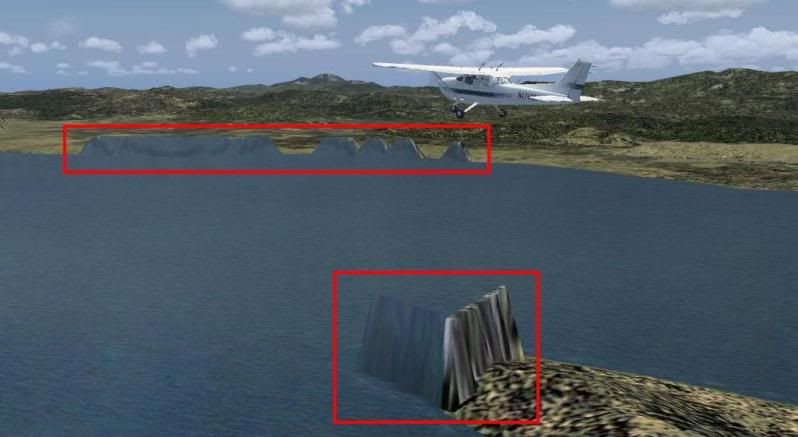
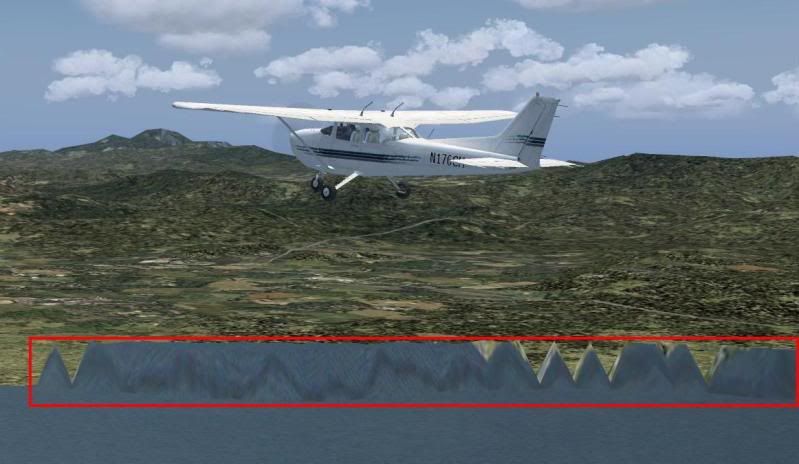
Hello again, already fixed the previous problem, but I have another problem with the mesh
mesh5.jpg


mesh2.jpg


mesh3.jpg


mesh4.jpg


It's very rare, It's fixed when used the altered file in the "Flight Simulator 9\Scenery\Same\scenery" directory, but when restored the original file in the same directory I got those rare elevations

Here is what I did in SBuilder

sbuilder.jpg


Help please
 
It looks like you need to make a redundant flatten a bit larger than the actual water. That should keep the original elevation from 'bleeding through'.

Dick
 
Hi Dick, sorry but what do you mean with "make a redundant flatten a bit larger than the actual water"? :confused:
 
Well, I tried three ways to solve the issue but unfortunately failed :banghead: this is what I did:

1. Expanded the Exclude polygon
2. Added a new Flatten polygon (even when I knew that it wouldn't work :D)
3. Added more Landclass

But no success, nothing solved the problem, I don't know what else to do :confused:
 
Zip up all the files you are using, attach them to this post, include a saved FLT file so I can instantly go to the problem without slewing around to see it. Then I can tell if I have the same problem.

Dick
 
The problem is the mesh.

Although SBuilder can make mesh, it isn't it's strong suit. And SRTM data is really only good for up to LOD9... and that's stretching it a bit. And the SRTM data you used has a lot of abnormalities.

The best SRTM based mesh is CGIAR 4.1 data. But, it is available in Geotiff format... good for FSX, but not good for FS2004. I'll look into a translation of GeoTIFF to BIL format, and show you how to make an inf file to drag'n'drop on FS2004 resample to make LOD9 mesh.

Jose Fermandois has also created some mesh for South America that is freeware and can be obtained at AVSIM's Library. Do a search for Jose Fermandois Venezuela

AND... about $12 US, you can buy FSGenesis LOD9 mesh for northern South America, and that is exactly what I recommend. Justin Tyme is very good at making mesh, and correcting any abnormalities that creep in... and $12 saves a lot of time and headaches.

Justin is also working on using ASTER data which should get LOD11 mesh worldwide eventually... he just has to work on the bugs in the data.

What I'm saying is: Why reinvent the wheel? There's quite good mesh out there, some free. Why not take advantage of that?

Dick
 
Hello guys, sorry for bother again :o

I can say the problem is "almost fixed" but not completely, because I got something rare with the terrain, here some pics

terrainproblem1.jpg


terrainproblem2.jpg


The answer is no, because when I go far away from that island, the elevation appears again :confused:

Here is what I did in SBuilder

terrainproblem3.jpg


http://www.2shared.com/file/hQPKzogM/SVVA27.html

Well, I honestly don't know if the real culprit is SBuilder or the Mesh :rolleyes: in this case I made the Mesh by converting 2 GeoTiff files (downloaded from http://www.gdem.aster.ersdac.or.jp/search.jsp) to .BIL with GM, then compiled with the resample, here is the code of the .inf file

Code:
[Destination]
LOD = 9
DestDir = "E:\Archivos de programa\FS2004SDK\TERRAIN_SDK\Samples\Escenarios"
DestBaseFileName = "SRTM_Mesh"
UseSourceDimensions = 1
NorthLat = 11
SouthLat = 10
EastLon = -67
WestLon = -69
FractionBits = 0
BaseValue = 0

[Source]
Type = MultiSource
NumberOfSources = 2

[Source1]
Type = ElevS16LSB
SourceDir = "E:\Archivos de programa\FS2004SDK\TERRAIN_SDK\Samples\Fuentes"
SourceFile = "N10W068.bil"
Lat = 11
Lon = -68
NumOfCellsPerLine = 3601
NumOfLines = 3601
CellXdimensionDeg = 0.000277700638711469
CellYdimensionDeg = 0.000277700638711469
ScaleInMeters = 1.0

[Source2]
Type = ElevS16LSB
SourceDir = "E:\Archivos de programa\FS2004SDK\TERRAIN_SDK\Samples\Fuentes"
SourceFile = "N10W069.bil"
Lat = 11
Lon = -69
NumOfCellsPerLine = 3601
NumOfLines = 3601
CellXdimensionDeg = 0.000277700638711469
CellYdimensionDeg = 0.000277700638711469
ScaleInMeters = 1.0

It's my first time using resample and .inf files with FS9, did I made something wrong???

Thank you all, and again, sorry for bother you guys :o
 
Hello FSDeveloper guys

I was trying to made a Mesh with SBuilder but no success

I dowloaded the .HGT files from the NASA website, converted it to .BSQ and .BMP, then used the .BMP as a map, calibration was correct because was the original calibration from the .HGT file

And for a unknow reason, SBuilder modified the calibration of the mesh map and it looks very small now after clicking the Mesh button

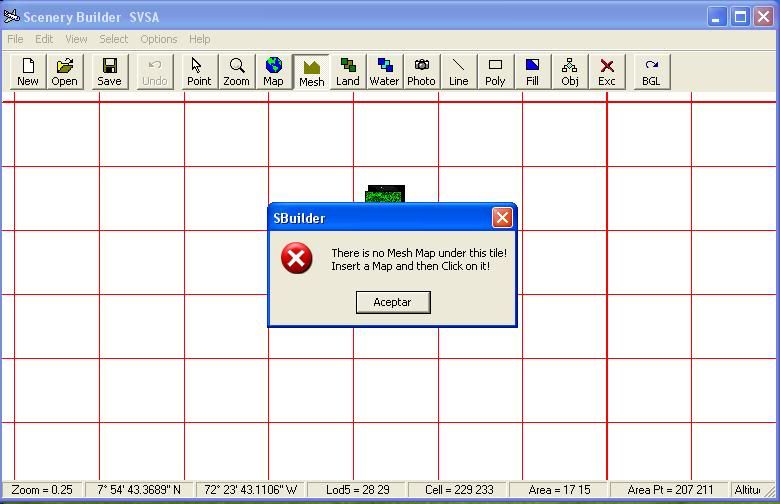
Then click in one of the tiles where the mesh map is and I got this message

problemsbuilder.jpg


Help please

Very frustrating...I have the same problem, tried everything I could click on, set, modify and my map still shrinks smaller than a LOD8.

What's the solution please?
 
Back
Top