• Which the release of FS2020 we see an explosition of activity on the forun and of course we are very happy to see this. But having all questions about FS2020 in one forum becomes a bit messy. So therefore we would like to ask you all to use the following guidelines when posting your questions:

    • Tag FS2020 specific questions with the MSFS2020 tag.
    • Questions about making 3D assets can be posted in the 3D asset design forum. Either post them in the subforum of the modelling tool you use or in the general forum if they are general.
    • Questions about aircraft design can be posted in the Aircraft design forum
    • Questions about airport design can be posted in the FS2020 airport design forum. Once airport development tools have been updated for FS2020 you can post tool speciifc questions in the subforums of those tools as well of course.
    • Questions about terrain design can be posted in the FS2020 terrain design forum.
    • Questions about SimConnect can be posted in the SimConnect forum.

    Any other question that is not specific to an aspect of development or tool can be posted in the General chat forum.

    By following these guidelines we make sure that the forums remain easy to read for everybody and also that the right people can find your post to answer it.

Missing Objects on World Map

Messages
1,267
Hi,

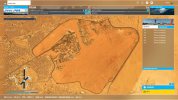
I don't know why in the world MSFS2020 is doing this strange thing now. First, I launch MSFS2020. When it gets to the opening screen, where you select your aircraft, airport, runway, ext, I select my airport. When the World Map comes up and I set the time of the day, all the objects are now gone. The terminal, all the airport hangars, tress, and everything is gone on this World Map. It's nothing but a map and it looks nothing like it looked before. Here's a screenshot:


Missing Objects on World Map.jpg


What's going on here? The map looks nothing like it did and the terrain looks nothing like it did. This started just all of a sudden. But there is one thing I want to mention. A few weeks ago I posted in another thread that I was getting a message saying that my data is different from the cloud. Here’s what the message said when I first launch MSFS2020:


Which one do you want to use?
The data we have in the cloud is different from the data on this device.
The one on this device (newer)
The one in the cloud (older)


I've been closing it out instead of selecting one of them because I wasn't sure which one to select. I was told to select newer, which is the one on this device. Anyway, I finally went ahead and selected the newer one. The next time I launch the sim, this is when the problem started. Did this have anything to do with the problem I'm having? I hope there's a simple fix and I did not corrupt anything. The message I was getting gave me the choice to select this device or select the data on the cloud. How do I go about setting my data to the cloud? This has got me worried now and wonder if I have to re-install.


Ken.
 
Last edited:
You will see your Objects when clicking on the fly now button

If you are talking about aerials, may be related to this


Inviato dal mio Mi 9 Lite utilizzando Tapatalk
 
Try to select the Gate again and see if they reset on the World Map. On mine the Gates and Runways came back to normal.

Patricio Valdes
 

Attachments

  • Screenshot (71).jpg
    Screenshot (71).jpg
    563 KB · Views: 107
  • Screenshot (72).jpg
    Screenshot (72).jpg
    539.1 KB · Views: 119
  • Screenshot (73).jpg
    Screenshot (73).jpg
    534.3 KB · Views: 106
  • Screenshot (74).jpg
    Screenshot (74).jpg
    558.3 KB · Views: 123
Try to select the Gate again and see if they reset on the World Map. On mine the Gates and Runways came back to normal.

Patricio Valdes

Thanks Patricio,

I posted this over a year ago and the problem was with Bing Map. Apparently, the server was down.

Ken.
 
Thanks Patricio,

I posted this over a year ago and the problem was with Bing Map. Apparently, the server was down.

Ken.
Glad Ken, you sorted it out. But, just in case if it happens again, you have an idea on what else can be done.

Patricio Valdes
 
I very seldom fly MSFS anymore, and besides, P3D is a much better simulator.
Oops! ... well, it depends on how you fly with Sim. I used to have FS2004, FSX in the past. I have P3Dv4 and v5; XP11 and XP12 and MSFS2020 with MSFS2024. Almost never used XP I don't like the graphics and too much trouble with re-activations. Also, the planes don't follow my instructions (lol). With P3Dv4 I like to fly with A2A Connie and PMDG 747. With P3Dv5 I don't like the performance. MSFS2020 I am flying with better graphics and performance with PMDG 777 and 737 models. The MSFS2024 is crap that needs to be improved, it is not working well so, I wait for updates to find better use.
Conclusion, MSFS2020 and P3Dv4 are my favorite simulators.

Patricio Valdes
 
Oops! ... well, it depends on how you fly with Sim. I used to have FS2004, FSX in the past. I have P3Dv4 and v5; XP11 and XP12 and MSFS2020 with MSFS2024. Almost never used XP I don't like the graphics and too much trouble with re-activations. Also, the planes don't follow my instructions (lol). With P3Dv4 I like to fly with A2A Connie and PMDG 747. With P3Dv5 I don't like the performance. MSFS2020 I am flying with better graphics and performance with PMDG 777 and 737 models. The MSFS2024 is crap that needs to be improved, it is not working well so, I wait for updates to find better use.
Conclusion, MSFS2020 and P3Dv4 are my favorite simulators.

Patricio Valdes

I only have FSX, P3Dv4, and MSFS2020. I rarely fly using MSFS2020 because I don't like the way it's designed, I don't like the fact that you have to be online to use it, so they can spy on you, and recently, I don't like anything that comes from Microsoft, including Windows 11. I will never buy MSFS2024 and support their dictatorial crap. I knew that MSFS2024 would be a piece of crap. I've been getting all the bad reports and complaints. For some time now, I have been very angry about the fact that developers are no longer developing and supporting P3Dv4 and are only developing addons for MSFS. That is the business attitude they are practicing and they don't care what the people want, especially those that fly Prepar 3Ds. Some claim that MSFS is the sim of the future and that nobody is flying P3Ds anymore. That is a lie.
 
Last edited:
I only have FSX, P3Dv4, and MSFS2020. I rarely fly using MSFS2020 because I don't like the way it's designed, I don't like the fact that you have to be online to use it, so they can spy on you, and recently, I don't like anything that comes from Microsoft, including Windows 11. I will never buy MSFS2024 and support their dictatorial crap. I knew that MSFS2024 would be a piece of crap. I've been getting all the bad reports and complaints. For some time now, I have been very angry about the fact that developers are no longer developing and supporting P3Dv4 and are only developing addons for MSFS. That is the business attitude they are practicing and they don't care what the people want, especially those that fly Prepar 3Ds. Some claim that MSFS is the sim of the future and that nobody is flying P3Ds anymore. That is a lie.
You can use MSFS2020 Off-line indeed, but the weather will not be working as expected. Try to use the MSFS2020 sim often, you will love it. FSX is troublemaker (lol) due to memory limitation and CTD. I removed FSX giving me too many problems with VAS.

Patricio Valdes
 
Back
Top