• Which the release of FS2020 we see an explosition of activity on the forun and of course we are very happy to see this. But having all questions about FS2020 in one forum becomes a bit messy. So therefore we would like to ask you all to use the following guidelines when posting your questions:

    • Tag FS2020 specific questions with the MSFS2020 tag.
    • Questions about making 3D assets can be posted in the 3D asset design forum. Either post them in the subforum of the modelling tool you use or in the general forum if they are general.
    • Questions about aircraft design can be posted in the Aircraft design forum
    • Questions about airport design can be posted in the FS2020 airport design forum. Once airport development tools have been updated for FS2020 you can post tool speciifc questions in the subforums of those tools as well of course.
    • Questions about terrain design can be posted in the FS2020 terrain design forum.
    • Questions about SimConnect can be posted in the SimConnect forum.

    Any other question that is not specific to an aspect of development or tool can be posted in the General chat forum.

    By following these guidelines we make sure that the forums remain easy to read for everybody and also that the right people can find your post to answer it.

Modeling problem

Messages
22
Country
brazil
Hello. I'm having some trouble when i export some 3d models from gmax. After make the export process, the model comes out like in the second picture, without a smooth shape.
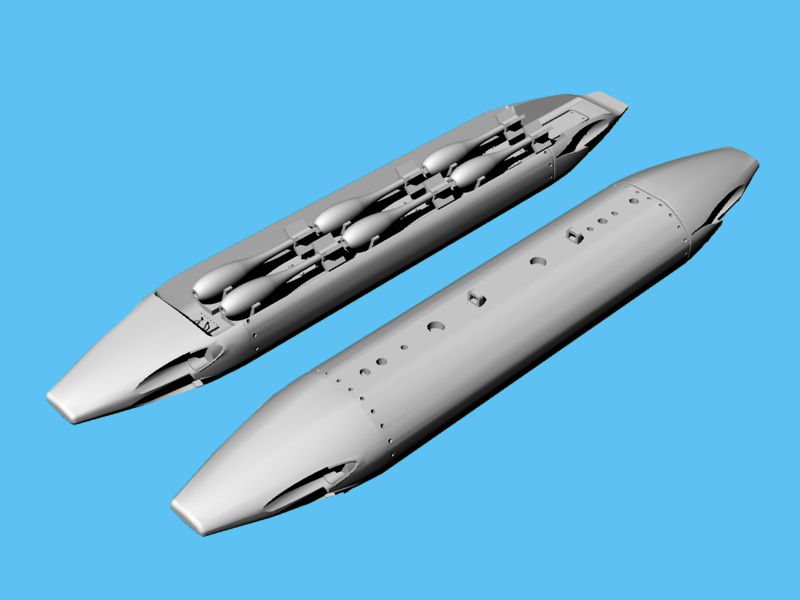
Also, i want to ask if someone can make a model of this SUU-20 bomb dispenser pod on the first picture. Just the pod, without the training bombs.

suu20_03.jpg

m117.jpg
 
I'm working on a mod for Tim Conrad super tucano and i need to fix this problem with the M117 bomb and also install the SUU-20 bomb dispenser to finish it.


FB_IMG_1558574800297.jpg


20190523_230639.jpg
 
I'm working on a mod for Tim Conrad super tucano and i need to fix this problem with the M117 bomb and also install the SUU-20 bomb dispenser to finish it.
A few months ago I was trying to contact Mr. Conrad with no luck at all... It seems he doesn't visit anymore. You succeeded with that? o_O
I like this airplane very much and I was trying to get the source files to enhance the FS9 versions :confused:
 
Tim Conrad left these shores years ago and doesn’t do postcards or answer emails and nobody knows where he is or what he’s doing.

Your bomb model isn’t smoothed. Select the polys of the body and set one smoothing value. Select the polys of the pimple on the nose (fuse?) and set a different smoothing value. Each set of polys should have only one smoothing value - this avoids unpleasant shading between body and pimple. The fins can probably get away without any smoothing.
 
To elaborate:

Add Edit Mesh (or Edit Poly) modifier to stack if not already present
Click black + next to Edit Mesh/Poly
Choose Polygon mode
Select the polygons that should be smoothed (as Tom says, do only one smoothing area at a time)
Scroll the right hand panel down until you see the smoothing section.
The simplest thing to do it choose Auto Smooth, or just click on smoothing group 1.
Select the other area, and click on smoothing group 2.

Hope this helps,
 
Back
Top