
• Which the release of FS2020 we see an explosition of activity on the forun and of course we are very happy to see this. But having all questions about FS2020 in one forum becomes a bit messy. So therefore we would like to ask you all to use the following guidelines when posting your questions:

    • Tag FS2020 specific questions with the MSFS2020 tag.
    • Questions about making 3D assets can be posted in the 3D asset design forum. Either post them in the subforum of the modelling tool you use or in the general forum if they are general.
    • Questions about aircraft design can be posted in the Aircraft design forum
    • Questions about airport design can be posted in the FS2020 airport design forum. Once airport development tools have been updated for FS2020 you can post tool speciifc questions in the subforums of those tools as well of course.
    • Questions about terrain design can be posted in the FS2020 terrain design forum.
    • Questions about SimConnect can be posted in the SimConnect forum.

    Any other question that is not specific to an aspect of development or tool can be posted in the General chat forum.

    By following these guidelines we make sure that the forums remain easy to read for everybody and also that the right people can find your post to answer it.

MSFS20 Models and Footprints

Messages
637
Country
unitedstates
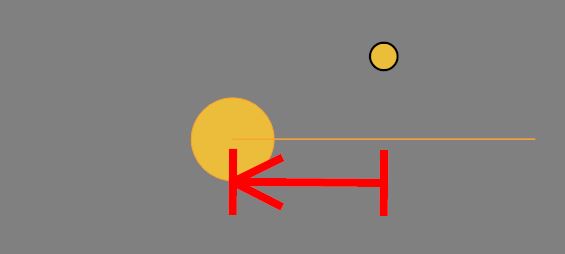
Placing models for MSFS has been going well with footprints showing in ADE as they did for FSX, except models for fence which show the footprint all to one side of the center. A 60 ft length of fence shows all on one side of center when there should be 30 ft on each side. The same model showed correctly in ADE for FSX.
fence.JPG


While moving project files to a folder outside the ADE file structure so paths do not change when switching to a new alpha version of ADE, I noticed that the model list cannot be edited to show the new path because the only option available is for showing mdl files, not gltf.

Art
 
If you are using the fences that can be created with ADE then I am not sure how well they work any longer so if they are offset this might be a consequence of how MSFS renders them

I don't quite understand the question on models. ADE only supports the concept of glTF user models and those for the airport are stored in the folder structure and are referenced that way so there should be no need for setting paths. If you are using mdl files with paths then that isn't really supported. Perhaps some screenshots?
 
The use of "model" is intended to refer to gltf files. This post is intended to refer to user models, not boundary fence vectors. For some reason, my user models for lengths of fence show in ADE with the footprint offset to one side of the center. As far as I know, the footprint for other gltf models are showing correct. In the FSX version of ADE, the mdl models were shown correctly. A zip file is attached with the model in question.

The other point is only that editing the path for the gltf files in the models list only gives the option for locating .mdl files. This needs to be changed to .gltf.
model.JPG
 

Attachments

Not sure what to say about the fence model

I agree there is a problem here but it is the presence of model file path and references to mdl that needs changing. While previous versions of ADE pointed to specific model files set by the user MSFS projects are slightly different. Model information is stored in a specific sub folder inside the project main folder

1610950748750.png


The compilers find the models based on the relative path from the modelLib folder to the project main folder. Therefore there is no requirement to specify a path to models which are stored in the modelLib folder. In the case that a project is moved from one location on your computer to another there is no requirement to manually adjust paths since the relative path between the project root and modelLib remains unchanged and the compilers know where to look,

The fact that the path is specified in the models list is a hang over from the old versions and I will remove it
 
I have modified ADE 2020 to remove references to the model path. As per my previous post glTF models are part of the project structure and the compilers use a relative reference from the project root folder to find them I have confirmed that you can move a ADE 2020 project folder to another folder or drive and the models are still accessible to the user. The List now looks like this

1610982389265.png


and the property editor looks like this/ The Name is now taken from the model and is read only so only the comment can be edited

1610982507684.png


I am not sure how you got to the dialog with the .mdl filter showing
, Using the Add button in the Models list now opens this dialog

1610983432302.png


I navigate into the folder ending in modelLib and select the model I want to add. This will look a bit different than the current version though as it has been updated slightly, The filter will select glTF files
 
I didn't get to the window with the .mdl filter from add model. It was from the browse button following the path after selecting the model edit button in the model list window. Anyway, I guess it doesn't matter anymore. All of this confusion is from me trying analyze why I am losing model footprints when moving the package from one location to another. The models still work, but they display as a rectangle with the center at one corner. I think the fence footprint is somehow related but not caused by moving the model location.

Art
 
Model footprints might disappear when you move to a new version since the database will go back to default. It is stored in the application. I need to fix this and the generation of model footprints and I have added that to the list to be fixed as soon as possible
 
Art I have looked at this again and you are right that the path gives issues. The idea is that a project can be placed anywhere and referenced by its root folder. However ADE as it stands does use the path for a couple of purposes including the generation of footprints. It is going to take me a little while to fix this.

Footprints are stored in a file called mfdd.dbs which in located in the version Global folder.

1611045008260.png

So when you start to use a new clean install for the alpha those footprints you add to it for user models are lost. If you haven't added any new models in the latest alpha then you could backup the dbs file in the new one and copy the file from the earlier one where you created the models. This is not a good fix however.

The model list has a button to regenerate footprints but the code behind it is looking for the path which will be wrong as you found out. I am trying to work out what to do. I want projects to be portable so fixed paths are wrong. I think I can deal with this using a relative path for the model.

The placement of the mfdb.dbs has always been a bit of a pain. Footprints take up a lot of space as you can see by the size of the file in the file in the screen shot above.

I have a couple of options. First is to move this so it is in a common folder in something like the AppData folder, second is to change the installation approach to update rather than generate new.

Thanks for all your hard work in testing ADE 2020. I am sorry that it will take a while to fixe thins properly
 
Ok, thanks. So even though I established a project folder outside the ADE file structure, using projects from this folder will still lose the footprints when accessing them with a new ADE version? But of course the solution is to move the mfdb.dbs file from the old version to the new version. Good to know.

I resolved the fence footprint offset problem by just going with it. Since the footprint is shifted right by half the length of the fence, I shifted the center of the model left by half the fence length and the center point is now at the actual end of the model (although probably the opposite end) and shows correctly in ADE.

Art
 
Back
Top