• Which the release of FS2020 we see an explosition of activity on the forun and of course we are very happy to see this. But having all questions about FS2020 in one forum becomes a bit messy. So therefore we would like to ask you all to use the following guidelines when posting your questions:

    • Tag FS2020 specific questions with the MSFS2020 tag.
    • Questions about making 3D assets can be posted in the 3D asset design forum. Either post them in the subforum of the modelling tool you use or in the general forum if they are general.
    • Questions about aircraft design can be posted in the Aircraft design forum
    • Questions about airport design can be posted in the FS2020 airport design forum. Once airport development tools have been updated for FS2020 you can post tool speciifc questions in the subforums of those tools as well of course.
    • Questions about terrain design can be posted in the FS2020 terrain design forum.
    • Questions about SimConnect can be posted in the SimConnect forum.

    Any other question that is not specific to an aspect of development or tool can be posted in the General chat forum.

    By following these guidelines we make sure that the forums remain easy to read for everybody and also that the right people can find your post to answer it.

Models appear to show a mesh

Messages
105
Country
unitedkingdom
Having completed a relatively complicated tower for my airport I converted it to a mdl and loaded it into fsx.

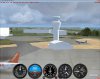
My issue is that when approaching the model a mesh can be seen through it and it looks messy.

Using sketchup to create the model I have coloured it grey. But no textures are used as such. I could do with loading an image but am at work.

I would expect to see a model that is solid not with these lines all over it.

Any ideas?

Thanks

Tom
 
Having completed a relatively complicated tower for my airport I converted it to a mdl and loaded it into fsx.

My issue is that when approaching the model a mesh can be seen through it and it looks messy.

Using sketchup to create the model I have coloured it grey. But no textures are used as such. I could do with loading an image but am at work.

I would expect to see a model that is solid not with these lines all over it.

Any ideas?

Thanks

Tom

Hello Tom,...

I have seen something like you have described once... it was quite awhile back though... the dae file that you loaded into MCX did it look messed up as well? What I had to do was start over (I know not something anyone wants to hear but...). What I think what happened though is that the sketchup file got corrupted,... so the dae file was corrupted...

Try this though,... delete the dae file and the folder with the same name as the dae file, Then loadup SketchUp... then load up your model,... resave it as a sketchup file, using a different name... then try exporting it to a dae file again... and proceed to load it into MCX etc...

See if that helps anything...
 

Attachments

  • Screenshot3.jpg
    Screenshot3.jpg
    90.2 KB · Views: 618
Hi,

You say there are no textures applied to the object yet? In that case it can only be that you have small polygons with another colour in the model. That would be the only case where you can see this.
 
Hi,

In your screenshot it looks more white than grey. So maybe something else went wrong here.

When you import the model in ModelConverterX, does it than have the same colour as in SketchUp? Did you use any function like the Drawcall Minimizer in ModelConverterX while converting it btw?
 
Hi

I used the drawcall function and exported to model. As far as I know the model was the same colour in sketchup and mdl converter
 
Hi,

If you use the drawcall minimizer function than you are seeing artifacts in the mipmaps. I hadn't seen this problem before in FSX, but I have recently made some changes to the drawcall minimizer function to reduce such artifacts. If you download the latest development release it should be better.

If not, please let me know and I will debug it more.
 
Hi,

If you use the drawcall minimizer function than you are seeing artifacts in the mipmaps. I hadn't seen this problem before in FSX, but I have recently made some changes to the drawcall minimizer function to reduce such artifacts. If you download the latest development release it should be better.

If not, please let me know and I will debug it more.
I downloaded the latest release, but it doesnt work on my pc. i just get repeated crashes.


Thanks

Tom
 
Last edited:
I just d/l'ed the updated release,... it worked for me... what kind of crash occurred?
 
Apologies, the latest release works, it is the latest development copy that doesnt work.

As for the type of crash i just get the 'error has occurred' message. I didnt bother to look in the event viewer - but i will make a point of this.

Tom
 
Hi Tom,

I was talking about the latest development release that should probably fix the bug you encountered with the drawcall minimizer functionality.

If you tell me the error you get I might be able to solve that as well :)
 
Ok im getting confused lol

I have the latest official release and this is what i used that has produced this phenomenon.

There is also an error when i try and match the textures (but im not concerned about that for now).

I downloaded that latest beta/test version and this is what i couldnt get to open at all due to a windows error. I will copy the output from the event viewer to show you what the error was.

I will need to wait for a future stable version if it is that the latest official release produces this issue.

I think that makes sense :s

EDIT: - How frustrating, the development/beta release works on my work pc just not on my home pc. blast!! hmmmm ill have to have a think - ARNO could you explain what the convert and place object wizard is used for? Is this simply a way to locate objects in FSX. I.E. i use this to locate my object and place the bgl to my fsx scenery folder and it automatically loads it omitting the need for ADE. Or does it do something else??

Tom
 
Last edited:
Hi Tom,

The convert and place object wizard converts your objects to a FS MDL file and also allows you to specify where it should be placed (which lat/lon). So the end result of the wizard is a BGL file that you can directly use in FS. Without the need of another tool to do the placement.
 
Now that is very handy!!!

Some i presume i wouldnt need to use ADE to locate it then compile etc?

So if i use a KMZ file, this should read the coordinates from sketchup and then draw everything in the right spot??

If thats the case - AMAZING!!!!!!

By the way i got your beta version working now, so i can use that at home too. Not sure why it crashed originally.

In terms of the object placer, is that feature working yet? only i tried to run it and had no output file. I loaded a KMZ file and an MDL file and specified the correct folders etc. But nothing was produced???


Tom
 
Last edited:
Hi,

If you are making an entire airport I would still prefer to the do object placement in ADE. But if you only want to place a couple of buildings in the scenery, then doing the placement from ModelConverterX might be easier.

Did you use the Convert and place object wizard? If you load the KMZ file you should see that it reads the coordinates from it. All you then have to do is select your output BGL and let it be converted.
 
Back
Top