• Which the release of FS2020 we see an explosition of activity on the forun and of course we are very happy to see this. But having all questions about FS2020 in one forum becomes a bit messy. So therefore we would like to ask you all to use the following guidelines when posting your questions:

    • Tag FS2020 specific questions with the MSFS2020 tag.
    • Questions about making 3D assets can be posted in the 3D asset design forum. Either post them in the subforum of the modelling tool you use or in the general forum if they are general.
    • Questions about aircraft design can be posted in the Aircraft design forum
    • Questions about airport design can be posted in the FS2020 airport design forum. Once airport development tools have been updated for FS2020 you can post tool speciifc questions in the subforums of those tools as well of course.
    • Questions about terrain design can be posted in the FS2020 terrain design forum.
    • Questions about SimConnect can be posted in the SimConnect forum.

    Any other question that is not specific to an aspect of development or tool can be posted in the General chat forum.

    By following these guidelines we make sure that the forums remain easy to read for everybody and also that the right people can find your post to answer it.

MSFS20 Modified default jetways help please

Messages
38
Country
us-illinois
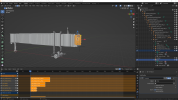
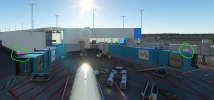
Hi everyone, i need a little help please. I imported the default sample jetway in blender and saved it and exported as a custom jetway. Everything works fine except the Capote and Door. For some reason i can not figure out why is not rendering in the correct position inside the sim. Please take a look at the pictures and see if you can spot something that i need to do. The project pictures are one in edit mode and the other one in object mode. I tried applying rotation & scale, location , pretty much all the option possible and no result.
Thank you in advanced
 

Attachments

  • blenderedit.png
    blenderedit.png
    608.1 KB · Views: 432
  • blenderobject.png
    blenderobject.png
    593.5 KB · Views: 432
  • sim2.png
    sim2.png
    2.7 MB · Views: 465
Hi everyone, i need a little help please. I imported the default sample jetway in blender and saved it and exported as a custom jetway. Everything works fine except the Capote and Door. For some reason i can not figure out why is not rendering in the correct position inside the sim. Please take a look at the pictures and see if you can spot something that i need to do. The project pictures are one in edit mode and the other one in object mode. I tried applying rotation & scale, location , pretty much all the option possible and no result.
Thank you in advanced
I ran into this issue as well. The thing is the Capote and Door need to be at 0,0,0 when parented to the respective nodes. Even doing so, it was deforming the animations and after a day of trying it, I sucked it up and just imported my Jetways into Max while I still had my subscription, tied it in, added my materials. 10 minutes and had a perfectly working jetway, after a week of struggle trying to get it all to work in blender.
I'm sure others have had much better luck, so hopefully someone around can shed some light! Re-Subscribing to Max just for the jetways just does not mix well with me! 🤣
EDIT: Worth noting, when I rigged it all with my own custom hood, everything worked well-ish, I opted to use the default, as my custom hood was..... well, a dumb amount of "Accordians" I call them, and weight painting it was just beyond my patience level.
 
The Autodesk "Indie" subscription, is cheaper than Sketchup Pro, coming in at somewhere around $200/year.
That is the license I had been using, I just sincerely don't particularly like using Max all that much. We'll see if the next project has jetways or not. :stirthepo
 
As soon as i take the armature off it shows in the corect spot in the sim. I am not familiar with the bones but i think the problem is from the pivot.
 
As soon as i take the armature off it shows in the corect spot in the sim. I am not familiar with the bones but i think the problem is from the pivot.
Blender to msfs is extremely delicate (or picky can be the righ word)
To have a functional armature, it must have it's origin at 0,0,0
Connected to an empy (with same origin point)
Scale must be 1 (either in object mode that in edit mode)
Animation Should have rotation keyframe only (location distorts the mesh when on Z axys, scale distorts the mesh)
so...the best thing you can do is make it from scratch, following all the above

As @Wickedbacon92 said, the most difficult thing of the Capote part is not the armature, but the weight painting. Asobo's one is AMAZINGLY done!
 
One more question! It is related to the jetways but its about the textures.
I am trying to set the textures for each jetway to show the correct gate number without having to upload 50 jetways. I followed the documentation from ASOBO but i think i am missing something in Blender.
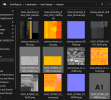
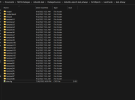
What do you need to do in blender for the sim to recognize multiple textures? Here are a couple of screen shots with the folder set up
This is what i get
2.png
This is the main folder: 1.png
I tried to enter the model name (D27 & D29) but didn't change anything
3.png
This is inside the texture folder
4.png
This is inside the model folder
5.png

Thank You very much!
 
One more question! It is related to the jetways but its about the textures.
I am trying to set the textures for each jetway to show the correct gate number without having to upload 50 jetways. I followed the documentation from ASOBO but i think i am missing something in Blender.
What do you need to do in blender for the sim to recognize multiple textures? Here are a couple of screen shots with the folder set up
This is what i get
View attachment 83997
This is the main folder: View attachment 83996
I tried to enter the model name (D27 & D29) but didn't change anything
View attachment 83998
This is inside the texture folder
View attachment 83999
This is inside the model folder
View attachment 84000

Thank You very much!
To do this, the way I did it for the airline logos/stand numbers, I have both materials calling for "xxx_jetway_stands" and "xxx_jetway_logo"
I export the jetway as usual, and then create my "livery" folders, ie, the texture.xx folders, those textures must be named the same as what the material is calling for. Each of my folders has the according stand number and airline logo png in it, typically those are all small texture sizes, with the fallback texture.cfg in each one.
I don't add a specific model folder/fallback for each jetway, it works without it. I do have a couple variants of the jetways, which are separate models, and added accordingly.
Here's a few screenshots, again, this needs to be done in the package sources, then built. The titles of the Fltsim entries you enter equate to the name of the container when selecting for placement, which i'm sure you're aware of! Those textures as well, to save on size and what not, just drag in the albedo's for each according, leave comp/normals to draw from default, if any. My stand numbers are each typed out on a 512x256, alpha'd, and set as a decal material over the sign enclosure.
Hope this helps.

sim.cfg snippet:

[VERSION]
Major=1
Minor=0

[fltsim.0]
title=ksat-jetway_A15
model=
texture=A15

[fltsim.1]
title=ksat-jetway_A17
model=
texture=A17

[fltsim.2]
title=ksat-jetway_B2
model=
texture=B2

[fltsim.3]
title=ksat-jetway_B3
model=
texture=B3

[fltsim.4]
title=ksat-jetway_B4
model=
texture=B4


Screenshots:

 

Attachments

  • Screenshot_13.png
    Screenshot_13.png
    219.6 KB · Views: 325
  • Screenshot_14.png
    Screenshot_14.png
    71.2 KB · Views: 314
  • Screenshot_15.png
    Screenshot_15.png
    164.7 KB · Views: 312
  • Screenshot_16.png
    Screenshot_16.png
    157.4 KB · Views: 321
To do this, the way I did it for the airline logos/stand numbers, I have both materials calling for "xxx_jetway_stands" and "xxx_jetway_logo"
I export the jetway as usual, and then create my "livery" folders, ie, the texture.xx folders, those textures must be named the same as what the material is calling for. Each of my folders has the according stand number and airline logo png in it, typically those are all small texture sizes, with the fallback texture.cfg in each one.
I don't add a specific model folder/fallback for each jetway, it works without it. I do have a couple variants of the jetways, which are separate models, and added accordingly.
Here's a few screenshots, again, this needs to be done in the package sources, then built. The titles of the Fltsim entries you enter equate to the name of the container when selecting for placement, which i'm sure you're aware of! Those textures as well, to save on size and what not, just drag in the albedo's for each according, leave comp/normals to draw from default, if any. My stand numbers are each typed out on a 512x256, alpha'd, and set as a decal material over the sign enclosure.
Hope this helps.

sim.cfg snippet:

[VERSION]
Major=1
Minor=0

[fltsim.0]
title=ksat-jetway_A15
model=
texture=A15

[fltsim.1]
title=ksat-jetway_A17
model=
texture=A17

[fltsim.2]
title=ksat-jetway_B2
model=
texture=B2

[fltsim.3]
title=ksat-jetway_B3
model=
texture=B3

[fltsim.4]
title=ksat-jetway_B4
model=
texture=B4


Screenshots:
Thanks a lot, i know now what i was doing wrong.
Much appreciated 🙏
 
Thanks a lot, i know now what i was doing wrong.
Much appreciated 🙏
Sure thing, and of course, same method applies to any SimObject, becomes extremely useful when you want more variety on ground handling and such.
It beats having a separate model for each, for sure! :wizard:
 

Attachments

  • Screenshot_17.jpg
    Screenshot_17.jpg
    636.4 KB · Views: 358
  • Screenshot_19.jpg
    Screenshot_19.jpg
    464.8 KB · Views: 384
Sure thing, and of course, same method applies to any SimObject, becomes extremely useful when you want more variety on ground handling and such.
It beats having a separate model for each, for sure! :wizard:
I really like your jetways, how much? 😁
The textures are stunning, how did you make them like that?
 
Thanks guys, i finally managed to modify the default jetways and add the animation. Not perfect but considering its my first time working with bone its not bad 😀

Looks very nice. Were you able to pull this off in blender or did you use 3ds max? I am doing one for a freeware project and have no interest in getting a max license, since i am not even a novice at 3d modelling. I also took the same approach by importing the sample lod0 gltf into blender by using the Asobo importer and then adding my modifications to the 3d objects. I did not touch any empty or animation bones or even the hood object. Then after exporting it and building the jetway with a scenery, the hood doesnot animate right. And it's detached and way above the actual jetway contact empty location. Could you please elaborate what you did in blender to get this to work?
 
It was done in blender, i erased all the annimation and do it from the beginning. I know q lot of freeware dev have the same issues. I had to create a shorter jetway model for some of the gates at DTW so i started to record the process and i will release a tutorial Give me a couple of days. Hopefully i can finish it over the weekend.
 
Ohh. Great. Hit me with the link when you upload it. For now, i am just not animating the hood and joined that with the cylinder ang entry gate object as part of those and creating the rest of my jetway. Still looks ok. Except just above the contact point.
 
Back
Top