
• Which the release of FS2020 we see an explosition of activity on the forun and of course we are very happy to see this. But having all questions about FS2020 in one forum becomes a bit messy. So therefore we would like to ask you all to use the following guidelines when posting your questions:

    • Tag FS2020 specific questions with the MSFS2020 tag.
    • Questions about making 3D assets can be posted in the 3D asset design forum. Either post them in the subforum of the modelling tool you use or in the general forum if they are general.
    • Questions about aircraft design can be posted in the Aircraft design forum
    • Questions about airport design can be posted in the FS2020 airport design forum. Once airport development tools have been updated for FS2020 you can post tool speciifc questions in the subforums of those tools as well of course.
    • Questions about terrain design can be posted in the FS2020 terrain design forum.
    • Questions about SimConnect can be posted in the SimConnect forum.

    Any other question that is not specific to an aspect of development or tool can be posted in the General chat forum.

    By following these guidelines we make sure that the forums remain easy to read for everybody and also that the right people can find your post to answer it.

MSFS20 MSFS Brisbane City - Work in Progress Thread

[EDIT: Nope, no effect in sim, going to have to dig through the forums.]

At this point I can't get crash materials to work with the vessels. Not sure if I need to update my Blender version.

And I have no idea what I'm doing but I might be learning...

This is on the master albedo textures, I have the mast looking like aluminum and the hull looking clean. Not sure how it will translate to the sim...
noidea.jpg


This looks like the right settings for window reflectivity on high glass buildings, but I may be going about this the wrong way with MSFS PBR (I figure I can add the different textures for these values separately)
windows.jpg
 
Last edited:
Learning the ropes with blender2msfs, got the whole thing set up in blender but for some reason the exports aren't adding the materials or crash stuff and I still need to dig through 27 pages of threads. Calling it a night...

Color matched the glass for CPA/AMP building, have the main windows looking reflective but it won't generate the gltf correctly...

Amp Compare.jpg
 
Spent the last 24 hours trying to add reflective glass to AMP Place, and because I couldn't get it to work yesterday I went back to square one and built some spheres for testing with various materials and I'll share those later.

I recorded a long tutorial on how to get to the end result, which I'll have to edit together, but tonight I can say I understand the process now and can give a shortcut on how to build the effect for glass façade buildings.

I'll see about uploading source files for the spheres so others can play around with blender and come to grips with how materials and textures work. Beware Blender does not give a good representation of what you will see in sim.

At the end of the day I'm really pleased with the results and just want to tweak a few things on the texture and finish off the other parts of the building...

Note the building was just placed for reflectivity tests, and I'll drop it into the build tomorrow, I need to conform filenames to a convention...

20201005193413_1.jpg
20201006001526_1.jpg
20201006001649_1.jpg
20201006001703_1.jpg
20201006001735_1.jpg
20201006001750_1.jpg
20201006001758_1.jpg
20201006001808_1.jpg
20201006001827_1.jpg
20201006001906_1.jpg
 
Okay I think I have both reflections and night emissive lights sorted out... Nearing the end for this building...

Work Completed:

Full Glass PBR Textures enabled for all windows
Replaced Roof Texture with one sampled from high resolution, it's not perfect but it's passable while flying but not pixel peeping
AMP changed to CPA and logo on the roofline, it's not perfect but it's passable while flying but not pixel peeping
Added Plastic Logo PBR Texture to CPA logo, it may be too reflective still but I need to research that more to match real life
Researched YouTube videos to find video of the building's night lighting, which basically just has the CPA logo with a halo effect around it
Added Emissive Night Textures to CPA logo, learned how to switch lights off and on in gltf file, kinda fun, will post video tomorrow

To Do:

Standardize Naming Convention of Models and Textures
Optimize Drawcalls and Textures

It has been a journey the last few days learning the ropes of both blender and the MSFS GLTF format, I have to say I'm loving how simple it is to tweak things, instead of having to build and rebuild, you can tweak the GLTF text file and make rudimentary changes, it's really fun.

Here's an earlier test flight before I got night lights enabled, and before I re-did the art on the CPA logo to match real life (text and shield is bigger IRL and the text Australia does not appear underneath)


EDIT: Forgot the final screenshot of the day.

20201007024942_1.jpg
 
Another day's progress, glassing the buildings should take less time now. CPA Building (aka AMP place) has now been completed except for main building night lights in windows, but added the light effect from the emissive texture now so there's a nice glow...


EDIT: YouTube is still processing HD and 4K but I've been able to complete glass for Comalco Place and One One One Eagle Street in a few hours this evening. Nightlighting to follow. Lots of research to do on YouTube to make sure they are lit as per real life.

 
Last edited:
This looks amazing. You have done an exceptional job on this and I am looking forward to its release.
 
WOW! Great work! Very impressive. And, I am a little jealous: you are a few days ahead of my learning curve.
 
WOW! Great work! Very impressive. And, I am a little jealous: you are a few days ahead of my learning curve.

I had to go to square one and build a bunch of spheres and then add all the different materials to each one to see what they each did as a base. I'll upload them soon for others to play with and experiment on, but I need to build an opener for a new YouTube channel and I'm kinda taking a rest and regroup day. Once you "get it", it becomes really fun. :D
 
Fantastic work Dean. Good to be bringing to life all those historic models you had. Cities are dynamic like everything else and don't think the Building models need to be bolted down to a particular time zone as you mentioned with the QUT building that is no longer present. The Roma Street Transit Centre is now demolished for the new Cross River Rail project - although looks fine in your scenery and many people who know the city will be familiar with it.
Certainly looks and feels like Brisbane.
Rob
Hey Rob, would you happen to know what the logo on the old Comalco building looks like now? I haven’t been able to find a pic recently to show what it is now. I can see it has changed but only just a smudge.

EDIT: I just had the idea to check Google Street View and found it’s BDO Australia. Now just need to verify if it’s red and blue text on white background or red and white text on blue background and how it’s lit at night. So thankful for the new logo as the Comalco one was going to be a bear to update.
 

Attachments

  • D86B53E2-6F8A-4CFB-8B22-1F7A293475A6.jpg
    D86B53E2-6F8A-4CFB-8B22-1F7A293475A6.jpg
    93.3 KB · Views: 245
  • 02B38546-6CC2-4FC4-B8BA-3184FA635F56.jpeg
    02B38546-6CC2-4FC4-B8BA-3184FA635F56.jpeg
    53.8 KB · Views: 242
Last edited:
Got inspired again today and started to light the Story Bridge, which is the main hero asset in Brisbane, it's been missing since every version of the sim ever!!!

So I have modeled the lighting as close to real as possible, I may change the base to standard 3200K white and just light the steel part of the bridge with colors. Calling it a night, discovered 2 more lights which are tucked in behind the bridge which I will add tomorrow. Shame the bridge model doesn't occlude the light fully, but that should be hidden by the other lighting once added.

12 hours of work compressed into 3.5 minutes...

 
I just found this post last night. Fantastic work. I'm up in Townsville but know Brisbane really well and amazed to see how you've got it looking in the sim. Will follow your progress with great interest and thanks for sharing.
 
Hey Dean - re old Comalco Building (12 Creek St) . There is BDO signage at the ground floor but you might be in for less work then anticipated as the top of the building is clean on all faces - no branding at all. Will PM you some fresh pics. Rob
 
Hey Dean - re old Comalco Building (12 Creek St) . There is BDO signage at the ground floor but you might be in for less work then anticipated as the top of the building is clean on all faces - no branding at all. Will PM you some fresh pics. Rob

Really? They took the rooftop signage away already? I found video and images with BDO on 3 faces but if they're gone, that makes like a heck of a lot easier :D Fresh pics would be awesome, I'll send you a private message ;) I just tried to find the photos of the white roof loop and can't seem to located them but there seems to be 3 BDO logos on the white loop, one on the short diagonal, one facing Southbank and one facing Central Plaza. I'll have to re-jig the model mapping to make it happen. :P

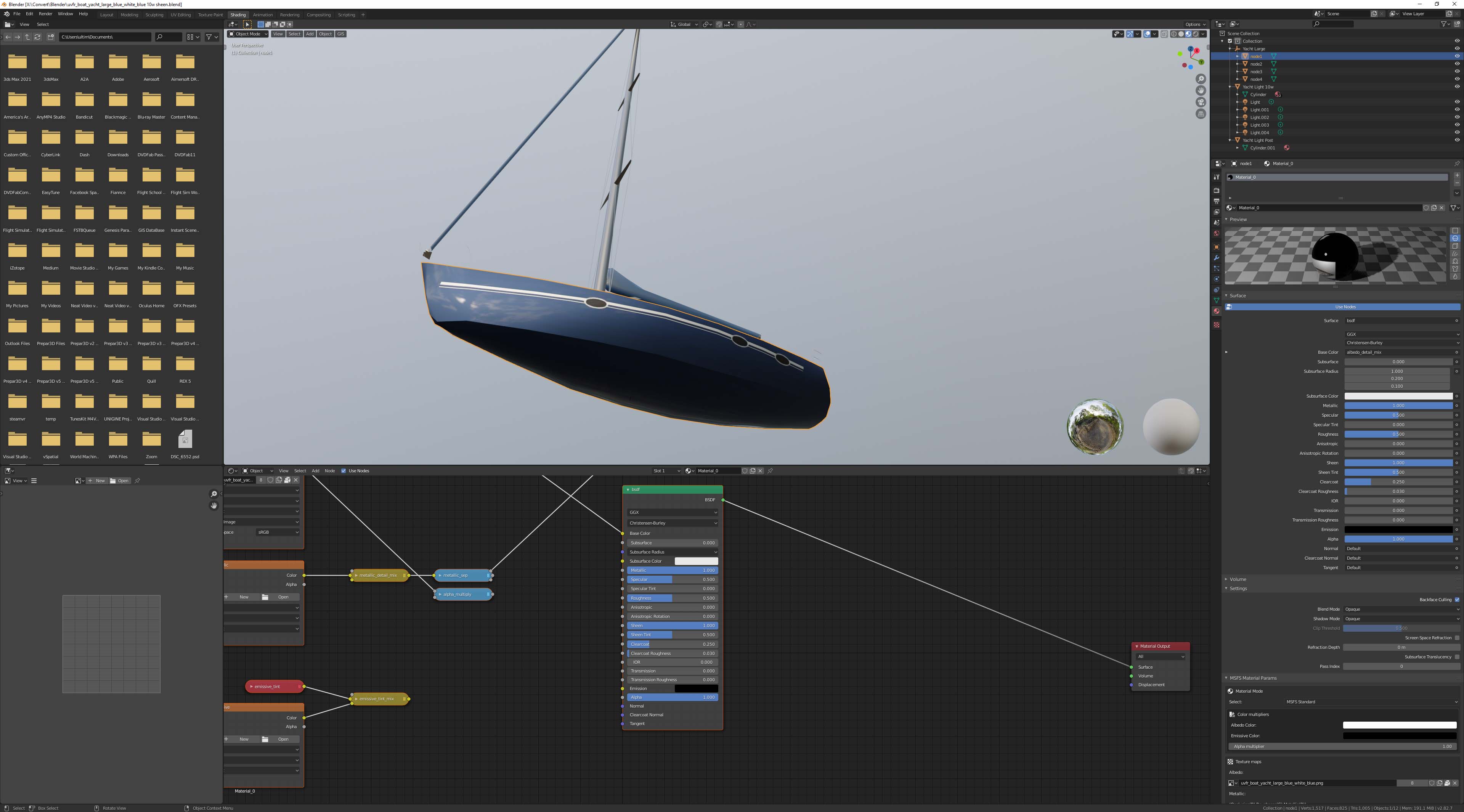
Finally got the yacht and boat hull reflections set, not going to spend too much more time on them as I need to get on with the rest of the city....

Here's the latest work, I need to swap out shots on the show intro with my own in sim shots...

 
Really Nice on those reflective textures. I didn't get into it yet.
What would be a good place to start?

Hey Tangerine, a good place to start is with some of Flying Theston's tutorials at https://www.youtube.com/channel/UCTrmxNqBCjRpnrMmDQeDMiA

For fully reflective glass on your metal texture you'll want to choose RGB: R=255 G=0 B=255, anything you want textured just as per default would be R=128, G=128, B=128, I'm working on a tutorial for my new channel to cover what the various settings are in more detail, I had a shocker trying to record it as it was also a learning process for me, so I took a few wrong turns. but I have to edit it together and create a few other episodes first for the channel.
 
Researching the next building to be upgraded to PBR has yielded some good background shots of AMP Place and Comalco Place (aka now the Blue Tower)


I've swapped out Riperian Plaza with a much more accurate model and will move on to glass textures next. I'm debating which version is best however, as the new one has the spiral drive but it is way too high up the building andI need to re-position it and it loses the base pillars of the building but has glass window awnings and in general is much more accurate. The original one has far too many windows up top as well as having the big awnings the wrong way around, but has done better with the base of the building. I may need to enlist the help of a friend to help me massage the 3D model. I'm still learning lots about blender.

Time to call it a night, also finished up all the yacht models today and figured out how to make translucent plastic anchor lights.

20201017014351_1.jpg
I will move on to the other vessels tomorrow.
 
Last edited:
Back
Top