
-
Which the release of FS2020 we see an explosition of activity on the forun and of course we are very happy to see this. But having all questions about FS2020 in one forum becomes a bit messy. So therefore we would like to ask you all to use the following guidelines when posting your questions:
- Tag FS2020 specific questions with the MSFS2020 tag.
- Questions about making 3D assets can be posted in the 3D asset design forum. Either post them in the subforum of the modelling tool you use or in the general forum if they are general.
- Questions about aircraft design can be posted in the Aircraft design forum
- Questions about airport design can be posted in the FS2020 airport design forum. Once airport development tools have been updated for FS2020 you can post tool speciifc questions in the subforums of those tools as well of course.
- Questions about terrain design can be posted in the FS2020 terrain design forum.
- Questions about SimConnect can be posted in the SimConnect forum.
Any other question that is not specific to an aspect of development or tool can be posted in the General chat forum.
By following these guidelines we make sure that the forums remain easy to read for everybody and also that the right people can find your post to answer it.
You are using an out of date browser. It may not display this or other websites correctly.
You should upgrade or use an alternative browser.
You should upgrade or use an alternative browser.
P3D v4 Need help in designing ground textures
- Thread starter mathurpc
- Start date

Otavio Bonomi
Resource contributor
- Messages
- 70
- Country

Hi Pramod,
Creating a texture with high definition is very difficult,
I had better results when I started to draw lines by modeling programs like blender, gmax or sketchup, then turn them into ground poly.
Look for tutorials that teach you how to work with PBR, so you get high definition with the final model design.
I wish you good luck.
Otavio.
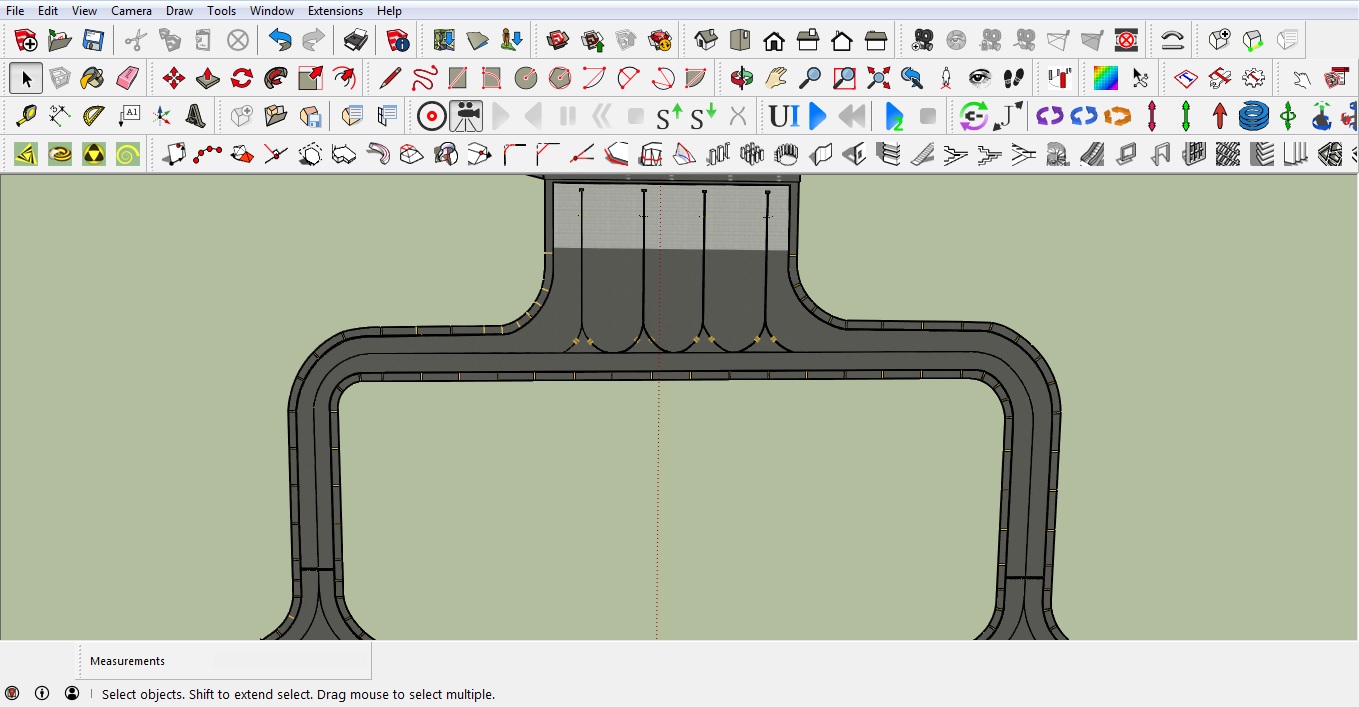
Creating a texture with high definition is very difficult,
I had better results when I started to draw lines by modeling programs like blender, gmax or sketchup, then turn them into ground poly.
Look for tutorials that teach you how to work with PBR, so you get high definition with the final model design.
I wish you good luck.
Otavio.
IN addition to what Otavio says IMO to create textures will require an application like one of the adobe ranges, GIMP or similar. That is especially so as you may have to create composites of a number of different pictures to build the ground effect you want i.e surface crack, wear, colourisation and tiling.
What is 'x' supposed to mean in ADEx?The easiest way to create HD ground texture is using ADEx. Plenty of tutorials here on FSD. The other methods work great too, they just require more work IMO.
View attachment 52670


P3D v4 - Need help in designing ground textures
I am trying to create textures for the markings painted on the taxiways for runway hold, taxiway directions, etc. Can anyone guide me in choosing the correct tools to be used, particularly with different layers to be used, the file format etc. Pramod
I am trying to create textures for the markings painted on the taxiways for runway hold, taxiway directions, etc.
Can anyone guide me in choosing the correct tools to be used, particularly with different layers to be used, the file format etc.
Pramod
What ground marking image resolution do you wish to have displayed in FS at run time from the aircraft cockpit ?

Since a Ground Polygon (aka "G-Poly") is a flat 3D model, FS can display a mapped texture image Material at resolutions of more than 7cm.
However, that display capability is always a function of what source image is used, the FS system-wide texture resolution setting, and the distance from the user aircraft camera position relative to the nearby ground in the FS 3D world.
The effective image resolution capable of being displayed in FS at run time from the aircraft cockpit relative to the nearby ground in the FS 3D world is limited by the built-in limits of the FS rendering engine, which enforces use of a Level Of Detail (aka "LOD") calculation of camera to object distance to determine an image MIPMAP to be displayed.
Level of detail - Wikipedia
Mipmap - Wikipedia
Generally this is calculated as pixel width on screen per 3D object in the FS 3D world scene-graph and may also be expressed as pixels per Meter.
If one opts to use a higher than FS default texture image resolution for a airport ground surface object, one should also be able to achieve a less aliased "shape" for textured flat 3D objects used to display ground markings, rather than having "jagged" edges or curves with obvious vector poly-line vertex break points ...as seen in the example image above.
IMHO, since vector content converted to 3D models is inevitably rendered in FS at run time as visible pixels, one may wish to use G-Poly production tools / methods that allow a higher resolution in texture pixel (aka "texel") density per Meter.
Image resolution - Wikipedia
3.5cm per pixel
The sim is stated as having up to 7cm per pixel photoreal resolution. But the FSX.cfg file can be edited to force 3.5cm per pixel resolution: [TERRAIN] LOD_RADIUS=4.500000 MESH_COMPLEXITY=96 MESH_RESOLUTION=23 TEXTURE_RESOLUTION=30 AUTOGEN_DENSITY=5 DETAIL_TEXTURE=1 WATER_EFFECTS=2...
www.fsdeveloper.com
GaryGB
Last edited:
Hi Don:
Does ADE-GP Editor currently impose a limit on the number of vertices used in source data for ex: vector curves, or the texture image mapped onto such vector objects ...before they are processed into flat 3D G-Poly objects ?
Thanks in advance for your clarification of this aspect of the current ADE-GP Editor feature set.
GaryGB
Does ADE-GP Editor currently impose a limit on the number of vertices used in source data for ex: vector curves, or the texture image mapped onto such vector objects ...before they are processed into flat 3D G-Poly objects ?
Thanks in advance for your clarification of this aspect of the current ADE-GP Editor feature set.
GaryGB
Last edited:

- Messages
- 1,238
- Country

The X stands for FSX.
Correct FSX, but it is also used for P3D.

- Messages
- 34,981
- Country

What is 'x' supposed to mean in ADEx?
In the earlier days of ADE we had two versions one for FS9 (ADE9) and one for FSX (ADEX) these terms are no longer needed but are often quoted by users which is fine.
No.Does ADE-GP Editor currently impose a limit on the number of vertices used in source data for ex: vector curves, or the texture image mapped onto such vector objects ...before they are processed into flat 3D G-Poly objects ?
Thanks for all those who responded to my question. But I still don't have my answer. Please see the attached picture, this is what I want to create. As suggested by some, I tried to search for any tutorials but did not find any. Also, as suggested by pinkjr, I tried to check the ADE but did not find any way of creating the ground poly.
I am a real-life pilot and find that more and more airports are marking even the runway numbers on the taxiway near the hold-short line. I wish the version of ADE can have this functionality.
Pramod
I am a real-life pilot and find that more and more airports are marking even the runway numbers on the taxiway near the hold-short line. I wish the version of ADE can have this functionality.
Pramod
Attachments

- Messages
- 198
- Country

See here: https://www.fsdeveloper.com/wiki/index.php?title=SketchUp_Ground_Polygons and here: https://www.fsdeveloper.com/wiki/index.php?title=Ground_polygon_creation_with_GMax
and do a search entering the following Syntax in your web-browser: ground polygons site:fsdeveloper.com
and do a search entering the following Syntax in your web-browser: ground polygons site:fsdeveloper.com
Thanks for all those who responded to my question. But I still don't have my answer. Please see the attached picture, this is what I want to create. As suggested by some, I tried to search for any tutorials but did not find any. Also, as suggested by pinkjr, I tried to check the ADE but did not find any way of creating the ground poly.
I am a real-life pilot and find that more and more airports are marking even the runway numbers on the taxiway near the hold-short line. I wish the version of ADE can have this functionality.
Pramod
It has !!!!!
Look at "Add Custom Ground Poly" - its in the manual as well. You can create your own ground signage i.e. "Runway Ahead" or Taxiway letter/number and add that.
for photo real when these are not present you will need to use gimp - photoshop etc to add as a layer to the tile area required but its doable
gareth
Attachments


Last edited:

tgibson
Resource contributor
- Messages
- 11,771
- Country

Hi,
You are correct, it is not possible to do what you want with the default ADE GP textures. You would need to create an alphabet texture that displayed black letters. Then it would be possible, with some work. It would need to have a black alpha channel outside the letters themselves to make that area transparent. Copying/Pasting an existing letter texture (like gp_Signs_white), editing it to make the letters black, and saving that with a new name would be a good way to proceed. Then add it to the GP system (see manual). There are two versions of each texture - details in the GP manual. Then you could:
1. Create a yellow ground polygon using the button gareth shows above.
2. Double click the last vertex as you create it.
3. In the GP Editor that pops up, create a yellow color (using texture gp_Yellow_20F) The size doesn't really matter, but you can play around with the size to get the paint texture looking right at your airport.
4. In the same dialog box, add an outline texture (perhaps using gp_Asphalt-dark) and set the width of the outline (1 foot?).
5. Create another GP polygon, the size of your first letter (A in your picture). Apply the black A that is in your new texture. Give it a higher Layer Number than the yellow one, so your black A will sit on top.
6. Move that new GP texture into place over the yellow polygon.
7. Repeat 5 and 6 as needed for other characters.
8. For arrows, either use a custom arrow texture or create black lines using the GP Line tool (the Add Custom Ground Line button). Use the gp_Line_Base texture for solid black lines. Remember the higher layer number. Move these lines into position so they make an arrow. Note that lines can have more than one segment, so you can reduce the total number of lines needed to two (arrow head and arrow shaft).
Sometimes copying the line/polygon (select GP or line, right click, Copy Object), pasting it back into the airport (Right click, Paste Object) and then editing it (if necessary) is faster than creating a new GP or line from scratch.
A custom texture added to ADE GP would probably be the easier choice, if you have such identical signs that occur at many locations or at several different airports.
Hope this helps,
You are correct, it is not possible to do what you want with the default ADE GP textures. You would need to create an alphabet texture that displayed black letters. Then it would be possible, with some work. It would need to have a black alpha channel outside the letters themselves to make that area transparent. Copying/Pasting an existing letter texture (like gp_Signs_white), editing it to make the letters black, and saving that with a new name would be a good way to proceed. Then add it to the GP system (see manual). There are two versions of each texture - details in the GP manual. Then you could:
1. Create a yellow ground polygon using the button gareth shows above.
2. Double click the last vertex as you create it.
3. In the GP Editor that pops up, create a yellow color (using texture gp_Yellow_20F) The size doesn't really matter, but you can play around with the size to get the paint texture looking right at your airport.
4. In the same dialog box, add an outline texture (perhaps using gp_Asphalt-dark) and set the width of the outline (1 foot?).
5. Create another GP polygon, the size of your first letter (A in your picture). Apply the black A that is in your new texture. Give it a higher Layer Number than the yellow one, so your black A will sit on top.
6. Move that new GP texture into place over the yellow polygon.
7. Repeat 5 and 6 as needed for other characters.
8. For arrows, either use a custom arrow texture or create black lines using the GP Line tool (the Add Custom Ground Line button). Use the gp_Line_Base texture for solid black lines. Remember the higher layer number. Move these lines into position so they make an arrow. Note that lines can have more than one segment, so you can reduce the total number of lines needed to two (arrow head and arrow shaft).
Sometimes copying the line/polygon (select GP or line, right click, Copy Object), pasting it back into the airport (Right click, Paste Object) and then editing it (if necessary) is faster than creating a new GP or line from scratch.
A custom texture added to ADE GP would probably be the easier choice, if you have such identical signs that occur at many locations or at several different airports.
Hope this helps,