
-
Which the release of FS2020 we see an explosition of activity on the forun and of course we are very happy to see this. But having all questions about FS2020 in one forum becomes a bit messy. So therefore we would like to ask you all to use the following guidelines when posting your questions:
- Tag FS2020 specific questions with the MSFS2020 tag.
- Questions about making 3D assets can be posted in the 3D asset design forum. Either post them in the subforum of the modelling tool you use or in the general forum if they are general.
- Questions about aircraft design can be posted in the Aircraft design forum
- Questions about airport design can be posted in the FS2020 airport design forum. Once airport development tools have been updated for FS2020 you can post tool speciifc questions in the subforums of those tools as well of course.
- Questions about terrain design can be posted in the FS2020 terrain design forum.
- Questions about SimConnect can be posted in the SimConnect forum.
Any other question that is not specific to an aspect of development or tool can be posted in the General chat forum.
By following these guidelines we make sure that the forums remain easy to read for everybody and also that the right people can find your post to answer it.
You are using an out of date browser. It may not display this or other websites correctly.
You should upgrade or use an alternative browser.
You should upgrade or use an alternative browser.
Blender No flowers on bush
- Thread starter unc1rlm
- Start date
-
- Tags
- blender 3.1


- Messages
- 695
- Country

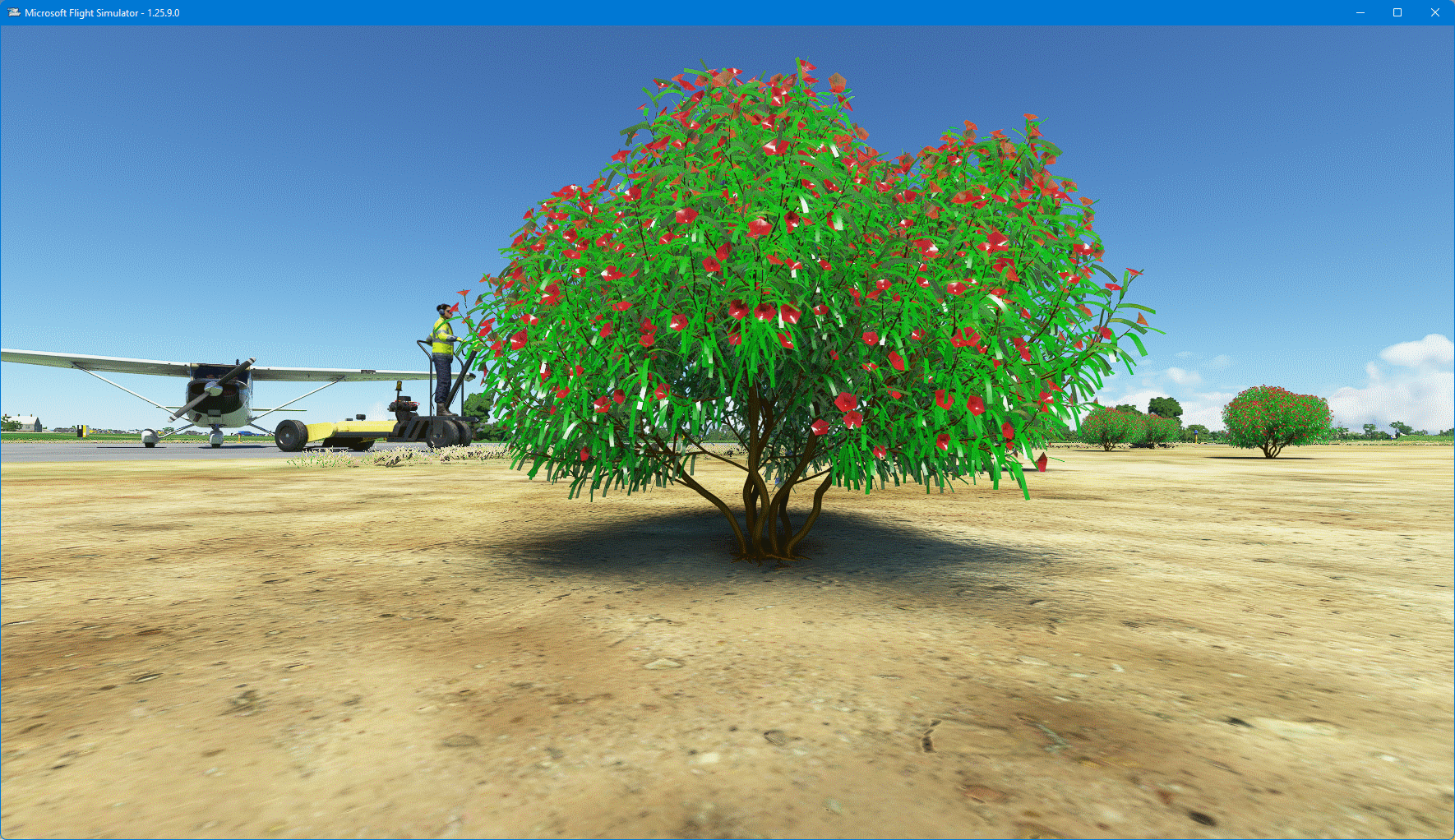
3.1.2 (latest) the flowers appear in Blender in the pic ( when I load the Blender file) but not in the scenery? Thanks @PyscenWhat version of Blender are you referring to? Nevertheless, appears to be an oversight by the artist.
I got the bush here: https://www.turbosquid.com/3d-models/2021-pbr-oleander-collection-nerium-oleander-3d-model-1756580#
Attachments


Ronald
Resource contributor
- Messages
- 974
1 - Does this project have an Blender into MSFS2020 exporter_driven UV map error(s)?Just curious..the textures are PNG but just don't show up?
2 - Have you already experimented with different texture_ :
- file_format (bmp, jpg, tiff)?
- sizes ? (smaller ,bigger)
3 - Have you already experimented with the same object but with materials based colours as "texture" ?
By just using Blender Materials colour as "colour" and not add an texture
4 - How does your (exported) Tree model look inside Arno's ModelConvertor?
-https://www.scenerydesign.org/ - website
-https://www.scenerydesign.org/modelconverterx/ - download location
- Messages
- 695
- Country
The textures are PNG... Model Converter X exports it as a glTF but its black..no flowers. The blender file I have..all the images are PNG. I gave Psycen above the link to the file. I am using the latest Asobo exporter but I am really new at all this and have only used Blender a little. I have 3.1.2.. I am trying to do more and more with DevMode. This is the only Nerium Oleander I could find. Tried an OBJ file and that didn't work either.
I will try the jpegs and see if it does better. I will have to convert them.
Anyway..thanks @Ronald for asking.
Greets,
BobM.
I will try the jpegs and see if it does better. I will have to convert them.
Anyway..thanks @Ronald for asking.
Greets,
BobM.


- Messages
- 6,561
- Country

Here's a link to a reworked Oleander bush .blend file. I removed the textures and colored it. You could change the color of the flowers to anything... or add the textures if you like in blender.
NeriumOleander.zip
NeriumOleander.zip
Ronald
Resource contributor
- Messages
- 974
1 - Tip: Get to know (the absolute) Blender (basics / fundamentals) inside and out, before jumping into the MSFS2020_Dev mode ok? Get to know your 3D modeling tool firstI am using the latest Asobo exporter but I am really new at all this and have only used Blender a little. I have 3.1.2..
Yes! I know :-} (from my own experience) It will take some time, must is something which saves you a lot of challenges later on in your wrokflow / pipeline.
2 - For all Blender beginners (and also experience users) this is must watch material on Blender:
Blender Foundation - Blender v2.8 fundamentals
-
CG GEEK - Blender v2.8 fundamentals
-
BLENDER BASICS 1: Intro to Blender 3.0 and CG Cookie:
-
3 - And since you are currently into MSFS2020 scenery building, some more materials to watch:
IBlueYonder - Very good beginner tools for MSFS2020 scenery builders
-
MyPhysical World - Very good beginner tools for MSFS2020 scenery builders
-https://www.youtube.com/channel/UCRO7cRdKa6spwfB3NXIR29Q/playlists
4 - This is a very , very usefull GoogleTube and Ebook
GoogleTube - "Blender Secrets" - loaded with tips and tricks
-https://www.youtube.com/c/BlenderSecrets - short 5 minute quick-tutorials videos about a single topic
-https://blendermarket.com/products/blender-secrets - this continuously updated ebook is more that worth its price!
Blend
 On!
On!
- Messages
- 695
- Country
Truly Stunning..now if I could figure out what you did but no you don't need to respond. Thank you @rhumbaflappy and @Ronald for your help and wise counsel..Here's a link to a reworked Oleander bush .blend file. I removed the textures and colored it. You could change the color of the flowers to anything... or add the textures if you like in blender.
NeriumOleander.zip
View attachment 82419
Bestest,
BobM.
- Messages
- 6,561
- Country
You could load the original OBJ into ModelConverterX. From there you can change the scale, rotate the model, replace the textures and adjust the material settings. Save it as glTF and load it back to Blender, check it out, make some minor tweaks to the material, save the .blend file, and export the MSFS glTF. You probably don't need the textures as coloring looks pretty good. The model does need LODs, which can be done in MCX or in Blender.
- Messages
- 695
- Country
I might try that for the experience,You could load the original OBJ into ModelConverterX. From there you can change the scale, rotate the model, replace the textures and adjust the material settings. Save it as glTF and load it back to Blender, check it out, make some minor tweaks to the material, save the .blend file, and export the MSFS glTF. You probably don't need the textures as coloring looks pretty good. The model does need LODs, which can be done in MCX or in Blender.
BobM.