• Which the release of FS2020 we see an explosition of activity on the forun and of course we are very happy to see this. But having all questions about FS2020 in one forum becomes a bit messy. So therefore we would like to ask you all to use the following guidelines when posting your questions:

    • Tag FS2020 specific questions with the MSFS2020 tag.
    • Questions about making 3D assets can be posted in the 3D asset design forum. Either post them in the subforum of the modelling tool you use or in the general forum if they are general.
    • Questions about aircraft design can be posted in the Aircraft design forum
    • Questions about airport design can be posted in the FS2020 airport design forum. Once airport development tools have been updated for FS2020 you can post tool speciifc questions in the subforums of those tools as well of course.
    • Questions about terrain design can be posted in the FS2020 terrain design forum.
    • Questions about SimConnect can be posted in the SimConnect forum.

    Any other question that is not specific to an aspect of development or tool can be posted in the General chat forum.

    By following these guidelines we make sure that the forums remain easy to read for everybody and also that the right people can find your post to answer it.

MSFS20 Orphan and Open links etc

Messages
695
Country
us-northcarolina
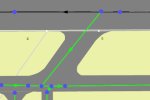
What constitutes an open link... Its connected to runway link..or a taxiway link.. see pic.s. Orphan links...Talks about being close but not connected....Pulling hair out...lol

Well thanks Jon for all your work..just some thoughts,
BobM.
 

Attachments

  • Another open link.JPG
    Another open link.JPG
    30.1 KB · Views: 205
  • Orphan Link.JPG
    Orphan Link.JPG
    58.1 KB · Views: 184
  • Open Link.JPG
    Open Link.JPG
    20.2 KB · Views: 193
Last edited:
Your screenshots do not prove that the links are attached at that node. If you place your cursor on the node and all the links are highlighted, then yes they are connected.
 
here are the before shots and the fault finder error message.. I am sitting on top of the line and don't understand how I can get any closer..lol.. I have read this and just trying to figure this out.

Thanks @art209
 

Attachments

  • Before shot.JPG
    Before shot.JPG
    52.1 KB · Views: 188
  • Fault finder error for these links.JPG
    Fault finder error for these links.JPG
    38.1 KB · Views: 186
Last edited:
It amazes me that the ADE programming is so good that it can detect an opening between links that we cannot see and warn us. Again, I am telling you that you can verify the opening by placing your mouse cursor over the node. If all the links that seem to be joined by the node turn white, then there is no open link. If one or more of the links does not turn white, there is indeed an open link. Or, if you move the node and one or more of the seemingly attached links does not move with it, there is an open link.

Two paths could be placed so close together they appear to be connected, but they are intentionally not. This might show as an open link by fault finder and can be ignored.
 
Well thanks @art209....the cursor turned white on everything....so I finally deleted it and started over. I guess you call that a false flag operation :)

BobM.
 
Back
Top