
-
Which the release of FS2020 we see an explosition of activity on the forun and of course we are very happy to see this. But having all questions about FS2020 in one forum becomes a bit messy. So therefore we would like to ask you all to use the following guidelines when posting your questions:
- Tag FS2020 specific questions with the MSFS2020 tag.
- Questions about making 3D assets can be posted in the 3D asset design forum. Either post them in the subforum of the modelling tool you use or in the general forum if they are general.
- Questions about aircraft design can be posted in the Aircraft design forum
- Questions about airport design can be posted in the FS2020 airport design forum. Once airport development tools have been updated for FS2020 you can post tool speciifc questions in the subforums of those tools as well of course.
- Questions about terrain design can be posted in the FS2020 terrain design forum.
- Questions about SimConnect can be posted in the SimConnect forum.
Any other question that is not specific to an aspect of development or tool can be posted in the General chat forum.
By following these guidelines we make sure that the forums remain easy to read for everybody and also that the right people can find your post to answer it.
You are using an out of date browser. It may not display this or other websites correctly.
You should upgrade or use an alternative browser.
You should upgrade or use an alternative browser.
P3D native groundpoly
- Thread starter pfabian
- Start date
- Messages
- 222
- Country

Been testing it for a little over a month, though I only just got it to work right a few days ago (it took me six weeks to figure out z-write needed to be turned off).

- Messages
- 35
- Country

Hey, late to the thread but I helped test it (I'm a LM dev) and use it on internal scenery quite a few times with multiple layers of taximarks, and ground polygon materials. I'm happy to help. I'm looking for other people to use it too! Right now I'm trying to figure out how to use an additive source ne dest: one light like material to not get filtered behind them!
ne dest: one light like material to not get filtered behind them!
Did anyone test the method Beau Hollis described yet?
Hi,
where can I find more information about the method?
Thx.

Hello:
http://www.prepar3d.com/forum-5/topic/notice-on-asm-based-scenery/
http://www.prepar3d.com/SDKv2/LearningCenter/modeling/modeling_materials.html#Z-Bias_Level
http://www.fsdeveloper.com/forum/threads/p3d-native-groundpoly.430488/
http://www.fsdeveloper.com/forum/threads/prepar3d-v2-z-bias-material.428218/
http://www.scenerydesign.org/2014/06/gpw-update-for-p3d-v2/
Hope this helps !
GaryGB
http://www.prepar3d.com/forum-5/topic/notice-on-asm-based-scenery/
http://www.prepar3d.com/SDKv2/LearningCenter/modeling/modeling_materials.html#Z-Bias_Level
http://www.fsdeveloper.com/forum/threads/p3d-native-groundpoly.430488/
http://www.fsdeveloper.com/forum/threads/prepar3d-v2-z-bias-material.428218/
http://www.scenerydesign.org/2014/06/gpw-update-for-p3d-v2/
Hope this helps !
GaryGB

- Messages
- 1,964
- Country

So according to
http://www.prepar3d.com/SDKv2/LearningCenter/modeling/modeling_materials.html#Z-Bias_Level
You set "no z-write"
and set the z-bias to -1 to -50
And do you place the object like another scenery object, or does one have to use the GPW in MCX still?
Thanks!
http://www.prepar3d.com/SDKv2/LearningCenter/modeling/modeling_materials.html#Z-Bias_Level
You set "no z-write"
and set the z-bias to -1 to -50
And do you place the object like another scenery object, or does one have to use the GPW in MCX still?
Thanks!

jtanabodee
Resource contributor
- Messages
- 3,924
- Country

Hi Arno,
I was wondering if the GP for P3Dv4 has priority over the buildings or other things made by 3dsmax, Gmax.
I was wondering if the GP for P3Dv4 has priority over the buildings or other things made by 3dsmax, Gmax.
- Messages
- 1,964
- Country
Ok this isn't working as I thought it might...
If i use the GPW with positive 4,8,12 etc and export as a p3d v4 ground poly, it looks fine in the sim, but there is a duplicated version of it at a rotation of 21 degrees.

And it appears wrong in MCX:

Now using negative values in MCX GPW (the same thing happens setting the z-bias to negative)
the bgl appears wrong in the simulator:

But correct in MCX

But both times a duplicate is placed there which doesn't exist in the .bgl.
Any suggestions?
If i use the GPW with positive 4,8,12 etc and export as a p3d v4 ground poly, it looks fine in the sim, but there is a duplicated version of it at a rotation of 21 degrees.
And it appears wrong in MCX:
Now using negative values in MCX GPW (the same thing happens setting the z-bias to negative)
the bgl appears wrong in the simulator:
But correct in MCX
But both times a duplicate is placed there which doesn't exist in the .bgl.
Any suggestions?
- Messages
- 1,964
- Country
Additionally, if I place it as a normal object after correcting for the curvature of the earth, I get bad flickering.
And yes, my buildings have disappeared also!
I tried using MCX GPW with my amarillo GPs also:

I got this same result three times in a row.
I use GMAX, but the values are the same, bar the z bias, which the GPW sets.
I checked other devs GPs and the material settings are the same.
Can anyone suggest what I am doing wrong?
And yes, my buildings have disappeared also!
I tried using MCX GPW with my amarillo GPs also:
I got this same result three times in a row.
I use GMAX, but the values are the same, bar the z bias, which the GPW sets.
I checked other devs GPs and the material settings are the same.
Can anyone suggest what I am doing wrong?
Last edited:

- Messages
- 34,509
- Country

Hi Arno,
I was wondering if the GP for P3Dv4 has priority over the buildings or other things made by 3dsmax, Gmax.
No, there is nothing set for priority. I'm not even sure if that is possible. All MDL object should show up.
jtanabodee
Resource contributor
- Messages
- 3,924
- Country
So, native ground poly in P3D should be the same as other things in the field. That is a good news for me. In some airports, there are a lot of tunnels and underway pass. When they are closed to the taxiway, the old ground poly cause so many problems. Since it has lower priority over those tunnels made by Gmax/3dsmax. Sometimes the tunnels are visible under the taxiway.
jtanabodee
Resource contributor
- Messages
- 3,924
- Country
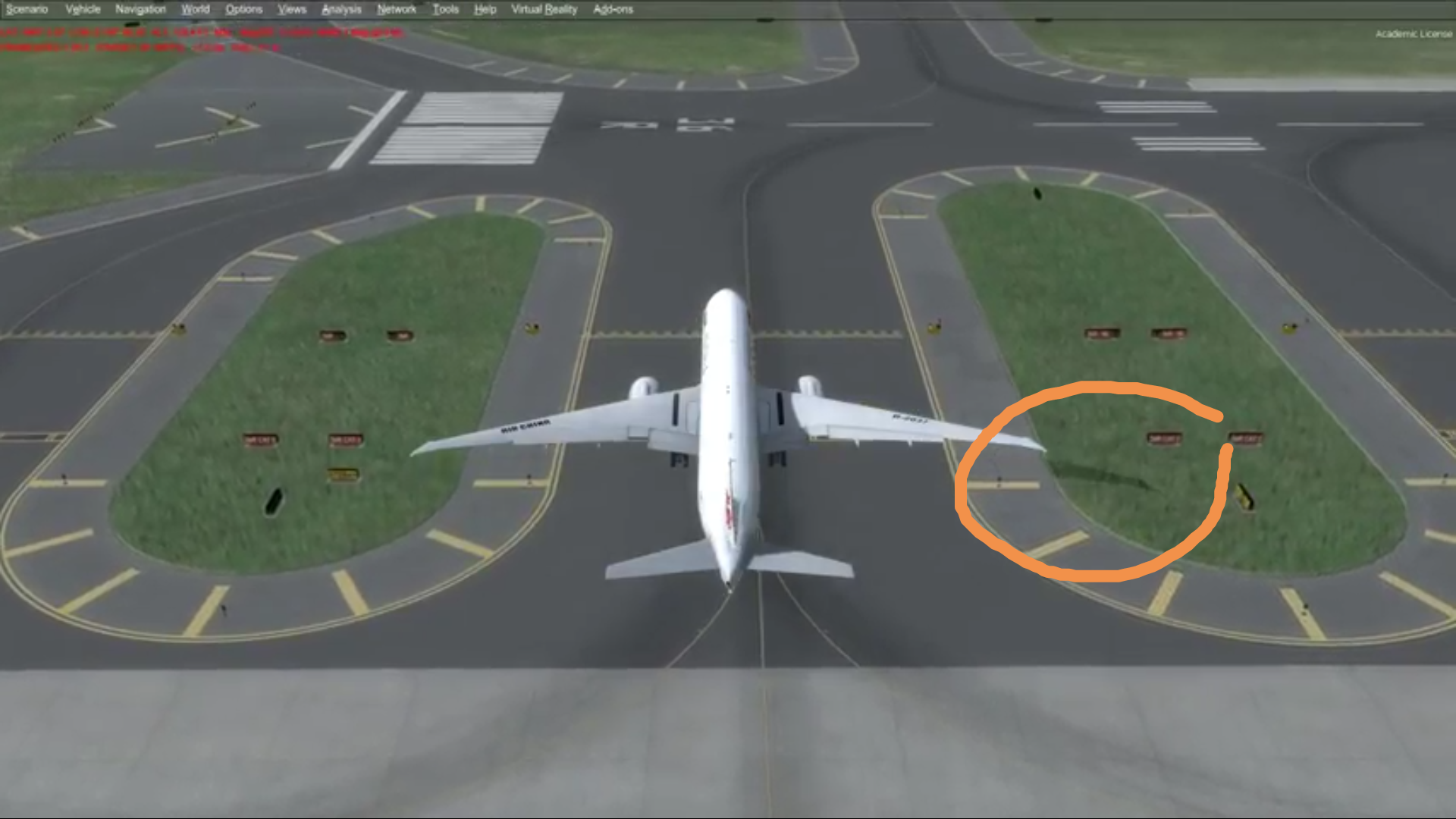
I have seen ground poly in P3DV4 and I found the the aircraft does not cas shadow on the ground but it does cast shadow on photoscnery. Is this a problem of GP or the setting in the game?

- Messages
- 51
- Country

Hi Tic and Arno Buldings shadow receive on.
https://www.fsdeveloper.com/forum/threads/prepar3d-v4-support.440237/page-2#post-774849
Buldings shadow receive on.https://www.fsdeveloper.com/forum/threads/prepar3d-v4-support.440237/page-2#post-774849

jtanabodee
Resource contributor
- Messages
- 3,924
- Country
Thanks Daniel. I thought it was the setting as well.
However, does it hurt fps a lot by setting that?
However, does it hurt fps a lot by setting that?
- Messages
- 51
- Country
Thanks Daniel. I thought it was the setting as well.
However, does it hurt fps a lot by setting that?
Hi Tic,
I actually didn't test if it hurts performance.
If you are planning a beta test, you can ask your testers to test it
P.S good job on the ZBAA scenery. Really like your screen shots!