
• Which the release of FS2020 we see an explosition of activity on the forun and of course we are very happy to see this. But having all questions about FS2020 in one forum becomes a bit messy. So therefore we would like to ask you all to use the following guidelines when posting your questions:

    • Tag FS2020 specific questions with the MSFS2020 tag.
    • Questions about making 3D assets can be posted in the 3D asset design forum. Either post them in the subforum of the modelling tool you use or in the general forum if they are general.
    • Questions about aircraft design can be posted in the Aircraft design forum
    • Questions about airport design can be posted in the FS2020 airport design forum. Once airport development tools have been updated for FS2020 you can post tool speciifc questions in the subforums of those tools as well of course.
    • Questions about terrain design can be posted in the FS2020 terrain design forum.
    • Questions about SimConnect can be posted in the SimConnect forum.

    Any other question that is not specific to an aspect of development or tool can be posted in the General chat forum.

    By following these guidelines we make sure that the forums remain easy to read for everybody and also that the right people can find your post to answer it.

(P3DV4) Terrain Punching Through Aprons and Taxi/Vehicle Paths

Messages
8
Country
canada
PLEASE HELP, I'M AT MY WIT'S END!!

I'm in the process of converting all my custom scenery (all built in ADEX by hand) from FSX:SE to P3DV4. However, in all of my sceneries, I'm getting these terrain punch-thru issues with absolutely no clear way to fix them. I've tried re-exporting the scenery files as P3D BGLs as opposed to FSX BGLs, all to no avail. I'm out of my depth on this one, and ready to put my head through a wall. Any and all suggestions are welcome- and very much needed.

Thanks in advance!
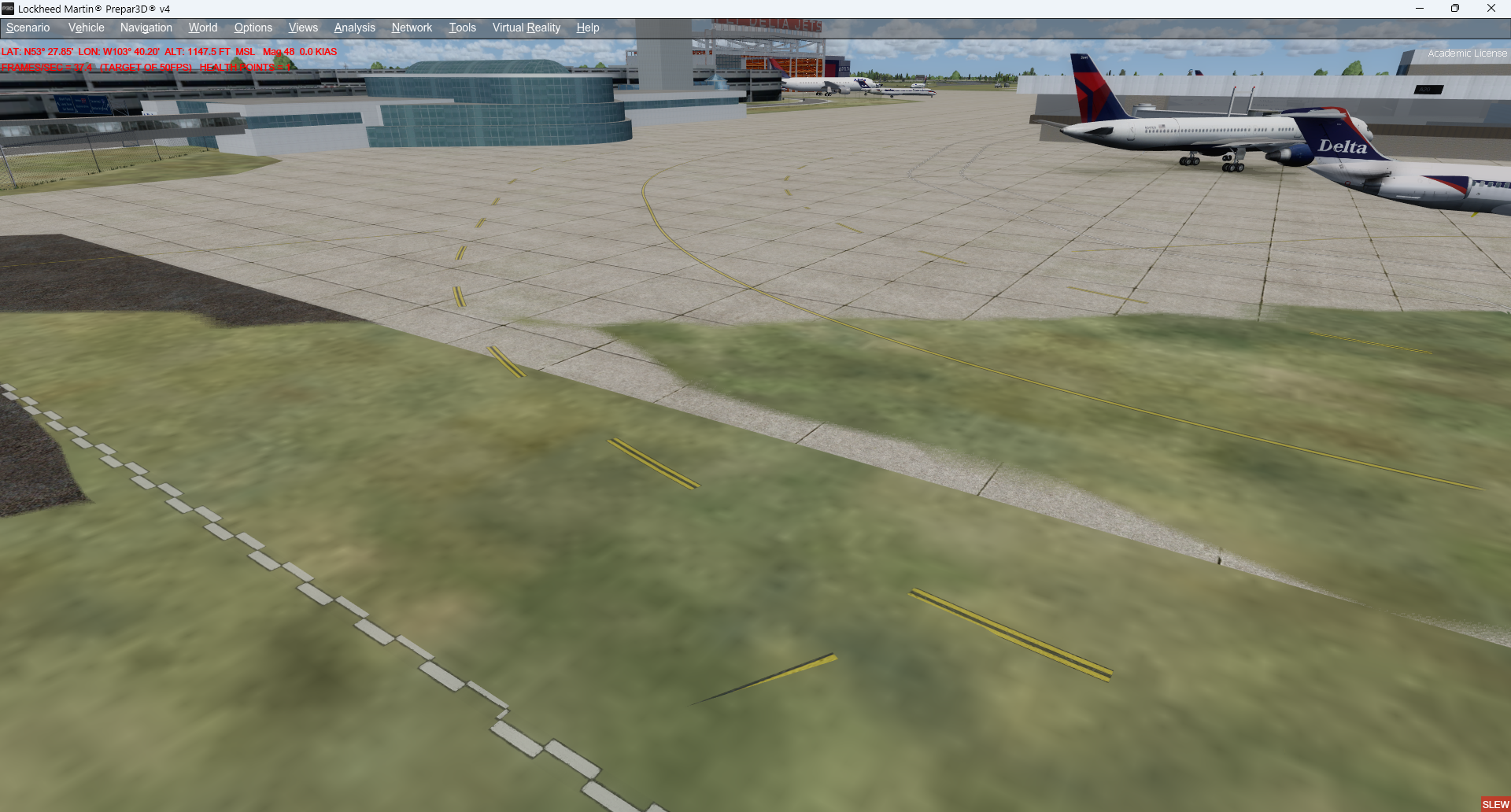
Issue.png
 
Hi Mike:

In the locale of your airport above, do you have installed:

OrbX Global / Region Packs, Land Class packs, and/or Airport packs ?

ADE GP's (aka "G-Polys"), or G-Polys made via MCX or SBuilderX ?

GaryGB
 
Hey Gary!

There are, to the best of my knowledge, no conflicting packs. It's basically P3DV4 right out of the "box" with my FSX:SE scenery ported over. The airport has been made with ADE and uses its default vehicle/taxi/runway/apron modeling. I admittedly have no idea whatsoever what a G-Poly is, and I've never used SBuilderX. If I'm missing something here, please explain it to me like I'm four, as the full extent of my scenery building has been in FSX and clearly I don't have a clue how P3D handles things.

Cheers!
 
Have you created a terrain airport background polygon in ADE that includes the Flatten attribute?
 
Yes- I've used Flatten Exclude Autogen, and the altitude of that polygon matches the altitude of the airport itself.
 
I hope to finish my FS computer rebuilds this week, and could take look at the example scenery you cite in your OP for this thread, if you attach- or link to- that airport's ADE *.AD4 project files from FSX and P3D here.

AFAIK, ADEv1.79 can also output a ZIP of the complete project and it's pertinent compiled files via the ADE project backup menu item.

GaryGB
 
Last edited:
Hey all, quick update.

I noticed after some more troubleshooting that the clipping didn't seem to happen with every view, just most VC views. This led me to go into the Camera Config file and see what code was different from one camera to the next. I noticed ClipMode=Minimal was in Spot View, but not First Person or VC, so I added that line. That hasn't totally solved the issues in every area I've built scenery in, but it's corrected a lot of issues, including the one pictured above. When I have time to go through all 200 files with a fine-tooth comb, I'll compile a list of visual errors I encounter, and either seek advice or share what I find fixes the issues!
 
Hi Mike:

Thanks for posting your intriguing update above.

I had not looked into the 3D geometry camera clipping possibility directly within FS, but I did have to work around it's limitations previously in Sketchup when making 3D models intended for use in FS.

Perhaps others might be interested to review some info on this setting in FS Camera.cfg ?


It may also be interesting to compare the scene rendering in Spot View as a function of Zoom level and Chase View camera settings.

While AFAIK FS requires us to manually implement LODs and associated MIPMAPs in Materials mapped onto custom 3D models, default 3D scenery objects such as aircraft SimObjects typically have these, as does FS Terrain.

Dynamically changing Chase View camera settings in Spot View will show the clipping of SimObject rendering as a function of LOD Z-sorting by FS camera-to-object distance.

An easy to test example is the default FSX Aircreations Trike, where the pilot eventually will vanish as one moves the Chase View camera farther away from the Trike.

It may also prove interesting to compare FS Terrain rendering in Spot View mode as a function of dynamic changes to Chase View settings for Camera-to-Terrain surface area as visualized in FS at run time, to see if the above anomalies in the OP are incurred in both default Resample SDK gridded and TIN Terrain, or rectangular Face flat / level 3D G-Polys.


FYI: A discussion of potentially related considerations that may merit review ...is here:

https://www.fsdeveloper.com/forum/t...lurry-from-a-near-distance.443581/post-805817

GaryGB
 
Last edited:
Back
Top