
-
Which the release of FS2020 we see an explosition of activity on the forun and of course we are very happy to see this. But having all questions about FS2020 in one forum becomes a bit messy. So therefore we would like to ask you all to use the following guidelines when posting your questions:
- Tag FS2020 specific questions with the MSFS2020 tag.
- Questions about making 3D assets can be posted in the 3D asset design forum. Either post them in the subforum of the modelling tool you use or in the general forum if they are general.
- Questions about aircraft design can be posted in the Aircraft design forum
- Questions about airport design can be posted in the FS2020 airport design forum. Once airport development tools have been updated for FS2020 you can post tool speciifc questions in the subforums of those tools as well of course.
- Questions about terrain design can be posted in the FS2020 terrain design forum.
- Questions about SimConnect can be posted in the SimConnect forum.
Any other question that is not specific to an aspect of development or tool can be posted in the General chat forum.
By following these guidelines we make sure that the forums remain easy to read for everybody and also that the right people can find your post to answer it.
You are using an out of date browser. It may not display this or other websites correctly.
You should upgrade or use an alternative browser.
You should upgrade or use an alternative browser.
Parking Spot Text
- Thread starter flynby
- Start date


Do you have a indicator showing there are more options available like the word *Add* has? I did right click but the menu screen disappears.
This only happens in FSX. P3D v 3 and 4 there is no text on the parking spots. Plus I just updated ADE to 1.76.6715. Friend of mine showed me
how it works properly on his computer. I do not get same results. Is there a setting I am missing somewhere? Thanks
This only happens in FSX. P3D v 3 and 4 there is no text on the parking spots. Plus I just updated ADE to 1.76.6715. Friend of mine showed me
how it works properly on his computer. I do not get same results. Is there a setting I am missing somewhere? Thanks
Attachments

Last edited:
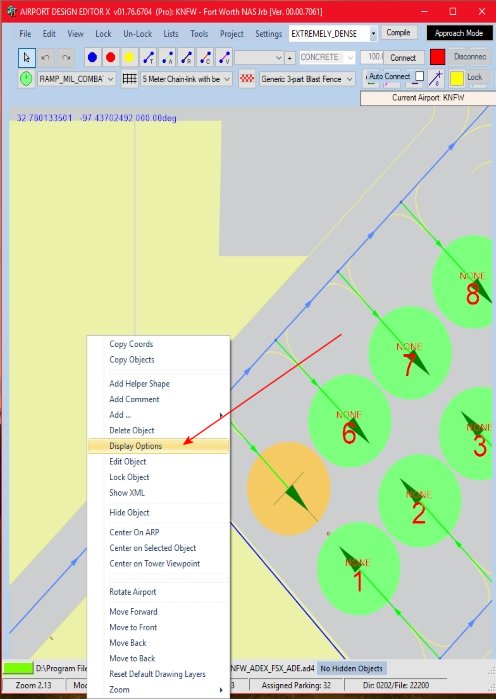
Let me try this: When my friend highlights "Display Options" and left clicks the mouse; a screen pops up with this stating "ShowParkingNumbe" to "False". This does not happen when I do the same. I left clicked the display option and waited 1 full minute
and no screen showed. Just retried: Although there are no numbers or text showing in P3D v3 or 4 - neither does a screen show in all 3 sims.
and no screen showed. Just retried: Although there are no numbers or text showing in P3D v3 or 4 - neither does a screen show in all 3 sims.

- Messages
- 34,981
- Country

No it works without a ProKey.. Perhaps some screenshots of what you are doing would help. You need to select a parking spot first then right click to get the context menu. Left clicking on Display Options works here fine:


Select True from the drop down, and then Close

Select True from the drop down, and then Close

- Messages
- 298
- Country

Hello
I'm in the same position Parking Options does not work for me either.
Action taken:
Left click parking spot ( to highlight)
Right click highlighted parking spot
Select "parking options" from menu
Nothing happens
I'm using the ADE version 01.76.6715.14291
Dave Butler
I'm in the same position Parking Options does not work for me either.
Action taken:
Left click parking spot ( to highlight)
Right click highlighted parking spot
Select "parking options" from menu
Nothing happens
I'm using the ADE version 01.76.6715.14291
Dave Butler
- Messages
- 34,981
- Country
I assume you mean Display Options where you say "parking options"?
Check the icon in the task bar for ADE. Is there just one icon or is there another one stacked with it? One possibility is that the Display Properties dialog is opening behind ADE rather than in front of it.
Check the icon in the task bar for ADE. Is there just one icon or is there another one stacked with it? One possibility is that the Display Properties dialog is opening behind ADE rather than in front of it.
- Messages
- 298
- Country
Jon
Sorry yes I mean Display Options.
Nothing hidden behind the ADE icon on the task bar.
Dave
Sorry yes I mean Display Options.
Nothing hidden behind the ADE icon on the task bar.
Dave
- Messages
- 34,981
- Country
OK - since I cannot replicate it there is not much I can do at the moment. However the property is stored in the relevant settings.ini file
[PARKINGRAWPROPERTIES]
showGateNumber=True
If it is missing from the ini file then it is defaulted to false. If it shows as above then the gate numbers will appear. You could manually change True to False.
Please also note that there is a separate settings.ini file in each version folder inside ADE (FS9, FSX, P34 etc) so the setting can be different depending on what version of the sim you are working with.
PS There is a typo in the settings section. If you decide to create it your self then be sure to use [PARKINGRAWPROPERTIES] which misses the 'D' from DRAW.
[PARKINGRAWPROPERTIES]
showGateNumber=True
If it is missing from the ini file then it is defaulted to false. If it shows as above then the gate numbers will appear. You could manually change True to False.
Please also note that there is a separate settings.ini file in each version folder inside ADE (FS9, FSX, P34 etc) so the setting can be different depending on what version of the sim you are working with.
PS There is a typo in the settings section. If you decide to create it your self then be sure to use [PARKINGRAWPROPERTIES] which misses the 'D' from DRAW.

- Messages
- 554
- Country

I found settings.ini but I changed to DRAW from RAW. I change from false to true not working and go back to false not working I opened setting .ini I saw it changed itself add parkingrawproperties. It took D out of it. Why would the Earth computer do with this? Very strange system.
Still not showing it up. I have ProKey.
Stuart
Still not showing it up. I have ProKey.
Stuart
Last edited:
- Messages
- 298
- Country
The change to the .ini file worked for me as regards showing the parking numbers but no change using parking options.
Dave Butler
Dave Butler
- Messages
- 34,981
- Country
Don't change from RAW to DRAW ADE updates the settings file each time you run. The program expects RAW instead of DRAW in the section name due to a programmer error - cant' spell 
- Messages
- 34,981
- Country

