
-
Which the release of FS2020 we see an explosition of activity on the forun and of course we are very happy to see this. But having all questions about FS2020 in one forum becomes a bit messy. So therefore we would like to ask you all to use the following guidelines when posting your questions:
- Tag FS2020 specific questions with the MSFS2020 tag.
- Questions about making 3D assets can be posted in the 3D asset design forum. Either post them in the subforum of the modelling tool you use or in the general forum if they are general.
- Questions about aircraft design can be posted in the Aircraft design forum
- Questions about airport design can be posted in the FS2020 airport design forum. Once airport development tools have been updated for FS2020 you can post tool speciifc questions in the subforums of those tools as well of course.
- Questions about terrain design can be posted in the FS2020 terrain design forum.
- Questions about SimConnect can be posted in the SimConnect forum.
Any other question that is not specific to an aspect of development or tool can be posted in the General chat forum.
By following these guidelines we make sure that the forums remain easy to read for everybody and also that the right people can find your post to answer it.
You are using an out of date browser. It may not display this or other websites correctly.
You should upgrade or use an alternative browser.
You should upgrade or use an alternative browser.
Prepar3D v4.4 PBR materials
- Thread starter arno
- Start date

- Messages
- 2,385
- Country

Thanks. I'll give it a try.
Hey Arno!
I have a problem with a ground model: I changed on of the parts to PBR for testing, the other parts are non-PBR. When I export the model as a 4.4 MDL the changes disappear. PBR is still on true but any other change I make in the material editor is reverted back to what it was. The same happens when I export as 4.4 BGL, none of the changes are kept...
I have a problem with a ground model: I changed on of the parts to PBR for testing, the other parts are non-PBR. When I export the model as a 4.4 MDL the changes disappear. PBR is still on true but any other change I make in the material editor is reverted back to what it was. The same happens when I export as 4.4 BGL, none of the changes are kept...

- Messages
- 88
- Country

Hey Arno, does the convert and place wizard support the new PBR matl's yet, cause I am not seeing anything in the sim?I know I haven’t posted on this blog for a while, but it’s time for an announcement that needs to be here on this blog as well.
The development release of ModelConverterX does include support for the new Prepar3D v4.4 PBR materials. This means that MCX can now:
- Read the material settings from a P3D v4.4 MDL file
- Write the material settings to a P3D v4.4 MDL/BGL file
- View and edit the material settings in the material editor
The preview image of MCX does not use the PBR settings, so the preview is still as before. For a pure PBR material it will probably look a bit weird. That’s something for a future update.
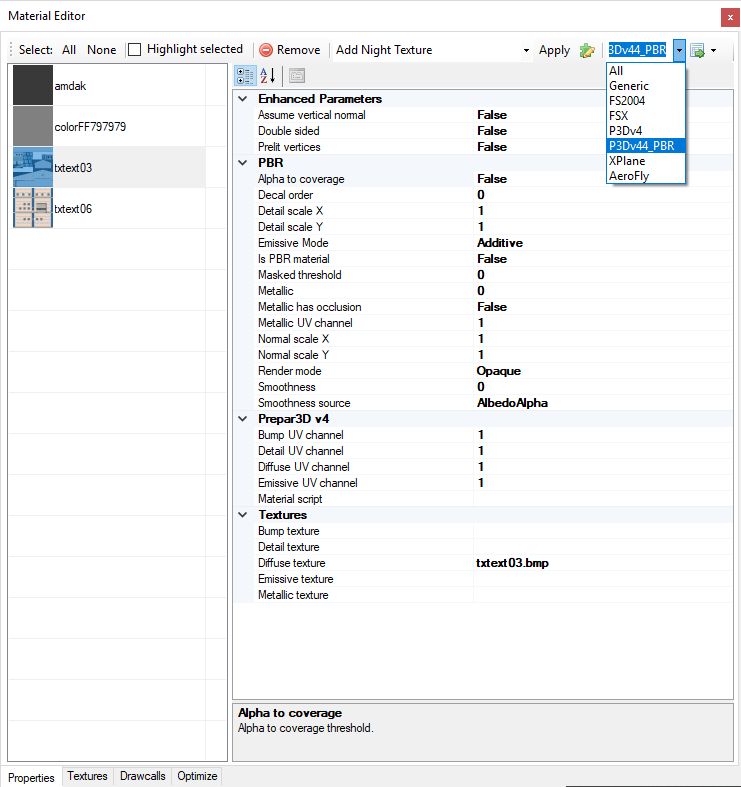
In the material editor I have added a special material view filter that will show you only the PBR related attributes. See the screenshot below. If you want to make a PBR material make sure you set the ‘Is PBR material’ attribute to true, else MCX will export as a normal P3D material.
Another thing you need to be aware of is that MCX can not automatically distinguis between the P3D v4.4 and previous v4 SDKs. This means you might manually have to check if the XtoMDL and BGLComp path for both versions are still correct. You can see them in the options.
Let me know if I forgot anything needed for PBR or if you find other issues. It was quite some refactoring to add this, so I might have broken something else by accident.
Continue reading...
- Messages
- 88
- Country
Ah OK, I will double check that, thanks
- Messages
- 172
Can I just check, MCX can add pbr to an imported obj model.
I import the obj, add the parameters in material editor, like PBR is true, I export as mdl.
The imported mdl has remembered the settings. I export scenery as bgl. I see no changes to the model in the sim.
Importing that bgl back into mcx, the material settings seem to of been forgotten.
Not sure if problem lies with obj, my MCX, or my first attempts at saving a metalic material file. I am sure it will be my fault somehow...
I import the obj, add the parameters in material editor, like PBR is true, I export as mdl.
The imported mdl has remembered the settings. I export scenery as bgl. I see no changes to the model in the sim.
Importing that bgl back into mcx, the material settings seem to of been forgotten.
Not sure if problem lies with obj, my MCX, or my first attempts at saving a metalic material file. I am sure it will be my fault somehow...
- Messages
- 172
Scratch that. I was selecting P3DV4 BGL and not V4.4 from the drop down selection box.
I am playing the 'head cold' card...
I am playing the 'head cold' card...

- Messages
- 68
- Country

Hello!
I'm trying to use PBR Rendering with MCX since it came out. I got it working so far with all the bump ( normal map ), metalic and smoothness map....
I noticed one problem though. When I have a diffuse texture with an alpha channel MCX uses it fine until I convert the model into a P3D v4.4 mdl file. When I import the mdl backk into MCX, the alpha channel is gone.
IDK if this is caused by me or if its an issue with MCX.
Thanks for any reply!
Norvin.
I'm trying to use PBR Rendering with MCX since it came out. I got it working so far with all the bump ( normal map ), metalic and smoothness map....
I noticed one problem though. When I have a diffuse texture with an alpha channel MCX uses it fine until I convert the model into a P3D v4.4 mdl file. When I import the mdl backk into MCX, the alpha channel is gone.
IDK if this is caused by me or if its an issue with MCX.
Thanks for any reply!
Norvin.

- Messages
- 34,467
- Country

Hi,
MCX will not change your textures, so the alpha channel should still be there. But the preview in MCX doesn't show the PBR settings, so the alpha channel will not be used when rendering the PBR material.
MCX will not change your textures, so the alpha channel should still be there. But the preview in MCX doesn't show the PBR settings, so the alpha channel will not be used when rendering the PBR material.
- Messages
- 68
- Country
Hi,
MCX will not change your textures, so the alpha channel should still be there. But the preview in MCX doesn't show the PBR settings, so the alpha channel will not be used when rendering the PBR material.
Thanks for the reply!
The alpha channel is still there.... The exported textures are all fine, but in MCX as well as in P3D the alpha channel is not visible.
Norvin.
- Messages
- 68
- Country
The normal material settings that apply to transparency do not apply to PBR materials. So you probably need to check your PBR settings again. MCX doesn't use them, but P3D will.
So is there a setting in the PBR Materials section that will use the alpha Channel?