• Which the release of FS2020 we see an explosition of activity on the forun and of course we are very happy to see this. But having all questions about FS2020 in one forum becomes a bit messy. So therefore we would like to ask you all to use the following guidelines when posting your questions:

    • Tag FS2020 specific questions with the MSFS2020 tag.
    • Questions about making 3D assets can be posted in the 3D asset design forum. Either post them in the subforum of the modelling tool you use or in the general forum if they are general.
    • Questions about aircraft design can be posted in the Aircraft design forum
    • Questions about airport design can be posted in the FS2020 airport design forum. Once airport development tools have been updated for FS2020 you can post tool speciifc questions in the subforums of those tools as well of course.
    • Questions about terrain design can be posted in the FS2020 terrain design forum.
    • Questions about SimConnect can be posted in the SimConnect forum.

    Any other question that is not specific to an aspect of development or tool can be posted in the General chat forum.

    By following these guidelines we make sure that the forums remain easy to read for everybody and also that the right people can find your post to answer it.

Problem blender export : invisible object in msfs scenery editor

Messages
14
Country
france
Hello,
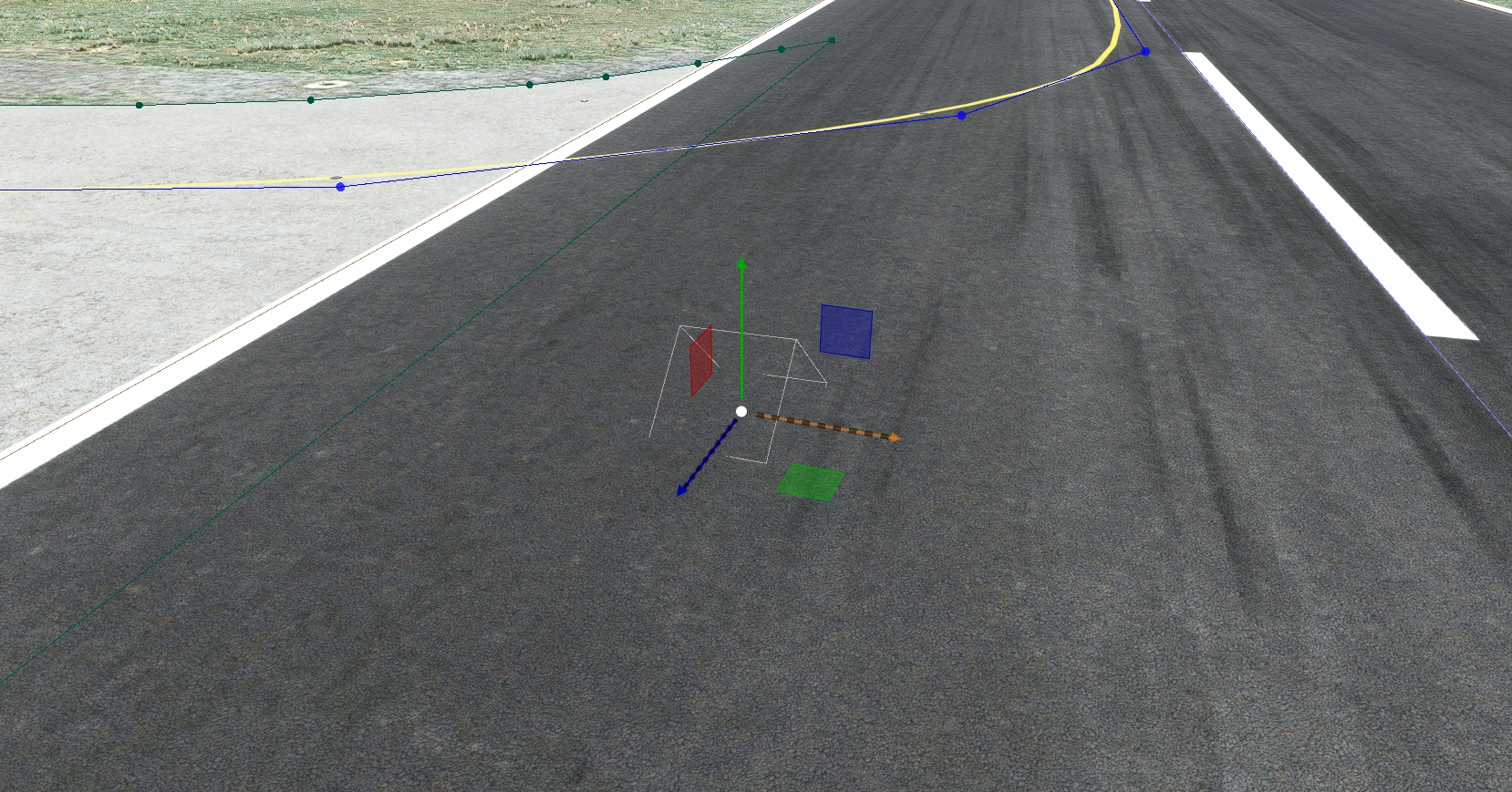
When i add my objet (bat8) in msfs scenery editor, my object is invisible :
1690190419521.png


I use blender 3.3 + asobo exporter.


I have tested my exported object in modelconverterX and i see it.
1690190764216.png


Here my asobo exporter settings :
1690190602903.png

1690190650537.png


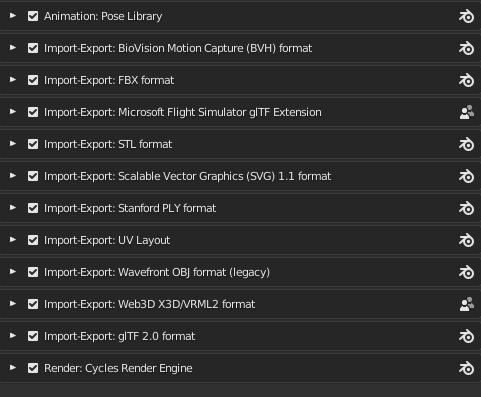
Here my active addon on Blender

1690191254643.png


Could you help me please.
Thank you in advance.
Blomotom
 
Last edited:
When building your object, check the console for any errors.
Without the sources and/or an error report it is impossible to help further

Inviato dal mio Mi 9 Lite utilizzando Tapatalk
 
when building on msfs no errror. The object appear invisible before building : in scenery editor mod when i add it in scene with object finder.
 
when building on msfs no errror.
In this regard, I have to suggest you might be mistaken, I'll explain why. If the model is in the PackageSources folder, FSPackagetool.exe will Build the Package, that is why you have the empty box and crosshairs, the model information has been added to the scene, but it remains invisible. This means the compiler searched for the textures, or the model and found one or the other to be inadequate, but conducted the Build anyway. To be sure, you could check the upper right corner of the Console window, to make sure the Autoset check box is selected, the message group filter to the right should read "PackageBuilder," or higher and check the red x Error field and the yellow "!" warning field that they are not "deselected" and are each surrounded by the blue box.

Anyway, right or wrong, it would be expedient to upload your Package. Bottom line, if the model appears in MCX, it is almost certainly not a Blender issue, nor an exporter issue. If the XML loads into MCX with textures applied, it does not matter the format, MCX can do the conversions and even conduct the build. This means the model is indeed, "ready," or very close.

The problem, most likely, is paths, or procedures and the uploaded Package would determine that upon examination. Without, it can be a rather lengthy back and forth, "is this there, have you placed these textures here," kind of thing. My guess is a paths situation, based on the fact that Arno has written in a pretty thorough search algorithm to find those textures. However, untextured models usually show up pink, which suggests some problem with the model itself, which raises one final consideration. Are you sure you're waiting long enough? Sometimes it takes more than a moment for my models to pop in, especially in crowded scenes. You'd want to make sure by testing other objects as well, if this is a possibility.

 
Zip your .blend file and attach it to a post, or upload it to the cloud and give us a link. Otherwise we just guess the cause.
 
I have the same issue... any solutions? I have made model in Google Sketchup and that worked before. loaded in just fine. However I made another one and did everything the same but this time it shows as invisible with a small box. I am not sure what I did wrong this time.
 
Last edited:
I have the same issue... any solutions? I have made model in Google Sketchup and that worked before. loaded in just fine. However I made another one and did everything the same but this time it shows as invisible with a small box. I am not sure what I did wrong this time.
Same suggestion as previous posts, zip all your sources and will be reviewed

Inviato dal mio Mi 9 Lite utilizzando Tapatalk
 
sorry (or happy) to say that your model shows up just fine in the game (using the same gltf/bin you provide)

...you can try to remove Packages and PackageInt from your project files and compile again, maybe it will help!


set up a quick project for you to test it including the a .blend with your gltf import and usual clean up


Attachments

  • Screenshot (571).png
    Screenshot (571).png
    2.4 MB · Views: 269
Last edited:
wow... looks good... just wish I could see it... ill try again thanks for letting me know... ill also try your file
 
As noted above, zip the needed files and attach them to a post, or give a link so they can be downloaded.
 
As noted above, zip the needed files and attach them to a post, or give a link so they can be downloaded.
I haven't replied just yet because i wanted to investigate it a little further. Turns out that even the SDK samples are facing the same issue for me, the custom models are shown as "unknown" in the scenery editor tab. I indeed don't understand how to fix this, =rk= said in his latest post that this is a new issue introduced by SU14 and that many devs are experiencing this issue. I believe this is my case.
Just for context, i started facing this issue when i couldn't import a new model into the sim, getting only an empty outline of a small box in the editor. In the pursue to fix this, i decided to do what someone wrote in another forum telling to delete PackageInit and Packages Definitions, so i did. The result was that now even the already existing models that were placed already became invisible and shown as "Uknown", since then i haven't found any fix for this and the fact that this same problem is happening with official Asobo samples tells me that it might be something beyond my realm of action.
 
Load your project in the DevMode. Save. Compile the project. Close the project. Load the Project. Unknown should change to the object unless the GUID in the placement has been changed. If you look in the Objects panel, under your project name, it should show up... even if the GUID wad changed.

You should be able to still send a link or attach a zip file, else we are just chasing our tails in the forum. Problems rarely get a quick response unless other helpful poster can test your problem.
 
I'll try to do that and i will try to send the .zip of the project under here.

Edit: Thank you for all the help so far, it's quite a big light for me already.
 
So, i loaded the project in DevMode, saved it, compiled (clicked on Build Package), closed the project and loaded the project again, sadly no changes. My project's name doesn't show in the Objects Panel since the issue started to happen. Should i re-export the models with a new GUID?

Edit: What part of the project should i attatch here? I don't think uploading a whole project .zip file sounds safe...

(~3h after 1st Edit) Edit no.2: Re-exported one of the models with overwrite GUID and it didn't do anything, as you may have noticed, i have no idea what i am doing...
 
Last edited:
GOOD NEWS!

I finally managed to fix it!
I made 2 changes but didn't check if the issue was fixed as i made the changes, so i don't know which change fixed my issue.

This is what i did:

1- I put an image for the thumbnail of the project.

2- I took a look at the Packages folder, where the compiled libs are put inside, i have two libraries, one for materials and another one for 3D Models. Because of that, inside my Packages folder there were also two folders, one for Materials and another for 3D Models. Since my custom materials (decals, aprons etc) were working, i checked the materials folder first and it had a lot of things inside, then i compared it with the models folder which was empty, so i decided to copy and paste my model library from PackageSources and paste it inside Packages and then i clicked in Clean All and Build All.
The result is that the model library folder inside "Packages" was cleaned up as it was before, but my project's name was back into Object List with all the models showing up back again in the list!

Therefore i believe what fixed the issue was to put a thumbnail for my project, for some reason.
 
I glad you discovered the solution.
As mamu often tells people, use the Devmode to create your project structure. If you had done so, you would have had a default thumbnail already in your project. It just avoids problems.
Also, when you have these types of problems, you can create a new project with the Devmode, and just copy your textures and models to the appropriate folders in the newly created project, and it may solve the issues.
 
I glad you discovered the solution.
As mamu often tells people, use the Devmode to create your project structure. If you had done so, you would have had a default thumbnail already in your project. It just avoids problems.
Also, when you have these types of problems, you can create a new project with the Devmode, and just copy your textures and models to the appropriate folders in the newly created project, and it may solve the issues.
That's great! Still on that, taking the oportunity of asking it, is it possible to transfer aprons from a project into another? Because let's say one day i need to restart by creating a new project and i don't want to make everything again, but transfer from the old one into the new one, how would i do that?
 
Back
Top