
-
Which the release of FS2020 we see an explosition of activity on the forun and of course we are very happy to see this. But having all questions about FS2020 in one forum becomes a bit messy. So therefore we would like to ask you all to use the following guidelines when posting your questions:
- Tag FS2020 specific questions with the MSFS2020 tag.
- Questions about making 3D assets can be posted in the 3D asset design forum. Either post them in the subforum of the modelling tool you use or in the general forum if they are general.
- Questions about aircraft design can be posted in the Aircraft design forum
- Questions about airport design can be posted in the FS2020 airport design forum. Once airport development tools have been updated for FS2020 you can post tool speciifc questions in the subforums of those tools as well of course.
- Questions about terrain design can be posted in the FS2020 terrain design forum.
- Questions about SimConnect can be posted in the SimConnect forum.
Any other question that is not specific to an aspect of development or tool can be posted in the General chat forum.
By following these guidelines we make sure that the forums remain easy to read for everybody and also that the right people can find your post to answer it.
You are using an out of date browser. It may not display this or other websites correctly.
You should upgrade or use an alternative browser.
You should upgrade or use an alternative browser.
Problem with polygons in GMax
- Thread starter JCRL
- Start date


Ok, I have to rename the material name, example: Mtl #1 to ds_Mtl #1 ?
Yes, that'll do it.


tgibson
Resource contributor
- Messages
- 11,865
- Country

Hi,
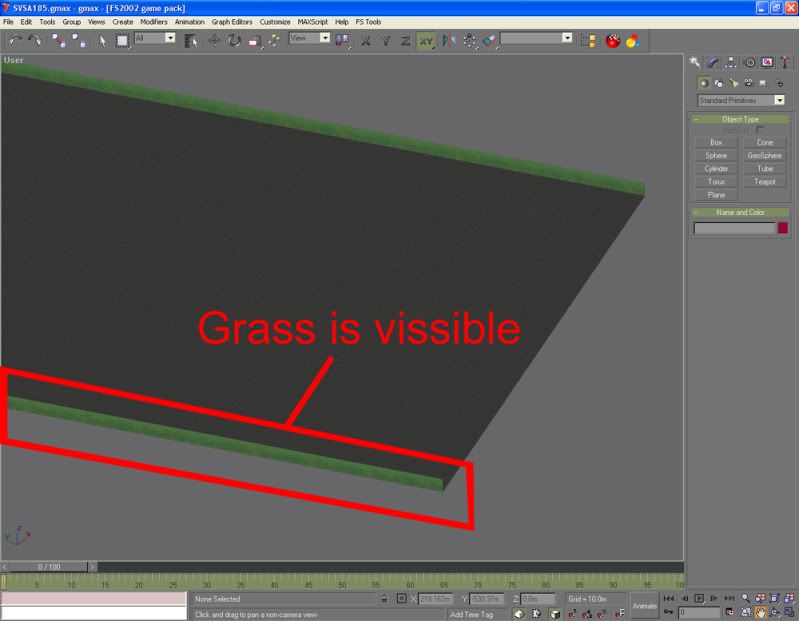
It can't be a double sided problem because you only see *one* side of a DS material in GMAX, not both. He is seeing both sides in GMAX, and only one side in FS.
My guess is that you have a black alpha channel in the texture for that part of the grass?
It can't be a double sided problem because you only see *one* side of a DS material in GMAX, not both. He is seeing both sides in GMAX, and only one side in FS.
My guess is that you have a black alpha channel in the texture for that part of the grass?

- Messages
- 217
- Country

I don't know exactly what's the problem, but watching the second screen
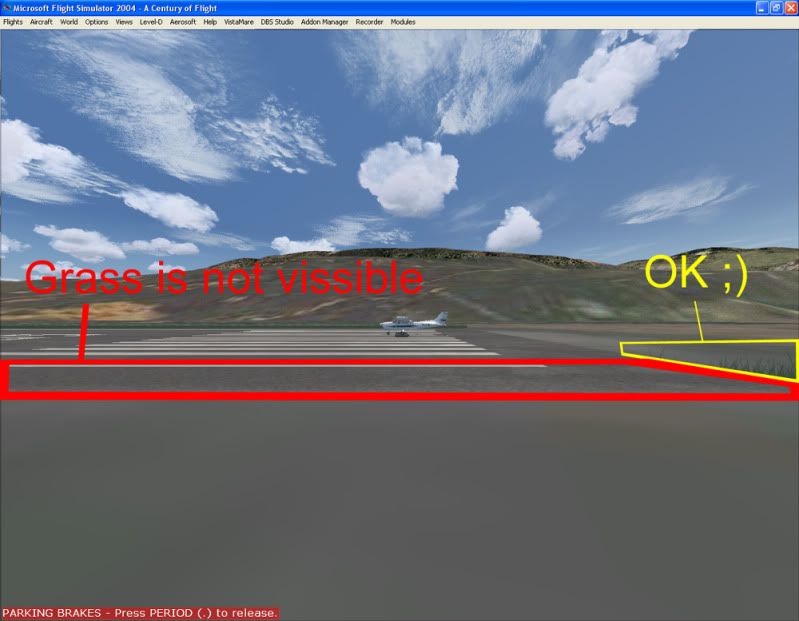
The grass in front of the photoreal polygon (the yellow marked) is perfectly visible, but the grass in front of the runway (the red marked) isn't visible, I don't think is the "_ds" because I already put the prefix and still with the problem
I only have 1 texture for the grass with the alpha channel included, I checked the alpha channel and it looks fine
I give up and will remove the grass polygon
Thank you guys for you help
The grass in front of the photoreal polygon (the yellow marked) is perfectly visible, but the grass in front of the runway (the red marked) isn't visible, I don't think is the "_ds" because I already put the prefix and still with the problem
I only have 1 texture for the grass with the alpha channel included, I checked the alpha channel and it looks fine
I give up and will remove the grass polygon
Thank you guys for you help
Last edited:
- Messages
- 76
- Country

try to select the poly, then add a Cap Hole and then convert it again to Editable Mesh/Poly whatever.
tgibson
Resource contributor
- Messages
- 11,865
- Country
Are you using this in FS2002, or a later sim? If in a later sim, output the grass strips (only) using an MDL compiler appropriate to the sim. Then place them as library objects (etc.). If in FSX keep the overall length relatively short and place several of the strips along each runway.
Hope this helps,
Hope this helps,

- Messages
- 34,670
- Country

Hi,
The last one is a good point. You can output the grass in FS2002 BGL, but then you need to be sure to not tweak them as your ground polygons. That will give display problems. Or as suggested export them as MDL objects.
The last one is a good point. You can output the grass in FS2002 BGL, but then you need to be sure to not tweak them as your ground polygons. That will give display problems. Or as suggested export them as MDL objects.
- Messages
- 217
- Country
Hi, thank you for your replies
Ok, let me see if I understood, I compiled the grass strip together with the ground in the same gmax file, and now it's in the same .MDL and .BGL file with the ground polygons, so I should take the grass away from the ground polygons, compiling it as a .MDL and a .BGL only for the grass strip without tweaking the .ASM files, right?
I'll try it
Ok, let me see if I understood, I compiled the grass strip together with the ground in the same gmax file, and now it's in the same .MDL and .BGL file with the ground polygons, so I should take the grass away from the ground polygons, compiling it as a .MDL and a .BGL only for the grass strip without tweaking the .ASM files, right?
I'll try it
tgibson
Resource contributor
- Messages
- 11,865
- Country
You can put it in a separate MDL and BGL file as I suggest (compile as usual, without worrying about ASM files), or you can try Arno's suggestion of leaving it in the FS2002 BGL file, but do not tweak the ASM file only for those polygons (if you can identify them).
Hope this helps,
Hope this helps,