That sometimes happens when one processes a lot of obscure info on FS SDK (especially if it is one of my postings from after midnight).

If you link to a ZIP of your project, we can take a look at it and see where to insert a local scenery layer MSFS 'Depth Bias' factor via "
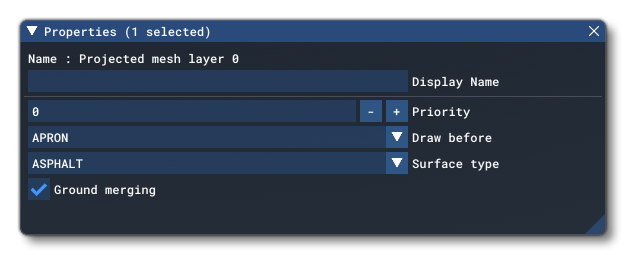
Draw Before":
https://docs.flightsimulator.com/ht...nery_Editor/Objects/ProjectedMesh_Objects.htm
"
Projected Mesh (Group) Properties
Projected Mesh groups have the following
Properties which can be edited (regardless of whether they are within an airport or independent):
"
"Priority
This option sets the
render priority for the projected mesh object. The default render priority is 0, which for most cases is fine. However, if you have overlapping meshes and want one to render over another one, then you will need to change this value clicking the + or - buttons to raise or lower the priority value. Higher priority values will render
over lower priorities, for example, a mesh with priority 1 will render over one with priority 0, which in turn will render over one with priority -1. Note that
the engine cannot guarantee the render order for meshes with the same priority, so if you need something to always render over or under something else, you need to set this value."
"Draw Before
This option permits you to place meshes into the render hierarchy so that they are drawn under or over different elements. When you click this option, you will be shown a list of object elements which are shown in the order they are rendered. When you pick one, the projected mesh will be rendered
over the previous object types, and
under the subsequent types. For example, if you select MARKINGS, then the projected mesh will be rendered over Aprons, Taxiways and Runways, but under Markings, Runway Markings and Marking Text."
You may also wish to practice using an edited copy of the SDK worked example in
The SimpleProjectedMesh sample project:
https://docs.flightsimulator.com/ht...als/Samples/Sceneries/SimpleProjectedMesh.htm
GaryGB